






Quick Minimap System - GPS Radar & Path Navigation
Gee Zyy Games
$10.99
(no ratings)
Jump AssetStore
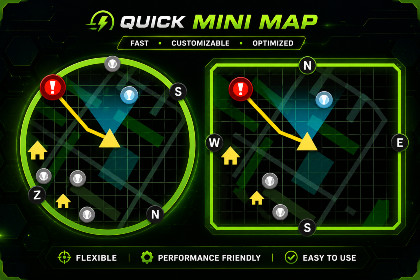
This Quick Minimap system allows you to create a map for any kind of your 3D Game.This minimap road texture is created according to the environment layout and positioned beneath the scene on the Y-axis to match world scale and navigation flow precisely. It acts as the base visual layer of the minimap system, representing roads and traversal paths in the game world.From a technical perspective, the system supports two minimap boundary designs:Square (Box) Boundary (only support 6000.3.10f1 package)— Uses a rectangular constraint system where icons and targets are clamped within a box-shaped minimap area. This is useful for HUD-style or modern UI layouts.Rounded (Circular) Boundary — Uses a circular constraint system where icons are clamped within a round minimap shape, giving a radar-style appearance.In both cases, when targets go outside the minimap camera range, their icons are pushed and clamped to the edge of the selected boundary shape, ensuring they always remain visible.The system also supports two direction line types:Arrow Line (only support 6000.3.10f1 package)— Displays directional movement using arrow-style indicators toward the target.Simple Line — Displays a clean straight line showing direct path direction.All minimap elements, including the road texture, icons, and direction lines, are assigned to the Minimap layer, ensuring they are rendered only by the minimap camera and remain hidden from the main gameplay camera.This setup provides a fully flexible minimap system with customizable boundary shapes, directional styles, and accurate world-to-minimap representation.Very optimize works for (PC, Mobile, Console)Round Boundary collide FunctionalityBox Boundary collide Functionality (only support 6000.3.10f1 package)Map Rotations with camerasmooth followmap rotation smothness functionalitydraw shortest path to the destinationEasy to Setup with any gameCustomizable iconsRuntime update destinationCustomizable map border & UIAny Questions:sh.anas.3000@gmail.com

