






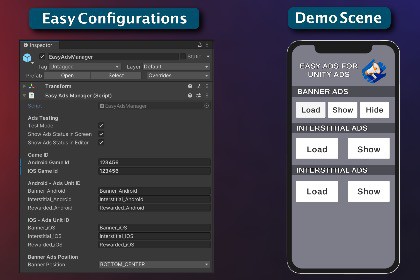
The easiest way to add Unity Ads to Android and iOS games. Set IDs from your Monetization dashboard and go. Demo scenes and documentation are included.Easy Ads for Unity Ads helps you integrate Unity Monetization (com.unity.ads) quickly on Android and iOS. Drag in the EasyAdsManager prefab, set your Game ID and placement IDs from the Unity Monetization dashboard, and start showing ads with minimal code.Demo scenes and documentation help new users get working ads right out of the box.WHAT'S INCLUDED• EasyAdsManager prefab and script - banner, interstitial, and rewarded ads• EasyAdsExamples scene - UI to load and show each ad format• AdsDemoWithTowerGame - sample game with interstitial on level end and rewarded on continue• Full documentation (setup, API, FAQ, iOS ATT/SKAdNetwork)• iOS Editor post-process - NSUserTrackingUsageDescription and SKAdNetwork IDs in Info.plist• Development builds log IDFA (iOS) / GAID (Android) for test-device registrationAD FORMATS• Banner ads• Interstitial / video ads• Rewarded video adsKEY FEATURES (v1.1.4)• Quick integration - add Game ID and Ad Unit (placement) IDs from your Monetization dashboard• Compatible with current Unity Advertisement package (com.unity.ads 4.x)• Default bidding placement names; waterfall placements also supported• iOS: App Tracking Transparency requested before ads initialize• Test Mode toggle for test vs live ads• Optional on-screen status text for debugging on device• Optional Debug.Log status in the Unity Editor• Works with Built-in and URP projects (core integration is render-pipeline agnostic)API - MAIN METHODSInitializeAds()OnInitializationComplete()OnInitializationFailed()BannerAdsAutoLoadShow()LoadBanner()ShowBannerAd()HideBannerAd()VideoAdLoadAtStart()LoadInterstitialAd()ShowInterstitialAd()LoadAd() / ShowAd() (legacy interstitial aliases)RewardAdLoadAtStart()LoadRewardAd()ShowRewardAd()EVENTOnWatchingCompleteRewardAd - fired when the user completes a rewarded ad (instance event on EasyAdsManager)QUICK START EXAMPLEGet EasyAdsManager in your scene, then call methods from your scripts:EasyAdsManager easyAdsManager = FindFirstObjectByType();easyAdsManager.BannerAdsAutoLoadShow();easyAdsManager.LoadInterstitialAd();easyAdsManager.ShowInterstitialAd();Reward callback (subscribe on your EasyAdsManager instance):void OnEnable() => easyAdsManager.OnWatchingCompleteRewardAd += OnReward;void OnDisable() => easyAdsManager.OnWatchingCompleteRewardAd -= OnReward;See the demo scenes for full examples.REQUIREMENTS• Unity 2022.3 LTS or newer (tested on Unity 6)• com.unity.ads (Package Manager → Unity Registry) — required• com.unity.ads.ios-support — recommended for iOSNOT LEVELPLAY: This asset uses direct Unity Ads (com.unity.ads). For mediation / LevelPlay, use Easy Ads for Unity LevelPlay (separate product). Do not install both in the same project.Contact for help: hello@imperello.comREQUIREMENTS• Install Advertisement (com.unity.ads) from Package Manager → Unity Registry• Install com.unity.ads.ios-support for iOS App Tracking Transparency (recommended)• Unity 2022.3 LTS or newer (tested on Unity 6)SETUP1. Open Unity Monetization dashboard (cloud.unity.com) and create iOS + Android games.2. Copy Game IDs into EasyAdsManager in the Inspector (Android Game ID, iOS Game ID).3. Set Ad Unit (placement) IDs to match your dashboard — exact spelling, case-sensitive.4. Enable Test Mode while developing; disable for production builds.5. Build to a real Android or iOS device to test (Editor shows a placeholder only).Game IDs ship empty in the prefab — you must enter your own.DEFAULT PLACEMENT IDs (BIDDING)The prefab defaults use Unity bidding placement naming. Replace with your dashboard values if different.Android:• Banner_Android_Bidding• Interstitial_Android_Bidding• Rewarded_Android_BiddingiOS:• Banner_iOS_Bidding• Interstitial_iOS_Bidding• Rewarded_iOS_BiddingWaterfall placements (e.g. Banner_Android, Interstitial_iOS without _Bidding) also work if they exist in your dashboard.KEY FEATURES• EasyAdsManager MonoBehaviour — single prefab integration• Banner, interstitial, and rewarded load/show APIs• Test Mode toggle (test ads vs live ads)• Optional on-screen ads status (device) and Debug.Log status (Editor)• iOS: ATT requested before Advertisement.Initialize() when undetermined• iOS: automatic SKAdNetwork IDs and tracking usage description in Info.plist (Editor post-process)• Development builds: logs IDFA (iOS) / GAID (Android) for Monetization test devices• Demo UI scene (EasyAdsExamples) and sample tower game (AdsDemoInGame)• Built-in + URP compatible (core scripts are render-pipeline agnostic)API HIGHLIGHTSInitializeAds()BannerAdsAutoLoadShow()

