







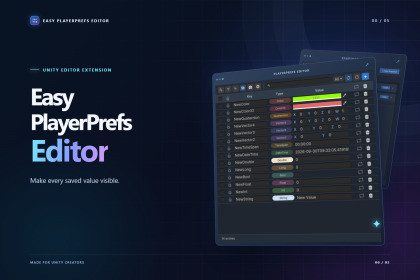
Easy PlayerPrefs Editor is a Unity Editor extension for viewing, editing, searching, and managing PlayerPrefs data without writing additional debug scripts.The tool provides a UI Toolkit interface for inspecting saved keys and values, modifying entries, managing snapshots, and importing or exporting save data. It supports Unity's standard PlayerPrefs types and includes an optional runtime library for additional data types and encryption.FeaturesPlayerPrefs ManagementView and edit saved PlayerPrefs keys and values.Support for standard String, Int, and Float entries.Automatically save changes or save them manually.Refresh the list to display changes made by the running game.Identify modified entries and revert unsaved changes.Lock individual keys to prevent accidental editing or deletion.Select, invert, lock, unlock, or delete multiple entries.Search, Filtering, and SortingSearch by key, value, or both.Filter entries by data type.Sort by key, type, or save time.View recently saved entries and entries with unsaved changes.Pinned EntriesPin frequently accessed keys to a separate section.Keep pinned entries visible at the top of the list.Manage pinned and unpinned entries separately.Preserve pinned entries between editor sessions.SnapshotsCreate named snapshots of all PlayerPrefs entries or selected entries.View and search saved snapshots.Compare existing data with a snapshot before restoring it.Review the number of entries that will be created, overwritten, or left unchanged.Restore individual key-value pairs or load an entire snapshot.Store snapshots in ProjectSettings/EasyPlayerPrefsSnapshots.json for sharing through version control.Import and ExportExport all entries or selected entries.Import previously exported PlayerPrefs data.Use import and export to transfer save data between projects or team members.View import and export progress for larger datasets.Editor InterfaceBuilt with Unity UI Toolkit.Supports Unity Editor dark and light themes.Dockable and resizable editor window.Uses list virtualization for displaying large collections of entries.Customizable toolbar options and data type badge colors through Unity Preferences.Optional Runtime LibraryEasy PlayerPrefs Editor also includes an optional runtime library named EasyPlayerPrefs.To use its extended methods, you can alias the class in your scripts:using PlayerPrefs = EasyPlayerPrefs.PlayerPrefs;The library provides methods for standard PlayerPrefs operations and additional data types:BooleanLongDoubleDateTimeTimeSpanVector2Vector3Vector4QuaternionColorColor32StringIntFloatThis allows supported data types to be stored and retrieved without writing custom serialization code.Optional AES-256 EncryptionThe runtime library also includes AES-256 encryption for PlayerPrefs values.Configure the encryption key through Project Settings.Encrypt values individually or enable encryption project-wide.Inspect decrypted values in the editor.Switch to a raw ciphertext view when needed.The extended runtime functionality is optional. You can use the editor window to manage standard Unity PlayerPrefs without replacing your existing PlayerPrefs calls.

