









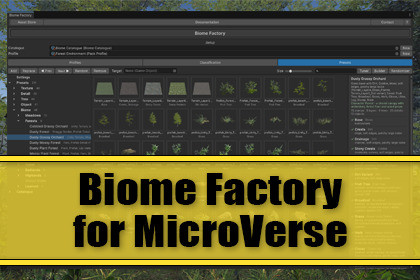
Helps you turn an environment asset into biomes for MicroVerse: suggests a classification of its terrain layers and prefabs for you to adjust, then generates presets from rules as a starting point.OverviewBiome Factory aims at turning an environment asset into ready-to-place biomes for MicroVerse.Drag the asset's folder onto the tool window. Biome Factory reads its terrain layers and prefabs, suggests what each one is (grass, rock, conifer, fern, boulder, log) and shows the result for you to check and correct. How much it recognises by itself depends on the names in the asset. The layers and prefabs are organized and can be re-assigned by hand on demand. From that classification it generates presets by rules: rock on the steep, dirt in the channels, ferns under the trees, flowers in the open. Drag a biome into the MicroVerse scene and it places textures, trees, details and objects in one step.Requires MicroVerse. It is recommended to have the MicroVerse Vegetation and Objects modules, without them a biome places its textures only.How it worksClassification: assets are recognised by name, folder, measured height, the pack's own terrains and, for terrain layers that name nothing, color. Everything is shown as a gallery with thumbnails. Drag a thumbnail onto another archetype to reassign it.Presets: five kinds are generated (Texture, Detail, Tree, Object and Biome). Add them, drag them into the scene, or flip through with Prev / Next.Biomes with character: each ground yields distinct biomes (open, flowered, rocky, scrub, wooded, forest, barren) instead of one mix with different noise. Mood variants (Dry, Scorched, Spring, Autumn, Winter) appear when the pack has the prefabs for them.Forest structure: ground cover, understory and props are placed relative to the canopy (under the trees, at the forest edge or in the open).Companions: "Logs with Ferns", "Boulders with Rocks" and other pairings are placed around their host.Farmland: fields, tracks and hedgerows from a plot layout, with one stamp per crop rather than one per field. Forests get clearings the same way.Amounts from the terrain: densities are computed from each asset's measured footprint and the terrain's size and resolution, not from fixed numbers.ToolsTuner: adjusts a placed biome in place, per group or per stamp. Density and size for plants and props, coverage and patch size for ground textures, and a shuffle for another arrangement.Builder: compose a biome by hand from what the pack holds; the scene follows every change.Randomizer: random biomes of one type (Meadows, Forests, Coast, Desert and more) and one mood.Learn From Scene: measures an existing scene, such as a pack's demo scene, and makes a biome preset that approximates features of it: which layer is the base and which lie on it, which plants stand on which ground, how far apart and in which mix. It gives the kind of land, not its layout; paths, stream beds and height zones are not carried over.Field Editor: draws field layouts from a recipe on the GPU; biomes placed with the layout update as you edit.ProfilesAn asset's classification is stored in a profile asset. Export it and share it, or ship it inside your own asset, so nobody has to classify the same pack twice. Profiles also carry the presets their author made, learned ones included. A profile refers to the pack's assets; it does not contain them.Configurable without codeEverything the generator knows is data in a catalogue asset: archetypes, name patterns, placement rules, ground families, moods, biome types and field layouts. Add your own or edit the shipped ones in the window. The default catalogue has about 40 ground and more than 50 vegetation archetypes, from temperate meadows and forests to desert, savanna, jungle, coast, underwater and cave.Good to knowNo AI and no online service: assets are classified by rules, and Learn From Scene counts and measures what is in the scene. There is no AI involved.Editor tool; nothing is added to your build and no components are added to your scene objects.A biome needs a ground: a pack with trees or plants only gives tree, detail and object presets, but no biomes.One profile is one pack. Terrain layers of one pack are not mixed with vegetation of another.Generated and learned results depend on the classification. Unrecognised assets land under Unassigned for you to place, and what a profile does not know is left out of a learned preset.What this isYou can see Biome Factory as an inbetween tool of Biomes & Presets for Microverse and Genesis Pro for MicroVerse. While preset creation has already been very fast, I thought of ways about how to make it even faster. Use Biome Factory to create presets qickly and adjust them as you require. It is the perfect companion to Genesis Pro for MicroVerse which allows you even finer granularity and enhancement.What this is notThis asset aims at helping you to create presets and biomes for MicroVerse. It is not a tool to auto-magically create a perfect scenery at the touch of a button. Please do take a look at the videos to get an idea what it's about.ImportantCreate and try out your biomes in a scene of their own, with a test terrain. Do not use your working scene for that.The goal of Biome Factory is to create reusable presets for MicroVerse, not to modify a scene directly.A biome replaces the textures, trees, ground cover and props in its area. While you flip through presets, shuffle and tune, the terrain under them changes every time.The presets belong to the project, not to the scene. When a biome is the way you want it, save it as a preset and place it in your working scene from the Presets tab. You can also save it as a preset in MicroVerse's Content Browser and place it from there.RecommendationIt is recommended to have knowledge about how MicroVerse prests and stamp work. Especially for finer adjustment to get to your intended world design.Showcase Videos and ScreenshotsThe videos and screenshots are example scenes that were created during the development of Biome Factory for MicroVerse. The assets of those scenes aren't included. In case you are interested please read the description of the youtube videos to see which assets were used.The videos were created in combination with other assets to demonstrate what you can achieve yourself in a very short amount of time, especially in combination with assets of top-rated publishers on the Unity Asset Store.The background in the Asset Store images was created with Forest Environment from NatureManufacture.Recommended Companion Assets - FREEStampIT! Collection - FREE Heightmaps for Unity 6, MicroVerse, Gaia TerrainTerrain Textures - FREEFullscreen Editor Play Mode - FREESceneNav - Smooth & Fast Scene Navigation - FREEQuickNav - History's Favorites - FREEKey featuresClassifies a pack's terrain layers, trees, details and prefabs into archetypesGenerates Texture, Detail, Tree, Object and Biome presets from rulesMakes biome presets from dressed scenes by measuring them (Learn From Scene)Tuner, Builder, Randomizer and Field EditorProfiles to share a pack's classification and presetsAll rules are data in a catalogue asset, editable in the windowRequirementsUnity 6000.0 or newerMicroVerse to place presets in a scene; its Vegetation and Objects modules are optional. Classifying and generating work without it.Render pipeline independentEditor only, full C# source, assembly definitions includedDocumentation included in the package