







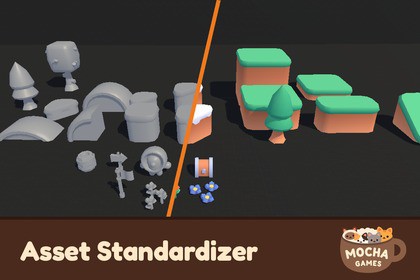
Drop in new models and get ready-to-use materials and prefabs, properly named and sorted into the right folders. Asset Standardizer automates the busywork of every asset import.Import a model, get a finished asset. Every time you bring a new model into Unity, the same chores follow: create materials, find the right textures, plug them into the right shader slots, build a prefab, rename everything and move it into the right folder. Asset Standardizer does all of it for you.Point it at your new models, or let the import watcher catch them as they land in your project. The tool matches each model with its textures, recognizes PBR channels from their suffixes, generates materials for your shader with every map assigned, builds a prefab with those materials in place, and files everything into your folder structure, named by your own templates.Nothing happens until you say so. Before anything is moved or created, a confirmation screen shows exactly where every file will land as a folder tree, along with a "Not done" summary of anything the tool couldn't resolve, such as unmatched textures or missing shader inputs. Every run can be fully undone.It respects what's already there. Existing materials and prefabs are detected and reused instead of duplicated. If a pack already follows its own naming convention, the tool points it out and lets you adopt it with one click. Run it again on the same folder and it recognizes its own output, so nothing gets renamed twice.Your conventions, not ours. Folder layouts, naming templates, texture suffixes, shader mappings, animation naming rules and texture import settings are all editable data you can save and share with your team.Core workflowGenerates materials for new models with every texture map assigned to the right shader propertyBuilds prefabs with the generated materials already in placeRenames models, textures, materials and prefabs using your own naming templatesSorts everything into your folder structure: type-based, object-based or custom layoutsOptional import watcher that notifies you or opens the tool when new models land in your projectSmart matchingMatches textures to models by name and embedded material slot namesRecognizes PBR channels from texture suffixes: Albedo, Normal, Metallic, Roughness, Occlusion, Emission, Mask, Opacity and HeightKeeps packed-channel textures (such as AlbedoTransparency) intact instead of renaming them awayDetects animation-only FBX files and files them separatelyReuses existing materials and prefabs instead of creating duplicatesSafe by designPreview screen with a destination folder tree before anything changes"Not done" summary of unmatched textures, missing shader inputs and anything left unresolvedFull undo of every runRecognizes its own previous output, so nothing gets processed twiceFully customizableNaming templates with tokens such as {Name}, {Slot}, {Variant}, {TexType}, {Category} and {Rig}Shader profiles: a URP Lit profile is included, and you can create profiles for your own shadersEditable texture suffix library; teach new suffixes directly from the windowTexture import settings per channel, including platform overridesDetects a pack's existing naming convention and offers to adopt itSupported OSEditor-only tool, no runtime code. Works on any platform the Unity Editor runs on.Documentation https://mocha-games.github.ioParts of the source code were written with the assistance of an AI coding assistant. All code was reviewed, tested with EditMode unit tests, and used in our own production projects before release. The design, workflow and all decisions about the tool's behavior are our own.