









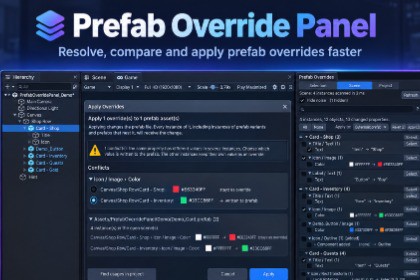
See every prefab override with old → new values, filter out noise, and apply or revert in bulk. Editor-only tool: it does not render anything and works the same in every render pipeline. Tested with Built-in and URP. The included demo scene uses only Unity UI (Canvas, Screen Space Overlay), not TextMeshPro.Unity's Overrides dropdown tells you that something changed, not what. It closes when your mouse slips, applies one override at a time, and fills up with changes nobody made: layout groups nudging anchors, TextMeshPro updating internal state, rotation hints, values that differ by 0.00001.Prefab Override Panel is a dockable window that shows every override as a clear before and after, hides the noise, and lets you apply or revert any selection in one step.Built for teams where artists and programmers share scenes and UI prefabs: check what changed before you commit, find the one scene where a button kept its old color, and clean up overrides left behind by a Unity upgrade.KEY FEATURES- Value diffs: every changed property as old → new, with color swatches- Noise filter: hides fake overrides from Layout Groups, Content Size Fitters, TextMeshPro, rotation hints and near-identical values- Bulk Apply and Revert: select any number of overrides, one Undo step- Conflict resolution: when two instances changed the same property differently, choose which value goes to the prefab- Nested prefabs and variants: apply to the outermost prefab or the original one, per object- Apply preview: see every affected prefab, instance and scene before anything is written- Added and removed components and GameObjects, plus missing prefabs flagged clearly- Three views: selected instance, all open scenes, or the whole project (read-only scan of every scene and prefab)- Search with t: (type), p: (property) and i: (instance or file) filters- Export results to CSV for reviews and release checklistsCOMPATIBILITY- Unity 2022.3 LTS and Unity 6 (tested on 2022.3 LTS and 6.3 LTS, Windows)- Built-in Render Pipeline and URP (editor-only, renders nothing)- Nothing is added to your buildsINCLUDED- Full C# source code in its own assembly definition- No dependencies: works with or without TextMeshPro- Demo scene with ready-made overrides- PDF documentationSUPPORTprefaboverridepanel.support@gmail.comREQUIREMENTS- Unity 2022.3 LTS or Unity 6 (tested on 2022.3 LTS and 6.3 LTS, Windows)- Built-in Render Pipeline or URP- Editor-only: nothing is added to your buildsWHAT'S INCLUDED- Full C# source code (14 scripts) in its own assembly definition: PrefabOverridePanel.Editor- Demo scene with 3 prefabs (nested prefab and prefab variant) and ready-made overrides- PDF documentation with quick startDEPENDENCIES- None. Works with or without TextMeshPro and Unity UI.- The demo scene uses Unity UI (Canvas, Screen Space Overlay).HOW IT WORKS- Opens from Tools > Prefab Override Panel as a dockable editor window- Project scans open closed scenes additively and close them without saving- Prefab files are read in an isolated preview and never saved- All Apply and Revert operations are undoable with a single Ctrl+ZFOLDER- Everything lives in Assets/PrefabOverridePanel (Editor, Demo, Documentation). Delete the folder to uninstall.PrPrefab Override Panel was designed, tested and directed by the publisher, who defined the features, made the design decisions, and tested every feature in Unity 2022.3 LTS and Unity 6.3 LTS (Built-in and URP). The publisher was assisted by an AI assistant (Claude by Anthropic) in writing the C# code, the documentation and the store text, and reviewed, debugged and refined all of it.