


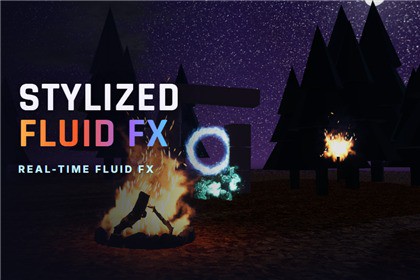
Real-time GPU fluid simulation for URP: 23 ready fire, smoke, magic, plasma, dust and space effects that react, trail and swirl, plus the tools to build your own.Requires the Universal Render Pipeline (URP 17, Unity 6) and a graphics API with compute shaders (Direct3D 11/12, Vulkan or Metal). Soft edges need the Depth Texture and the glow looks best with HDR and Bloom; the included Welcome window enables both in one click. Not compatible with Built-in RP, HDRP or WebGL. Not profiled on mobile devices.OVERVIEWFire, smoke and magic that really move. Every effect is a live fluid simulation on the GPU: heat rises and cools into smoke, explosions roll differently every time, and when you move a torch the flames trail behind it. Drop one of the 23 ready prefabs into your scene, adjust it with four sliders, or build your own effect from the same parts.READY EFFECTS (23 prefabs, 5 families)• Pyro: Bonfire, Campfire, Torch Flame, Fire Breath, Toon Fire, Smoke Column, Explosion, Toon Explosion.• Arcane: Portal Swirl, Arcane Vortex, Spell Charge, Magic Wisps.• Plasma: Plasma Orb, Plasma Burst, Plasma Thruster, Toxic Plume.• Dust: Dust Column, Dust Trail, Ground Impact, Cartoon Poof.• Nebula: Nebula Cloud, Galaxy Swirl, Aurora Veil.A REAL SIMULATION• 2D stable-fluids solver in compute shaders: velocity, pressure, vorticity, buoyancy, turbulence.• Density, temperature and fuel: flames burn, rise, cool and turn into smoke.• GPU particles (sparks, embers, stars) carried by the flow.• Moving sources: Inherit Motion from 0 (the fluid stays in the world and trails behind) to 1 (moves rigidly with the object).EASY TO USE• Quick Controls on every effect: Size, Intensity, Turbulence, Smoke Lifetime.• Effect Browser window: pick an effect by family and drop it in front of the Scene view camera.• Live preview in the Scene view, including one-shot effects.• One-shots (explosions, bursts) with duration, fade and auto-destroy.BUILD YOUR OWN• Fluid Domain + Fluid Emitter: disc, ring or line shapes; continuous, burst or pulse.• Fluid Force: vortex, radial, directional and drag, continuous or impulse.• Fluid Interactor: characters and projectiles push the smoke.• Presets as assets: every setting of the simulation and the look in one place, shared or per effect.• Looks: smoke, fire, energy, dust and nebula, with gradients, cel bands, outlines and self-shadowing.PERFORMANCE• About 0.15 ms per effect on an RTX 3070 (16 effects: 3.5 ms frame), benchmark scene included.• Global quality levels (Low to Ultra), distance LOD, effects pause when no camera sees them.INCLUDED• 23 prefabs and 23 presets, full source code (C# + HLSL + compute).• Demo scene with a camera tour and click-to-spawn effects, plus a benchmark scene.• Welcome window with a one-click project check.• Offline HTML documentation with GIFs and a reference for every setting.COMPATIBILITYUnity 6, URP 17. Needs compute shader support (Direct3D 11/12, Vulkan, Metal). Not for Built-in, HDRP or WebGL.THIRD-PARTY CONTENTAsset uses 2 demo models from Poly Haven (Stone Fire Pit, Dry Branches Medium 01) under CC0 1.0 Universal (public domain); see Third-Party Notices.txt file in package for details. They are used only by the demo scene; all effects, shaders and scripts are original.• Unity 6 and URP 17 (tested on Unity 6000.3 / URP 17.3, Direct3D 11)• Needs compute shaders: Direct3D 11/12, Vulkan or Metal. Not supported on WebGL or GLES-only devices• Camera-facing simulation card + GPU particles; SRP Batcher compatible• Soft contact with the scene needs the Depth Texture; glowing fire needs HDR + Bloom (both enabled in one click by the Welcome window)• Quality levels, resolution per effect, distance LOD and off-screen pausing to control GPU cost• Not tested or profiled on mobile devices• Not supported: Built-in RP, HDRP, WebGL• Full source code (C#, HLSL, compute). Demo props: 2 CC0 models from Poly Haven (license file included)The C# scripts, compute and HLSL shaders, editor tools and documentation were written with the assistance of Claude (Anthropic), then reviewed, tested and iterated in Unity by the publisher. The noise texture is generated procedurally by our own code. No AI image generators were used; all screenshots are real in-engine renders. Marketing images and the trailer are composited from real in-engine renders.