









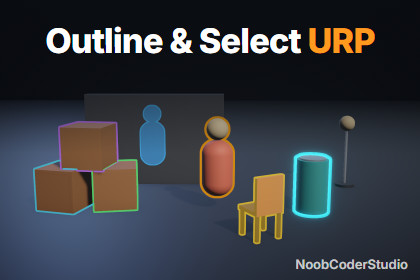
Pixel-perfect outlines for URP with x-ray, fills and HDR glow, plus hover and click selection built in. One-click setup, works in Edit mode and in every build.URP only: Unity 6.0 or newer with URP 17 (Render Graph) and the Universal Renderer. HDRP, the Built-in Render Pipeline and the 2D Renderer are not supported. After import, Tools > NoobCoderStudio > Outline > Setup Check adds the Outline renderer feature to your URP renderers in one click.I made this tool because I needed one for a project, and the existing ones were quite expensive. It is for anyone who wants to highlight objects, in games or in archviz. What I'm most proud of is how simple it is to use and how well it performs.Outline & Select adds clean outlines to any object in Unity 6 URP, and lets players hover, click and select those objects without writing a line of code.Outlines• Constant width in screen pixels at any distance, from a crisp line to a soft glow, anti-aliased on both sides.• Every object keeps its own outline, even when objects touch.• X-ray: a different color, or a filled silhouette, where the object is hidden behind walls.• Fills: tint the visible part, or paint a silhouette on the hidden part.• HDR colors that glow with Bloom.• Child renderers merge into one outline; Outline Ignore excludes a part (a muzzle flash, a light bulb).• Alpha-clipped materials keep their holes. Skinned meshes and LOD Groups are supported.• Fade in / out per style, and an Intensity value for your own tweens.• 10 ready-to-use style presets.Selection• Hover and click with the mouse, touch, the screen center (first person) or your own ray (gamepad).• None, single or multiple selection, and a highlight-all mode to show what can be clicked.• UnityEvents and C# events; filters for what can be hovered or selected.• Works with the Input System and the legacy Input Manager, and ignores clicks on uGUI.• Several interactors at once (split-screen).Built for production• One-click Setup Check adds the renderer feature to every URP renderer your quality levels use. A check also runs before each build, so outlines never go missing in builds.• Edit-mode preview that never modifies your scenes or prefabs.• Built on URP Render Graph. No material is added to your objects, so the SRP Batcher keeps working.• About 0.1 to 0.3 ms of GPU time on desktop (RTX 4060, 1080p, 1 to 200 outlined objects). No managed allocation per frame. A half-resolution option for mobile.• Full C# source, clean public API, tooltips and documentation for every setting.Tested onUnity 6.0, 6.3 and 6.6. Windows (DirectX 11 and 12), Android (Vulkan and OpenGL ES 3), WebGL 2 in desktop browsers. MSAA, FXAA, SMAA, TAA, STP, render scale, HDR on and off, Linear and Gamma, Forward, Forward+, Deferred, Depth Priming, GPU Resident Drawer, orthographic cameras, split-screen and camera stacking.Requirements and limitations• Unity 6.0 or newer, URP 17 with the Universal Renderer (no HDRP, Built-in or 2D Renderer).• Not supported: XR (VR / AR) cameras, WebGL in mobile browsers. macOS and iOS (Metal) are not tested yet.• Up to 255 objects are outlined independently at once.• Full list in the documentation.Documentation: https://noobcoderstudio.vercel.app/outline/ (also included as a PDF)Support: noobcoderstudio.support@carpecool.fr• Unity 6.0+ / URP 17 (Render Graph), Universal Renderer.• Effects included: outlines with visible and hidden (x-ray) colors, tint and silhouette fills, soft glow, HDR glow with Bloom.• Custom shaders: 2 (outline mask, Jump Flood outline and composite), plus 1 shared HLSL include.• Textures: none required; the outline buffers are created at runtime and cover only the screen area around outlined objects.• Components: Outlinable, Outline Interactor, Outline Ignore, Outline Style assets, Outline renderer feature.• 10 style presets, 6 demo scenes.• Input System and legacy Input Manager.• Setup Check window and build check.• Full C# source, PDF and online documentation.Claude (Anthropic) was used as a coding assistant to write and review parts of the C# scripts and shaders, the editor tools, the demo scenes and the documentation, and to compose the marketing images and video from in-engine renders. All of it was reviewed and tested in Unity by the publisher on the platforms listed in the description.

