









UITK Industrial IoT and Robotics (needs Core)
GerLabs
$12.31
$17.59
30%OFF
(no ratings)
Jump AssetStore
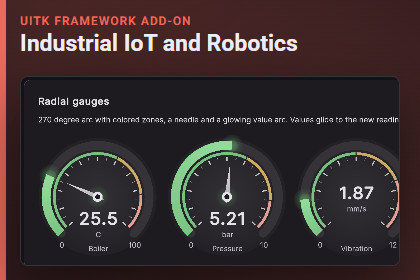
Gauges, sensors, alarms, plant floor, energy, robot instruments, arm jogging, maps, fleet and digital twin widgets for UI Toolkit. Needs UITK Framework Core.REQUIRES UITK FRAMEWORK CORE 1.0.0 OR NEWER (sold separately, same publisher). Import the Core first. This pack does nothing alone.The Industrial IoT and Robotics pack adds control-room and robot interfaces to UITK Framework Core: gauges and sensor cards, alarm lists and annunciators, plant floor and process flow, energy displays, robot instruments, arm jogging, maps, state machine views and fleet tables. The demo uses simulators; no hardware or network is involved.Features by task- Show one value. Radial and linear gauges, thermometer, tank level, seven-segment display, knob, KPI tile, ring progress, battery, signal bars.- Devices and sensors. Sensor card, device tile and grid, relay panel, status LEDs, LED bar, andon stack.- Trends and history. Strip chart, sparkline, heat map, PID bars, latency graph, trajectory plot, IMU plot.- Alarms and messages. Alarm list with acknowledge and filter, annunciator panel with lamp test and horn (static markers under Reduce Motion), message log with topic wildcards, topic explorer.- Plant floor and energy. Floor plan, process flow, energy flow and meter, OEE card.- Robot instruments and arm. Artificial horizon, compass, tape indicators, arm kinematic view, joint panels, jog pads, waypoint editor.- Maps, logic and fleet. Occupancy map, lidar view, robot top view, state machine and behavior tree views, fleet table, digital twin layers, emergency stop and power panels.- Unity workflow. Ten prefabs, ten GameObject menu entries, every widget is a UXML element and works with the UfWidget component. Texts in IndustrialText.Requirements and compatibility- Unity 6 and above (6000.0 or newer). Developed on Unity 6000.3.27f1; also tested on 6000.0.85f2.- UITK Framework Core 1.0.0 or newer (sold separately).- UI Toolkit only. No uGUI. No other Unity packages are required.- Render pipelines: no custom shaders. Tested in URP only. Built-in and HDRP are not tested.- Platforms: Editor and Windows standalone (Mono) tested. Mobile, WebGL, consoles and IL2CPP are not tested.- Not tested: Enter Play Mode with domain reload turned off (Fast Enter Play Mode).What is includedSource code (C#), style sheets, one UXML file, ten prefabs, the LiveIotControlRoom demo scene, documentation (README, IoT, Robotics), third-party notices. 11 pages are added to the Core Showcase. Simulators for demo data are in the Samples assembly. No images, fonts, audio, models or shaders.Third-party content: none. See Licenses/THIRD-PARTY-NOTICES.txt in the package.This pack is a set of display widgets. It does not connect to PLCs, robots or any network, and it is not a safety system.Images in this listing are UI Toolkit runtime renders of the included demo content. All data shown is simulated.Gauges, sensor cards, device grids, strip chartsAlarm list and ISA-style annunciator panelPlant floor, process flow and energy displaysRobot instruments, arm kinematics and jog padsOccupancy map, lidar view, fleet table, digital twin layersState machine and behavior tree viewsEmergency stop and power panelsReduce Motion support with static alarm markersTen prefabs and menu entriesSource code included, no third-party contentThe contents of this package were generated, in part, with the aid of AI. The C# source code, the UXML and USS files, the prefabs and demo scenes (built by scripts), the automated tests and the documentation were written with Anthropic Claude, used through Claude Code, and then reviewed, tested and edited by the publisher (the publisher chose the features, checked the behavior in Unity and fixed problems found in testing). This covers all functional content of the package. The package contains no AI-generated artwork, audio, video, fonts or 3D models. The only image files in the product line are three small glyph PNGs (a check mark and two arrows) in the Core package, made by a small script that was itself written with AI help. The package does not call any AI service or the network at run time. The store images are marketing material only: they are renders of the package demo content, laid out with scripts that were written with the same AI help; no AI image generator was used.

