









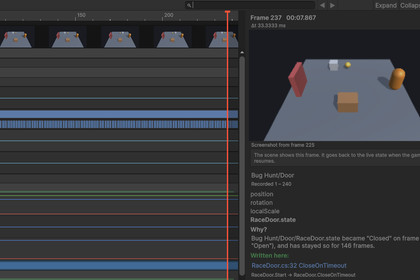
Records your game during Play. Pause, move back through the frames, and select a value to see which line last changed it. Restore and replay recorded frames, and turn them into tests.Smart Rewind Debugger records the state of your game every frame during Play mode, in the Editor and, if you choose, in development or release builds.What is recorded: frames and time, logs and exceptions with their stacks, input (Input System actions, or the old Input Manager through RewindInput), scene loads and UI clicks. Objects with a Rewind Target component: transform, Rigidbody and Rigidbody2D, Animator, NavMeshAgent. Fields and properties you mark with [Rewind] in a partial class: the recording code is generated when your scripts compile, and recording allocates no memory per frame.The timeline: each recorded object is a row and each value a track: graphs for numbers, bands for states, marks for events and errors, and Game view screenshots. While the game is paused, the scene shows the frame under the cursor. A search such as health < 0 or grounded == false finds the frames where it became true.Why?: select a value to see when it last changed, the file and line that wrote it, the call path, the part of the frame it ran in (Update, physics, a coroutine) and how certain that is. Values the engine sets, such as a Transform moved by physics, are named as such. Two recordings can be compared to find the first frame where they differ.Replay: restore a recorded frame, replay the recorded input from there, or continue playing from it. The Determinism Doctor lists what made a replay drift (for example an unrecorded random number) and how to fix it.Tests: mark what should have happened on the timeline and create a PlayMode test that replays the recording and checks it. The test fails while the bug is there and passes after the fix, in the Editor or in CI.Player reports: builds can keep a short recording, mark errors, exceptions and freezes, and build a report with the recording when the player agrees. Text filters remove e-mail addresses, paths and other personal text before anything leaves the device. Delivery to a file, to your own server (a small reference server is included, as source), or to Discord or Slack webhooks. Report UI samples for uGUI and UI Toolkit are included.Smart suite: if RealCut's Smart Ability System, Smart Stats, Smart Inventory, Smart Quest or Smart Save is in the project, its state is recorded without setup.Bug Hunt sample: a small scene with four planted bugs (a coroutine race, an unrecorded random number, a physics-order bug and a state machine that never leaves Attack) to find with the timeline.Documentation is included in the package: a quickstart, the manual (16 pages) and an API reference.FeaturesRecords logs, exceptions, input, scene loads, UI clicks, transforms, physics, Animator, NavMeshAgent and your own [Rewind] fields, every frame.Timeline window with graphs, states, events, errors, bookmarks, screenshots and search.Why?: the file and line that last changed a value, with the call path.Restore a frame, replay recorded input, compare two runs.Create a PlayMode test from a recording.Player reports with privacy filters; delivery to a file, your server, Discord or Slack.No GC allocations per recorded frame; about 0.1 ms per frame for 1,300 values in an IL2CPP player (Intel Core i5-10210U).C# source included; the [Rewind] code generator ships as a compiled Roslyn analyzer. Its C# source is in Tools/SourceGenerator.zip. No third-party code, no API keys, nothing contacted unless you set it up.SupportedUnity 2022.3 LTS and Unity 6 (tested on 2022.3, 6.0, 6.3, 6.5, 6.6).Editor on Windows; Mono and IL2CPP players (tested in Windows builds with managed stripping High).Built-in, URP and HDRP. Enter Play Mode options (domain reload off).Not tested on mobile or console devices. No multiplayer or network replay.Documentation: in the package, Assets/RealCut/Smart Rewind Debugger/Documentation (quickstart, manual, API reference).AI assisted with creating marketing images, developing tests, reviewing the code, and identifying potential bugs and errors.

