









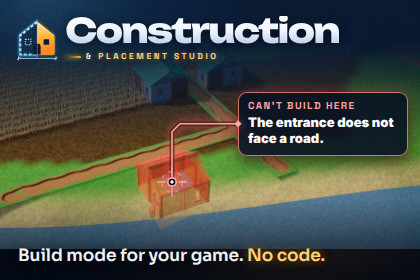
Build mode for city builders, colony sims and survival games: placement rules that say why not, construction sites with workers and materials, upgrades, refunds and undo. No code needed.The building system for city builders, colony sims, factory games and survival bases.Pick a building, move the mouse, click. The ghost turns red on a slope and says why: "Slope 24° is more than 15°." Roads drag in an L and join up by themselves, a house wants its door on a road, fields grow only on fertile soil, the bakery earns more next to the mill. Then the site is built: blueprints wait for planks, carriers bring crates from the warehouse, builders walk over and the scaffolding grows stage by stage. And if the player changes their mind, Ctrl+Z."Why can't I build here?" in plain English Every refusal comes with its reasons, in the tooltip, on a grid that colours each cell by its reason, and one call away for your HUD: "The entrance does not face a road." "Beauty 14 of 20." "No Planks: 0 in storage — build a sawmill." The same goes for stalled sites ("why is this not being built?") and for stats ("where does +25 % come from?").Four ways to place, one systemGrid: footprints with ports (doors, docks), several floors, autotiles for roads and walls, drag a line, an L or a rectangle.Edges and corners: thin walls, doors and fences on cell edges, outlines by drag with posts at the corners.Free: props and decorations anywhere, with real shapes (not just boxes) and slope limits.Sockets: modular parts that snap together, with support that weakens with distance and collapses when a bearing wall goes.Plus fences and walls along a clicked path, fitted to the path with posts, closing the loop.Rules as data, no code Slope, height, water (on it, off it, partly), surface (fertile soil, sand), near or far from a tag, the door facing a road, influence such as territory or beauty, limits per map, floors, unlocks, and All of / Any of / Not groups. Neighbour bonuses, influence fields with heat maps, stats with a breakdown. Write your own rule in a few lines of C# and it appears in the editor's menu.Construction that feels alive Costs, paid up front, on delivery or per stage. Materials taken from the wallet, or carried from storages by carriers. Built by a timer or by builders from worker pools, with priorities, pause and an ETA. Stage visuals, growing from the ground, scaffolding and progress bars. Upgrades with requirements, variants, damage and repair, demolition with refunds, moving, and collapses.A studio instead of scripts The Construction Studio window holds every building: a catalogue with icons rendered from your models, a definition editor where you paint the footprint on the model and click to add ports and sockets, a rules editor with a live check, and a model wizard that turns a prefab into a building in under a minute. Place buildings in the Scene view with the same preview as the game, see why a cell is refused before you press Play, and simulate construction: a Gantt chart per site, worker use and the bottleneck ("planks: waited 3:20 of 5:00"). A validator checks content and scenes, also from the command line.Ready for real games Undo and redo in game. Saves in one call, with versions and migration. A deterministic integer core with state hashes, for lockstep multiplayer and replays. 100,000 buildings in the stress test; a tick of 2,000 sites, 1,000 workers and 500 deliveries takes under 0.1 ms and allocates nothing. A pure C# core that runs on a server. Optional bridges to the publisher's Deterministic Logistics (machines and belts), Macro Economy ATE (market prices) and PowerGrid & Logic Studio (power).IncludedConstruction Studio window: Catalog, Definition, Project, Test (simulation with a Gantt chart), Debug (Play Mode), Validate and Integrations tabsScene view tools: place, drag, path, demolish and move in the editor, the reason grid, heat mapsRuntime components: world, grid, ground (terrain heights, water, surfaces, trees as obstacles), placement controller (mouse, gamepad, touch, first person), ghosts, reason grid, heat-map overlay, building views with stage visuals and reactions, worker views, savesA HUD built from code (resources, build menu, tooltip, building panel, tools), easy to replace with your ownFour demo scenes: Riverside Town (city builder), Colony Outpost (workers and materials), Hilltop Camp (first-person survival building) and Stress Test (100,000 buildings with timings on screen)Documentation: README, a QuickStart with screenshots, two guides (your first city, your first base), Concepts, 26 recipes with compiled code, a full API reference, a changelog and an upgrade guideRequirementsUnity 6000.5 (Unity 6.5) or newerURP or the built-in pipeline (the demo materials convert with one menu item). HDRP is untested.No dependencies. The HUD and the demo scenes use uGUI (included in Unity's project templates); the Input System package is used when it is installed.What it does not do No pathfinding or road network (workers walk straight lines; plug in your own through one interface), no networking (the core is deterministic and serializable; sending commands is your netcode's job), no physics destruction (collapses are rule-based; the demo drops the parts with temporary rigidbodies), no 2D placement yet (planned for 1.1), no automatic "best spot" search yet (planned for 1.1; a recipe shows how with Preview), and no terrain flattening.About the images: the scenes and windows are Unity Editor screenshots of the included demo content. The demo scenes use CC0 models by Kenney (kenney.nl). The backgrounds, callouts, captions and the icon were drawn in HTML and CSS.FeaturesGrid, edge, corner, free, socket and span (path) placement in one system, with floors and autotilesPlacement rules as data (slope, height, water, surface, near/far, entrance faces, influence, limit, floor, unlock, groups) with plain-English reasons; custom rules in C#Influence channels with heat maps, neighbour and obstacle bonuses, stats with a breakdownConstruction sites: costs, payment policies, storages, carriers, builders, stages, priorities, ETA, stallsUpgrades with requirements, variants, damage, repair, demolition with refunds, moving, support and collapseUndo and redo in game; one-call saves with migration; deterministic core with state hashesNo-code Construction Studio, Scene view tools, construction simulation, validator (also from the command line)Zero allocations per tick; 100,000 buildings in the stress testPure C# core without UnityEngine; full C# source with XML documentation on every public memberFour demo scenes; optional bridges to three other assets by the same publisherSupported OSEditor: any OS supported by Unity 6.5 (developed and tested on Linux)Runtime: all Unity platforms. Pure C#, no native code, no threads.Link to documentationIncluded in the package: Assets/Fkgen/Construction/Documentation (README, QuickStart, YourFirstCity, YourFirstBase, Concepts, Recipes, API, CHANGELOG, Upgrade). Tools > Construction > Documentation opens it.AI tools were used to assist with writing parts of the source code, automated tests, documentation, and store descriptions.All AI-assisted content was reviewed, integrated, and tested by the developer. No generative AI was used for images, 3D models, textures, or audio.The package contains no AI features and does not call or require any AI/ML services at runtime.

