









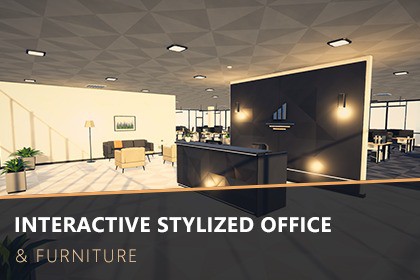
A complete, interactive low-poly office: 137 modular prefabs, a furnished demo building and drop-in scripts for doors, drawers, chairs, screens, lights and elevators.Build a modern office in minutes. Interactive Stylized Office & Furniture is a clean, angular low-poly pack with a premium faceted look, made for simulation, management, story, puzzle and first-person games.Everything is ready to play: open the demo scene and walk through a furnished office floor with a lobby, reception, open-plan workspace, meeting room, manager and executive offices, kitchen, server room and male/female restrooms. Doors swing, drawers slide, chairs swivel, monitors turn on and cycle content, lights switch on and off and the elevators open on request.What's inside137 prefabs in 8 categories: Architecture, Furniture, Electronics, Kitchen, Lighting, Plants, Props and RestroomModular 2 m / 1 m walls, floors, ceilings, windows, glass partitions, doorways, glass doors, a 4 m automatic sliding entrance and an elevatorDesks, sit-stand desk, office, conference and executive chairs, cabinets, bookcases, sofas, reception desk, conference tableFull kitchen: base, drawer, sink and wall cabinets with contents, fridge, microwave, coffee machine, kettle, dishes and moreRestrooms: toilet cubicles, toilets, urinals, vanity, mirror lights, dispensers, baby changing table, signageServer rack, UPS, printer, TV, monitors, laptop, phones, keyboards and dozens of small desk props3 scenes: Showcase, Interactive Demo (first-person) and Asset PreviewInteraction system (C#, configured in the Inspector)Hinged doors (automatic swing direction), sliding drawers and sliding doors, swivel chairsScreens with power toggle and content cycling, light switches that drive real lights and emissive materialsRelays (one button opens several parts, e.g. the elevator call panel) and material cyclersWorks with any controller: call Interact() from your own code, or use the included first-person demo controller (WASD, mouse look, Shift run, Ctrl crouch, E to interact, prompts and crosshair)Art & performanceAbout 37.5k triangles for all 137 assets together (4 to 1,671 per asset)One shared palette of 64 URP Lit materials over a small tileable albedo map: easy recolouring, few material switchesReal-world scale (1 unit = 1 m), +Z forward, clean pivots, colliders on every prefab, static flags setOriginal procedural images for screens, whiteboards and artworks, plus a stylized 360° sky and a ready post-processing VolumeA user guide is included in the Documentation folder.Render pipeline: Universal Render Pipeline (URP 17); built and tested on Unity 6000.6Number of meshes/prefabs: 137 prefabs (42 interactive, 10 with lights)Minimum polygon count: 4 trisMaximum polygon count: 1,671 tris (Executive Chair)Total: about 37,500 tris for all assetsNumber of textures: 12 PNGTexture dimensions: power of two, 128 to 2048 px (albedo variation map, screen, whiteboard and artwork images, 2048x1024 sky panorama)Types of materials and texture maps: 64 URP Lit materials (shared colour palette with an albedo map, emissive variants, glass) and 1 Skybox/Panoramic sky materialUV mapping: YesRigging: NoAnimation count: 0 (movement is driven by scripts)LOD information: no LODs (low poly)Colliders: box colliders on all prefabs, separate colliders for moving partsScripts: interaction system (namespace ISOF.Interaction) and demo controllers (ISOF.Demo) with assembly definitions; the demo controller uses the Input System packageScenes: ISOF_Showcase, ISOF_InteractiveDemo, ISOF_AssetPreviewDocumentation: user guide (Markdown)This package was created with AI assistance. Claude (Anthropic), an AI coding assistant, wrote the Blender Python scripts that procedurally generate all 3D models, the C# interaction and editor scripts, the procedural texture generators (screens, whiteboards, artworks, sky), the demo scenes and the documentation, under the publisher's direction and review.No generative image or 3D-model AI was used: the meshes and textures are produced by those scripts in Blender 3.3 and Unity, and all screenshots are renders of the package content. No third-party assets, scanned data or copyrighted material are included. Details: Documentation/AI_Usage_Disclosure.md.

