









NanoGeo: Virtualized Geometry for Unity
Roam Moon
$108.89
$217.79
50%OFF
(no ratings)
Jump AssetStore
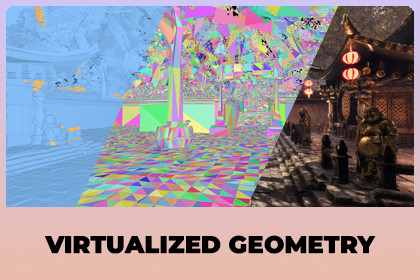
Virtualized geometry for Unity 6 (HDRP and URP). Use meshes with millions of triangles without making LODs: NanoGeo draws only the detail you can see.NanoGeo lets you use extremely detailed 3D models in Unity 6, with millions of triangles each, and still keep a high frame rate. You do not need to make LOD models or set up LOD Groups.OverviewDocumentationHOW IT WORKSAdd the NanoGeo Mesh component to an object. NanoGeo prepares the model once in the Editor, cutting it into small pieces with many levels of detail. While the game runs, the graphics card draws each piece only as detailed as it needs to look on screen, and skips pieces that are off screen or hidden behind other objects. A model far away costs almost nothing, even if it has millions of triangles.HOW MUCH FASTERBenchmark scene with 381 rocks of 1.3 million triangles each, 499 million triangles in total, RTX 5070, 1080p, shadows on:Standard MeshRenderers: about 6 FPSGPU Resident Drawer with LOD Groups: about 270 FPSNanoGeo: about 500 FPSNanoGeo drew only about 92,000 triangles per frame instead of 499 million.WHEN TO USE ITNanoGeo is made for very heavy scenes: millions to hundreds of millions of triangles, scanned or sculpted models, large detailed environments. The more geometry you have, the bigger the gain.It is NOT a good fit for light scenes. NanoGeo has a fixed cost of about 0.3 ms of GPU time per frame and uses about 0.5 GB of extra video memory, even when there is little to draw. In a light scene that already runs fast, this can cost a few dozen FPS (for example 300 FPS can drop to about 275 FPS). At 60 FPS the difference is less than 1 FPS. If your scene already runs well with normal models and LODs, you may not need NanoGeo. Use Tools > NanoGeo > Disable NanoGeo to compare in your own scene.GOOD FOROpen worlds and large environments with lots of detailed propsPhotogrammetry and 3D scans used straight from the scanHigh poly sculpts from ZBrush or Blender, no retopology or LODs neededArchitecture, interior and product visualizationReal time cinematics and trailersBig asset packs: add NanoGeo to hundreds of prefabs in one clickWHAT YOU GETOne component. Your MeshRenderer and materials stay as they are.Works with HDRP and URP. Lighting, shadows, decals, SSAO, light probes, TAA and post processing look the same as before.HDRP Lit, URP Lit and HDRP Shader Graph materials, with alpha clipping (leaves, fences) and double sided materials.Works with LOD Groups, mirrored objects and moving objects.Hidden objects are skipped automatically (occlusion culling on the GPU).NanoGeo Mesh Prefab: set up whole prefabs or folders of prefabs, with warnings and one click fixes.If something cannot be drawn by NanoGeo, it keeps its normal MeshRenderer and the Inspector tells you why. Nothing breaks.Visualization modes, statistics and GPU timings to see what NanoGeo is doing.Demo scenes for HDRP and URP, benchmark tools and a full user guide (PDF).NOT SUPPORTEDThese objects keep their normal MeshRenderer: skinned meshes and blend shapes, transparent materials, terrain, tessellation, URP Shader Graphs, custom hand written shaders, and objects with baked lightmaps (use light probes instead).CREDITSAsian Dynasty Environment by Befour Studios. Used to show NanoGeo in a real scene. The environment is not included with NanoGeo.Third-party software: meshoptimizer by Arseny Kapoulkine, MIT license (Editor only, not included in builds). See Third-Party Notices.txt.Unity versions: Unity 6, 6000.0.84f1 or newer.Tested with the full test suite: Unity 6000.0 (HDRP and URP 17.0), 6000.5 (HDRP and URP 17.5), 6000.6 (HDRP and URP 17.6). Unity 6000.1 to 6000.4 are checked.Render pipelines: HDRP 17 and URP 17. Built-in Render Pipeline is not supported. URP requires Render Graph (the default) for occlusion culling, the software rasterizer and the visualization modes.Graphics APIs:Direct3D 12 and Vulkan: all features.Direct3D 11 and Metal: all features except the software rasterizer.Devices without compute shader and indirect draw support fall back to standard MeshRenderers.Platforms: tested on Windows (Direct3D 11 and 12). Shaders compile for Vulkan and Metal but were not tested on Linux, macOS or consoles. Baking runs in the Windows 64 bit Editor only; baked data works in builds for other platforms.Requirements: compute shaders, mesh Read/Write enabled for baking, Project Settings > Graphics > BatchRendererGroup Variants set to Keep All (one click fix included).Data: clusters of up to 128 triangles, a continuous level of detail hierarchy per mesh, baked data about the size of the source mesh. Default limit 16,384 NanoGeo objects at once (configurable). Default GPU buffers use several hundred MB of video memory (configurable).Package: C# source code and HLSL shaders included. No dependencies beyond HDRP or URP.Asian Dynasty Environment by Befour Studios. Used to show NanoGeo in a real scene. The environment is not included with NanoGeo.Third-party software: meshoptimizer by Arseny Kapoulkine, MIT license (Editor only, not included in builds). See Third-Party Notices.txt.

