




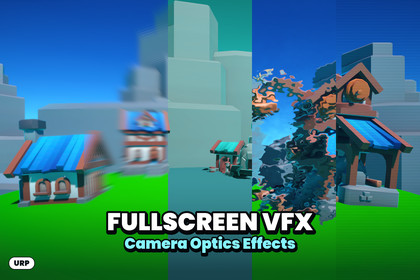
Five fullscreen effects for Unity URP: blur, sharpen, color modes, distortion, and glitch. Customize your camera's look with editable Shader Graphs.Fullscreen VFX - Camera Optics EffectsENGLISHShape the look of your camera with five editable fullscreen effects for Unity's Universal Render Pipeline. Camera Optics Effects brings together image softening and sharpening, radial blur, RGB color modes, animated distortion, and screen glitch in a Shader Graph workflow.Included effects- Blur and Sharpen: blend between the original image and a weighted neighborhood filter. Positive values soften the image, while negative values enhance detail.- Radial Blur: create a zoom-like blur around the fixed screen center, with separate blur blend and sampling reach controls.- Color Adjustments: switch between None, Tritanopia, Protonopia, and Deuteranopia channel-mixing modes. These are approximate visual transformations for artistic use and visual inspection.- Screen Distortion: animate a texture-driven UV displacement with noise speed, intensity, and blend controls.- Screen Glitch: combine animated horizontal image displacement with brightness bands for an unstable digital signal look.Use the effects for speed and impact feedback, dream sequences, disorientation, heat-like screen distortion, damaged camera feeds, sci-fi interfaces, or stylized cinematic moments. These are suggested uses; the package does not include gameplay event logic.Five supplied materials provide starting settings, and the editable Shader Graphs let you explore the implementation visually. Apply an effect with URP's Full Screen Pass Renderer Feature and adjust its exposed settings in the material Inspector. A Portuguese README and detailed PDF explain setup, parameters, runtime control, and troubleshooting.Integration notesRequires URP and Shader Graph. The inspected project uses Unity 6000.6.0f1 with URP / Shader Graph 17.6.0; these are reference versions, not a certified minimum. Blur and Sharpen, Color Adjustments, and Screen Glitch read Blit Source. Radial Blur and Screen Distortion read Scene Color and need the opaque color texture; transparent objects are not part of that source image. See the documentation for the recommended injection points.Screen Distortion requires a noise texture. Its supplied material references Color Mask.png in the sibling Stylized & Artistic Effects/Pencil Filter folder. Include that dependency when exporting, or assign your own texture. The Shader Graph's default texture reference must also be checked when creating a new material.The color modes are not a clinically validated vision simulation or an accessibility certification. Built-in and HDRP implementations are not included. Platform-specific performance and compatibility must be verified in your project.RequirementsTested with Unity 6.6 (6000.6.0f1), Universal Render Pipeline (URP) 17.6.0, and Shader Graph 17.6.0. The effects require URP. The included demo also requires Input System 1.20.0. To use the demo controls, set Active Input Handling to Input System Package (New) or Both in Player Settings.Third-party assetsThe demo uses Poppins Black under the SIL Open Font License 1.1 and models and textures from Kay Lousberg’s KayKit packs under CC0 1.0 Universal. See Third-Party Notices.txt in the package for details.-------------------------------------------------------------------------------PORTUGUÊSTransforme o visual da câmera com cinco efeitos de tela cheia editáveis para o Universal Render Pipeline da Unity. Camera Optics Effects reúne suavização e nitidez, desfoque radial, modos de cor RGB, distorção animada e glitch em um fluxo de trabalho com Shader Graph.Efeitos incluídos- Blur and Sharpen: mistura a imagem original com um filtro ponderado de pixels vizinhos. Valores positivos suavizam a imagem, enquanto valores negativos realçam os detalhes.- Radial Blur: produz um desfoque com aparência de zoom ao redor do centro fixo da tela, com controles separados para a mistura e o alcance da amostragem.- Color Adjustments: alterna entre os modos de mistura de canais None, Tritanopia, Protonopia e Deuteranopia. São transformações visuais aproximadas para uso artístico e inspeção visual.- Screen Distortion: anima o deslocamento das UVs a partir de uma textura, com controles de velocidade do ruído, intensidade e mistura.- Screen Glitch: combina deslocamento horizontal animado da imagem com faixas de luminosidade para criar a aparência de um sinal digital instável.Utilize os efeitos em feedback de velocidade e impacto, sequências de sonho, desorientação, distorção de tela semelhante a calor, câmeras com falhas, interfaces de ficção científica ou momentos cinematográficos estilizados. São sugestões de uso; o pacote não inclui lógica de eventos de gameplay.Os cinco materiais fornecidos oferecem configurações iniciais, e os Shader Graphs editáveis permitem explorar visualmente a implementação. Aplique um efeito com a Full Screen Pass Renderer Feature do URP e ajuste os parâmetros expostos no Inspector do material. O README e o PDF detalhado, em português, explicam configuração, parâmetros, controle em runtime e diagnóstico.Notas de integraçãoRequer URP e Shader Graph. O projeto inspecionado utiliza Unity 6000.6.0f1 com URP / Shader Graph 17.6.0; são versões de referência, não um requisito mínimo certificado. Blur and Sharpen, Color Adjustments e Screen Glitch leem Blit Source. Radial Blur e Screen Distortion leem Scene Color e precisam da textura de cor dos opacos; objetos transparentes não fazem parte dessa imagem de origem. Consulte a documentação para os pontos de injeção recomendados.Screen Distortion precisa de uma textura de ruído. Seu material fornecido referencia Color Mask.png na pasta vizinha Stylized & Artistic Effects/Pencil Filter. Inclua essa dependência ao exportar ou atribua uma textura própria. A referência padrão de textura no Shader Graph também precisa ser conferida ao criar um material novo.Os modos de cor não são uma simulação visual clinicamente validada nem uma certificação de acessibilidade. Implementações para Built-in e HDRP não estão incluídas. Desempenho e compatibilidade por plataforma devem ser verificados no seu projeto.RequisitosTestado com Unity 6.6 (6000.6.0f1), Universal Render Pipeline (URP) 17.6.0 e Shader Graph 17.6.0. Os efeitos exigem URP. A demonstração incluída também exige o Input System 1.20.0. Para usar os controles da demonstração, defina Active Input Handling como Input System Package (New) ou Both em Player Settings.Recursos de terceirosA demonstração usa a fonte Poppins Black sob a licença SIL Open Font License 1.1 e modelos e texturas dos pacotes KayKit, de Kay Lousberg, sob a licença CC0 1.0 Universal. Consulte o arquivo Third-Party Notices.txt incluído no pacote para mais detalhes.Fullscreen VFX - Camera Optics EffectsENGLISH - TECHNICAL DETAILSMain Features5 Fullscreen Shader Graphs: Blur and Sharpen, Radial Blur, Color Adjustments, Screen Distortion (asset name typo: Distorction), and Screen Glitch.5 materials with saved initial settings.1 reusable Sub Graph, Blur Sample, used by Radial Blur.Integration through the native URP Full Screen Pass Renderer Feature.Material controls for blur/sharpen blending, radial blend and range, color mode, distortion texture/speed/intensity/blend, and glitch noise scale/time/scanline modulation.Editable visual graphs. Manual setup does not require a custom C# renderer or gameplay scripts.Detailed README and PDF in Portuguese; store listing text in English and Portuguese.Effect ParametersBlur and SharpenValue: -1 to 1. Graph default: 0.Radial BlurBlur: 0 to 1. Graph default: 0.5.Intensity: 0.1 to 5. Graph default: 1.Color AdjustmentsColor Mode: None, Tritanopia, Protanopia, and Deuteranopia.Screen DistortionNoise Intensity: 0.001 to 0.1. Graph default: 0.02.Blend: 0 to 1. Graph default: 0.5; material default: 1.Noise Speed: Vector2. Graph and material default: (0.03, 0.4).Noise Texture: Texture2D. Two animated samples of the R channel control UV displacement.Screen GlitchNoise Amount: 0 to 100. Graph default: 50.Glitch Strength: 0 to 100. Graph default: 1.Scan Line Strength: 0 to 1. Higher values reduce the contrast of the scanlines; 1 removes this brightness modulation.Requirements and CompatibilityReference project: Unity 6000.6.0f1; Universal Render Pipeline 17.6.0; Shader Graph 17.6.0. This does not represent a certified minimum version.-------------------------------------------------------------------------------PORTUGUÊS - DETALHES TÉCNICOSPrincipais recursos5 Shader Graphs de tela cheia: Blur and Sharpen, Radial Blur, Color Adjustments, Screen Distortion (grafia do asset: Distorction) e Screen Glitch.5 materiais fornecidos com configurações iniciais salvas.1 Sub Graph reutilizável Blur Sample, utilizado pelo Radial Blur.Integração pela Full Screen Pass Renderer Feature nativa do URP.Controles de material para mistura de desfoque/nitidez, mistura e alcance radial, modo de cor, textura/velocidade/intensidade/mistura de distorção e escala de ruído/tempo/modulação de scanlines do glitch.Gráficos visuais editáveis. A configuração manual não exige renderer C# próprio ou scripts de gameplay.README e PDF detalhado em português; textos para a loja em inglês e português.Parâmetros dos efeitosBlur and SharpenValue: -1 a 1. Padrão do gráfico 0;Radial BlurBlur: 0 a 1. Padrão do gráfico 0.5;Intensity: 0.1 a 5. Padrão do gráfico 1;Color AdjustmentsColor Mode: None, Tritanopia, Protonopia e Deuteranopia.Screen DistortionNoise Intensity: 0.001 a 0.1. Padrão do gráfico 0.02; Blend: 0 a 1. Padrão do gráfico 0.5; material 1.Noise Speed: Vector2. Gráfico e material (0.03, 0.4).Noise Texture: Texture2D. Duas amostras animadas do canal R controlam o deslocamento das UVs.Screen GlitchNoise Amoun: 0 a 100. Padrão do gráfico 50;Glitch Strength: 0 a 100. Padrão do gráfico 1;Scan Line Strength: 0 a 1. Padrão do gráfico 0.7; Valores maiores reduzem o contraste das faixas; 1 remove essa modulação de luminosidade.Requisitos e compatibilidadeProjeto de referência: Unity 6000.6.0f1; Universal Render Pipeline 17.6.0; Shader Graph 17.6.0. Não representa uma versão mínima certificada.

