




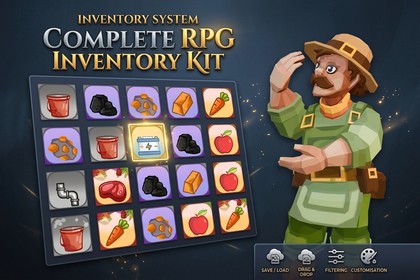
A drop-in inventory system for Unity with hotbar, drag-and-drop, item stacking & merging, slot filtering, quick-move, and JSON save/load. Ready for RPG, survival, and adventure games.A complete, production-ready inventory system for Unity. Drop it into any project and get a fully functional RPG-style inventory with hotbar in minutes — no boilerplate code required.What's included:Item System: ItemSO ScriptableObject with icon, display name, description, stack settings, buy/sell prices, 3D world prefab, and optional localization support.Inventory Grid: Configurable grid of slots split into main inventory and hotbar sections. Each slot supports per-slot filtering by item type and/or item ID.Hotbar: 10-slot hotbar with keyboard shortcuts (1–9, 0), mouse wheel navigation, and integration with the active slot system for quick item use.Drag & Drop: Full drag-and-drop between slots with intelligent stacking, automatic stack merging when dragging onto the same item type, slot-to-slot swapping, and item splitting via right-click while dragging.Quick Move: Shift + Right Click instantly moves items between the main inventory and the hotbar.Slot Filtering: Each slot can be configured to accept specific item types (e.g. "Weapon", "Potion") or specific item IDs, using union (OR) logic — perfect for equipment slots, potion pouches, and crafting stations.Save & Load: JSON-based persistence in persistentDataPath with automatic saving on every inventory change and automatic loading on start. Fully customizable via autoSaveOnChange and autoLoadOnStart toggles.Optional Localization: Compile-time toggle (USE_UNITY_LOCALIZATION define) for Unity Localization package support — item names and descriptions can be localized with fallback to plain strings when localization is not used.Visual Styling: InventoryStyleSO controls per-item-type backgrounds, frames, and colors. Each ItemSO can override with specialBack / specialFrame sprites for unique rarity visuals.3D World Pickup: PickUpManager + PlayerPickUpTrigger + UnitOnGround enable 3D world items that can be picked up into the inventory by walking over them.Event System: 7 C# events (onItemSpawned, onItemAdded, onItemRemoved, onSlotSelected, onQuickMoved, onInventoryChanged, onActiveSlotChanged) for seamless integration with custom gameplay code.Editor Tools: Custom property drawers for item type dropdowns, searchable dropdown windows for filter configuration, and a menu command to generate a default InventoryStyleSO asset.Architecture: Clean separation of business logic (InventoryModel — pure C# with no UI coupling) and presentation (InventoryUIController, InventorySlot, InventoryItem). Assembly Definition Files keep editor and runtime code properly isolated. DontDestroyOnLoad support via InventorySystemRoot.Game genres supported:RPG — inventory, consumables, equipment, quest itemsSurvival / Crafting — resources, materials, food, toolsAdventure — quest items, keys, artifactsSimulation — resource management and item trackingDemo: A fully working demo scene with sample items, styled slots, and a functional hotbar✉️ Feedback & SupportJoin our Discord community: https://discord.gg/GJ9zVF7V8- Get help with integration and setup- Suggest features and vote on upcoming ones- Showcase your game in #showcase- Be the first to know about updates and new assetsDemo Assets Notice: The item graphics, icons, and UI visual samples included in this package are strictly for demonstration purposes. These artwork assets are NOT granted for commercial use or redistribution. You must replace all demo icons and graphics with your own custom assets before publishing your game.✅ Grid-based inventory with configurable main slots + 10-slot hotbar✅ Full drag-and-drop with visual feedback between slots✅ Item stacking with configurable max stack size (1–999 per item type)✅ Automatic stack merging when dragging onto same item type✅ Slot-to-slot item swapping✅ Item splitting via right-click while dragging✅ Slot filtering by item type and/or item ID (union OR logic)✅ Quick-move with Shift + Right Click (inventory ↔ hotbar)✅ Hotbar keyboard shortcuts (1–9, 0) + mouse wheel navigation✅ JSON save/load with automatic saving on every change✅ Automatic loading on Start (toggleable)✅ Optional Unity Localization support (compile-time USE_UNITY_LOCALIZATION define)✅ Per-item-type styling via InventoryStyleSO (backgrounds, frames, colors)✅ Per-item override sprites for specialBack and specialFrame✅ 3D world item pickup system (PickUpManager, PlayerPickUpTrigger, UnitOnGround)✅ 7 extensible C# events for custom integration (onItemSpawned, onItemAdded, onItemRemoved, onSlotSelected, onQuickMoved, onInventoryChanged, onActiveSlotChanged)✅ Clean architecture: business logic separated from UI (InventoryModel has no MonoBehaviour coupling)✅ Editor tools: searchable dropdowns, custom property drawers, InventoryStyleSO creator✅ Assembly Definition Files (runtime + editor) for clean project organization✅ InventorySystemRoot component with DontDestroyOnLoad checkbox✅ Works with and without Unity Input System (HotBar works standalone with keyboard + mouse)✅ Performance optimized: cached PointerEventData, cached AssetDatabase.FindAssets, centralized input handling✅ Safe singleton pattern with duplicate detection and [DisallowMultipleComponent]Primary category: ToolsSub-category: Scripting / UI / Game ToolkitsTags: inventory, rpg, item, slot, ui, drag-drop, hotbar, save-load, scriptableobject, crafting, equipment, stackable, localizationUnity Version & DependenciesUnity: 2021.3 LTS or newer (tested on Unity 6000.3.10f1)Required: Unity UI (UGUI) 2.0.0, TextMesh Pro (both bundled with Unity)Optional: Unity Input System 1.18.0, Unity Localization 1.5.12Render Pipeline: URP 17.3.0 (demo scene uses URP; UI is pipeline-agnostic)Artificial intelligence (Claude) was utilized during development to assist with writing, structuring, and optimizing the C# scripts and UI logic for the inventory system.

