




SayLayer: Screen Reader and Accessibility for uGUI
schnurbusch
$38.49
$54.99
30%OFF
(no ratings)
Jump AssetStore
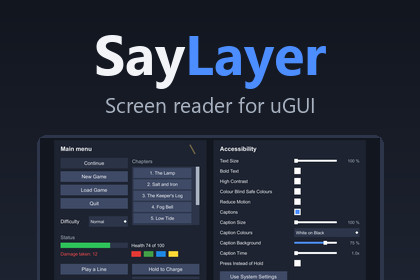
Connects uGUI to Unity's accessibility module so screen readers can read your menus. Adds text size, contrast, colour, caption and motion settings and an audit window.Windows screen reader (Narrator): Unity 6000.3.25 LTS, or 6000.4.5 and newer. 6000.4.1 and 6000.4.3 pass nothing to Windows. TalkBack and VoiceOver via Unity's module, not yet verified on a device. uGUI only. No shaders or materials: every render pipeline works. Input System optional. TextMeshPro optional; captions fall back to Unity's built-in font.SayLayer connects uGUI to the accessibility module in Unity 6, so screen readers can read and operate your menus.Unity's module does not build the accessibility hierarchy from your UI. Without SayLayer you create and update every node yourself. With SayLayer you call SayLayer.Attach(canvas) once per root canvas. SayLayer then adds buttons, toggles, sliders, scrollbars, dropdowns, input fields, scroll views and text (uGUI Text and TextMesh Pro) with name, role, value and state, and keeps them up to date while the game runs. The name comes from the element's own text or from the label next to it. Use SayLabel to set a name yourself and SayIgnore to hide decoration.I tested the screen reader support on Windows with Narrator, in Unity 6000.3.25 and 6000.4.5. Unity 6000.4.1 and 6000.4.3 pass no accessibility data to Windows, so on the 6.4 line use 6000.4.5 or newer. TalkBack on Android and VoiceOver use the same Unity module, but I have not tested them on a device yet.The package also contains player settings. They start from the operating system's values, and players can change them in your menu:- text size up to 200 % and bold text, for uGUI Text and TextMesh Pro- high contrast and colour blind safe colours for graphics you mark by role- captions with speaker names, size, colours and background- reduced motion- press instead of hold for hold actionsThe editor window Window > SayLayer > Accessibility Audit lists missing names, small text, low contrast, controls that a keyboard or gamepad cannot reach, and a missing first selection. Common findings have a one-click fix with undo.If SettingsNow is in the project, its menu gets an Accessibility tab. Neither package requires the other.Limits: uGUI only, not UI Toolkit. SayLayer works with the screen readers that Unity's module supports (Narrator, TalkBack, VoiceOver), not with NVDA or JAWS. It has no speech output of its own, and it does not by itself make a game compliant with accessibility laws or standards.The package contains the full C# source, 167 edit mode tests, a demo scene and a manual.Setup- SayLayer.Attach(canvas) once per root canvas.- Optional components: SayLabel, SayIgnore, SayKeepSize, SayColor, SayReduceMotion.Screen reader- Builds Unity's AccessibilityHierarchy from Button, Toggle, Slider, Scrollbar, Dropdown, TMP_Dropdown, InputField, TMP_InputField, ScrollRect, Text and TextMeshPro.- Name, role, value and state (disabled, checked, expanded). Dropdown options and scroll view items as child nodes.- Activate, increase, decrease, focus and page scrolling from the screen reader.- No work while no screen reader is running.Player settings- Text scale, bold text, high contrast, colour blind palette, reduced motion, captions, press instead of hold.- Start values: Windows settings read directly; Android and iOS through Unity's AccessibilitySettings.- Saved in PlayerPrefs or your own store (ISayStore). Change events for your code.Audit window- Missing names, text size, contrast, navigation set to None, unreachable controls, missing first selection, missing EventSystem.Contents- 54 files, C# source only, no DLLs.- Assemblies: Runtime, Editor, InputSystem (optional), Demo, Tests.- 167 edit mode tests.Compatibility- Unity 6000.3.25 (LTS), 6000.4.5 and newer. All render pipelines.- Tested with Windows Narrator. TalkBack and VoiceOver not yet tested on a device.- Input System, TextMesh Pro and SettingsNow optional.Support: daniel.schnurbusch@web.deI used an AI assistant (Anthropic Claude) to write the C# source, the documentation and drafts of the store texts. I set the scope, reviewed the work and tested it. After the first review I shortened the store texts and checked each statement against the package.Testing: 167 edit mode tests. On Windows I checked the elements, values, states and actions through UI Automation, the interface Narrator uses, and by listening with Narrator. The package imports into a fresh Unity 6000.3.25 project without warnings.The package contains no AI generated images, audio or third party content.

