




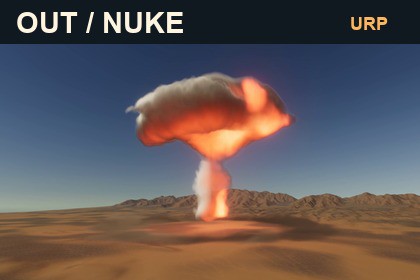
Real 3D nuclear explosions for Unity URP. Five editable presets, volumetric fire and smoke, expanding dust, GPU auto exposure and a complete desert demo.ONE DETONATION. EVERY ANGLE. A COMPLETE CINEMATIC EVENT.Create a nuclear explosion your camera can move around.OUT NUKE URP renders fire, smoke and ground dust as procedural 3D volumes. Viewpoint-dependent silhouettes, parallax and depth occlusion bring the event into your scene—from the first flash to the rising mushroom cloud, cooling smoke and final dissipation.REAL VOLUMETRIC 3DExplore the explosion from different camera angles. Frame wide establishing shots, dramatic side views or elevated perspectives.FIVE EDITABLE PRESETS• Compact — a smaller, concentrated event.• Surface — a powerful ground-level detonation.• Dust Storm — a heavier, more persistent dust front.• Airburst — an elevated explosion.• Cinematic — a larger event with a persistent glowing core.HDR PRESENTATION FOR URPIncluded GPU auto exposure reacts to the rendered HDR image, darkening the environment during the bright event and gradually restoring visibility. ACES tonemapping, Bloom and a phase-driven point light complete the presentation.A COMPLETE DESERT SHOWCASEStart in a 15 × 15 km desert environment based on measured USGS elevation data. Includes four blended Terrain Layers, three surface texture sets, sandstone props and a procedural sky.GUIDED SCENE SETUPThe dedicated Unity launcher helps you open the demo, configure a camera, place presets and frame an explosion. Generated camera settings are stored separately from the supplied assets.SIX LANGUAGESThe launcher, setup interface and guides support English, Spanish, German, Japanese, Russian and Simplified Chinese.EDITABLE AND SCRIPTABLECustomize profiles for scale, timing, emission and rendering quality. Trigger events through C# and UnityEvents. Optional gameplay interactions include approximate blast impulse, damage and thermal line-of-sight effects.SUPPORThttps://discord.gg/qpa2XdA6uTREQUIREMENTS AND LIMITATIONSRequires Unity URP. Reference configuration: Unity 6000.0.23f1, URP 17.0.3, Windows Direct3D 11.This is an artistic VFX and gameplay approximation, not a scientific blast, radiation or CFD simulator. GPU cost depends on resolution, screen coverage, sample counts and overlapping events. Mobile, XR, consoles and other graphics APIs have not been qualified. No audio is included.Render pipeline: Universal Render Pipeline (URP).Reference environment: Unity 6000.0.23f1, URP 17.0.3, Windows Direct3D 11.Built-in Render Pipeline and HDRP are not supported.• Procedural raymarched 3D explosion volume.• Five desert presets: Compact, Surface, Dust Storm, Airburst and Cinematic.• Complete event lifecycle, including cooling and final fade.• Opaque-depth occlusion for the event volume.• Adjustable cloud raymarch quality: 40–160 samples.• Included 64³ cloud-detail Texture3D.• GPU HDR auto exposure with configurable adaptation.• ACES and Bloom presentation settings.• Phase-driven point light; artistic illumination, not calibrated photometry.• 15 × 15 km USGS-based terrain with a 2049 × 2049 heightmap.• Three 1024 × 1024 albedo/normal-map pairs blended through four Terrain Layers.• Procedural sky, terrain and sandstone prefabs.• Unity launcher and camera setup interface.• C# triggers, UnityEvents and optional approximate gameplay interactions.• Launcher and guides in EN, ES, DE, JA, RU and Simplified Chinese.Overlapping transparent events do not share a single volume integrator.Performance varies with resolution, coverage, quality and overlap.Mobile, XR, consoles, IL2CPP and player shader stripping have not been qualified.Promotional footage was captured offline at a fixed 24 fps; it is not a performance benchmark.No audio is included.The original asset foundation was created by the publisher, who personally reviewed all final content and tested the asset in Unity. AI was used as an assistance tool during development. OpenAI imagegen generated three functional desert albedo textures. They were integrated into terrain layers with Repeat/mipmap settings and derived normal maps; terrain blending was authored from measured slope, curvature and drainage. OpenAI Codex assisted with C# code, shaders, documentation and listing drafts, which were iterated and checked in Unity. USGS elevation data is measured source data, not AI generated. Promotional screenshots and video are actual Unity demo captures. No AI service is required at runtime.

