




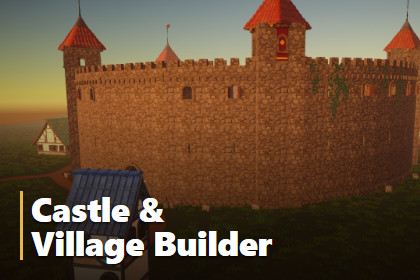
Paint medieval villages and castles straight into your scene: whole houses, castle walls with towers and gateways, paths and props. Works on any Terrain or mesh.Castle & Village Builder paints medieval villages and castles straight into your scene. Brush down whole houses, each one put together from modular pieces and each one different. Draw castle walls with towers and gateways, and join everything up with paths. It works on any ground with a collider, such as a Unity Terrain or your own mesh, and every stroke can be undone.HOUSES• Brush, Along a Line, or One at a Time placement• Every house is different: sizes, storeys, roofs, windows, doors, balconies and chimneys• Right-click to turn new houses so their front doors face the mouse• Colour themes for walls, roofs and wood, with your own themes and per-house re-theming• Stone footings on slopes, optional dark interiors seen through windows and doors• Each stroke goes into its own group, so it's easy to select or deleteCASTLE WALLS• Draw tower to tower, freehand, as a circle, or place single towers• Cut gateways with a passage, portcullis, doors and torches, or wall them up again• 8 tower styles: Square, Round, Octagonal, Tapered, Turreted, Stepped, Hoarded and Mixed• Details: arrow slits, see-through windows, shutters, buttresses, corbels, plinths, banners, flags, torches with optional real lights, stairs, ivy and rubble• Presets: All On, Defensive, Ruined and Bare Stone• Smooth curved walls, with each wall in its own sectionPATHS AND PROPS• Automatic paths from every front door to the nearest house or path, finding their way round houses and through gateways• Paths are strips of mesh laid on the ground, in any colour or your own material• Scatter props round houses (crates, wagons and bricks included), or add your own plants and rocks• Clears Unity Terrain trees from under new houses, walls and pathsRAIN AND DAY/NIGHT• Building Lit shader: URP Lit with rain wetness, so buildings darken and shine when wet• Works with any lighting, fog and day/night cycle• Building Weather component to drive the wetness, or set three shader globals from your own weather systemINCLUDED• The editor tool (Tools > Castle & Village Builder)• Medieval Village MegaKit by Quaternius (CC0): modular house pieces, textures and URP materials• A demo scene: a castle and village at dawn, with grass and flowers• A user manual (PDF)WORKS WITH PAINT LAND (OPTIONAL)If Paint Land is in your project, the builder finds it automatically. It can then build on Paint Land's land, paint paths and textures onto it, plant its scatter kinds round houses, keep grass out of gateways, and move houses when the land is reshaped. Paint Land is not required.• Unity 6 (6000.0) or newer• Universal Render Pipeline (URP)• Editor tool: everything it builds is ordinary GameObjects, meshes and materials, with no runtime cost from the tool• Runtime scripts: ScatteredBuilding, CastlePiece, BuildingWeather (namespace YaraJ.CastleVillageBuilder)• Assembly definitions: YaraJ.CastleVillageBuilder (runtime) and YaraJ.CastleVillageBuilder.Editor (editor-only)• Works on Unity Terrain or any mesh with a collider• Full undo support• Custom shader: Custom/Building Lit (URP Lit forward pass with rain wetness)• Third-party content: Medieval Village MegaKit by Quaternius, CC0 1.0 (see Documentation/Third-Party Notices.txt)• Documentation: Documentation/Castle & Village Builder Manual.pdfThe tool's C# code, the demo scene setup, the user manual and the marketing images were made with the help of an AI coding assistant (Claude by Anthropic), directed, reviewed and tested by the publisher. The house models and textures are not AI-generated: they are the Medieval Village MegaKit by Quaternius (CC0). The castle walls, towers and paths are made procedurally by the tool's own code.

