




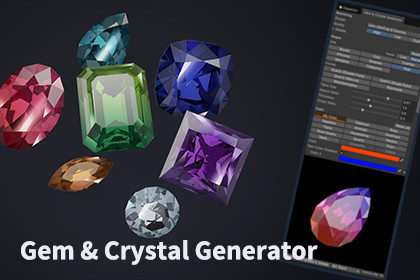
Generate stylized or realistic gems and crystals right in the Unity Editor. Pick a shape and a color, adjust, and export a ready-to-use mesh, material and prefab.Gem & Crystal Generator is an Editor tool for creating gems and crystals for your URP project. Choose from 8 cuts and 5 crystal shapes, pick one of 11 color presets based on real gemstones, and fine-tune the result while watching a live preview. One click exports a mesh, textures, a material and a prefab that you can drop into any scene.The included Gem shader makes stones shine with facet reflections inside the gem and per-facet sparkle. Switch the look between Stylized, Balanced and Realistic, and choose High or Low quality to balance appearance and performance. By default, gems follow the scene lighting, so they get darker in dark places; this can be turned off.Everything is customizable: proportions, facet count, crystal distortion, two-color gradients, rainbow fire, milkiness and HDR glow for Bloom. Save your own colors as presets and reuse them across the project. Generated materials can be edited later in the Inspector.Suitable for fantasy and RPG games, treasure and loot, item shops, crafting systems, puzzle games and decorative crystals in environments. No coding is required.Key featuresEditor window with a live, rotating preview and an in-scene preview8 cuts: Round, Oval, Cushion, Princess, Emerald, Pear, Marquise, Cabochon5 crystals: Quartz (double point, single point, natural), Bipyramid, Rhombohedron11 color presets based on real gemstones, plus user-saved color presetsGem shader with inner reflection, per-facet sparkle, background refraction and scene lighting support3 looks (Stylized / Balanced / Realistic) and 2 quality levels (High / Low)Two-color gradients, rainbow fire, milkiness and HDR glow for BloomExports a mesh, textures, a MatCap texture, a material and a prefab per gemThe exported MatCap can also be used in other MatCap shadersEdit generated materials later in the InspectorOption to use the URP Lit shader insteadEnglish and Japanese interface3 demo scenes and a PDF manualRequirementsUnity 6.0 or laterUniversal Render Pipeline (URP) onlyThe generator runs in the Editor. Generated assets work in builds.AI coding assistants (Claude and OpenAI Codex) were used as development aids throughout the project. Under my direction, they helped write and refactor the C# Editor scripts and the HLSL shader code, and assisted with the accompanying text.All design decisions were made by me. I tested and reviewed the features in Unity before release, and I made the final decisions on the look, the settings and the text.No AI-generated images, textures, 3D models or audio are included in the package. All meshes, textures and materials in the package, including the demo scenes, are generated procedurally by the tool's own code.

