




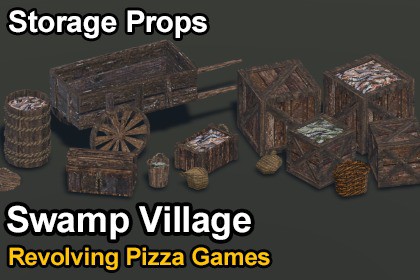
Swamp Village: Storage Props - Retro Style Asset Pack
Revolving Pizza Games
$5.49
(no ratings)
Jump AssetStore
A retro-style storage props pack featuring 31 low-poly prefabs, including wooden barrels, crates, chests, sacks, baskets, buckets, and a cart.IMPORTANT: This is a standalone selection of assets from the complete Swamp Village environment pack, not an expansion. All assets in this pack are also included in the complete environment.Add storage and cargo details to your environments with 31 retro-style prefabs. Featuring wooden barrels, crates, chests, sacks, baskets, and a cart, this pack provides a variety of props for decorating medieval villages, warehouses, docks, markets, and other fantasy environments.Swamp Village: Storage Props features a distinct low-resolution texture style, combined with crisp filtering, creating a unique aesthetic that blends retro charm. It captures a nostalgic feel without the limitations of old game engines or consoles.The included prefab showcase scene displays the available assets for easy browsing.OTHER SWAMP VILLAGE PACKSIf you like this pack, check out the other asset packs from the same collection:Swamp Village: Fishing Props - Retro Style Asset PackSwamp Village: Furniture & Props - Retro Style Asset PackSwamp Village: Vegetation - Retro Style Asset PackOr get the complete collection with all 344 prefabs and two example scenes:Swamp Village - Retro Style Modular Environment PackKEY FEATURES31 models and 31 prefabs4 wooden barrel variations18 wooden crate variations, including standard, small, and open crates2 wooden chests3 sack variationsBasket, bucket, and wooden caseWooden cart for transporting goodsLow-resolution textures with a crisp pixel styleReal-world scale proportions1 prefab showcase scene includedDrag-and-drop ready prefabsTEXTURES AND MATERIALS3 low-resolution textures and 3 materials, including wood and prop textures.Texture resolution of 256×256.Materials are prepared for the Built-in Render Pipeline and can be easily converted to URP.Converting to URPUnity 2022Select all materials (they should appear magenta). From the top menu, click Edit > Rendering > Materials > Convert Selected Built-in Materials to URP.Unity 6Open Window > Rendering > Render Pipeline Converter. Select the Built-in pipeline as the source and choose your target pipeline. Select "Material Upgrade," then click "Initialize and Convert."Texture SettingsEnsure all textures have their Filter Mode set to "Point (no filter)" to prevent blurriness.Texture Compression should be set to "None".No custom shaders are used. Materials are compatible with URP and HDRP, though HDRP has not been explicitly tested.Number of Prefabs: 31Number of Models: 31Number of Meshes: 66Number of Textures: 3Number of Materials: 3Texture Dimensions: 256×256 (3 textures)Minimum Triangle Count: 84Maximum Triangle Count: 1,088UV Mapping: YesRigging: NoAnimation Count: 0LOD Information: No LODs includedTexture Maps: Base colorPrefab Showcase Scene: 1Render Pipeline: Built-in Render PipelineCustom Shaders: No

