




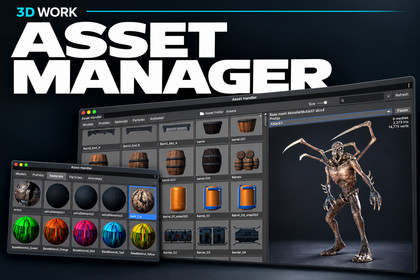
Browse, preview and drop models, prefabs, materials and particle effects into your scene — a fast thumbnail grid, live 3D preview, animation playback and drag-and-drop placement.Editor-only tool with no runtime footprint, so it works under any pipeline. The 3D preview uses PreviewRenderUtility with SRP support and renders with your active pipeline (Built-in, URP, HDRP). Materials made for a different pipeline show pink, as in the Scene view. Custom RPs untested. Requires Unity 6 (tested on 6000.2), no dependencies.Asset Handler is a dockable Model/Prefab/Material browser that turns any folder in your project into a visual, searchable library of everything you can put in a scene.Point it at a folder and it scans for models, prefabs, materials and particle effects, then lays them out in a thumbnail grid with real rendered previews, not generic type icons. Click any tile and the panel on the right shows a live, orbitable 3D preview of the asset: spin it with the mouse, zoom with the wheel, read its vertex and triangle counts at a glance.Found the asset you want? Drag the tile straight into the Scene view, the Hierarchy, or an Inspector slot, or double click to place it instantly at a target you choose. Double click a material to apply it to whatever you have selected in the scene, with full undo.Built for real projects: the grid only renders the tiles currently on screen and loads assets lazily as you scroll, so a folder with thousands of entries stays smooth. The window only repaints while something is actually animating, so it sits in your layout without burning frames.Key features* Real rendered thumbnails for models, prefabs, materials and particle effects: textured meshes render correctly, materials preview on a sphere.* Live 3D preview powered by `PreviewRenderUtility`: LMB orbit, wheel zoom, works under Built in, URP and HDRP.* Animation playback: assets with animation clips get a clip dropdown plus Play/Pause, a scrub timeline with time readout, sampled directly with no Animator setup required. Particle effects loop in the preview.* Drag and drop anywhere: Scene view, Hierarchy, Inspector object fields.* Double click to place at a configurable target: scene root, current selection, or a named group created on demand. New models auto arrange beside existing ones instead of stacking at the origin.* Apply materials to selection with one double click: repoints `sharedMaterials` only, never clones the asset or disturbs its tiling and offset.* Search and type filters: comma separated search terms ("orc,zombie"), per kind toggles, and an "Animated only" filter.* Adjustable tile size slider.* Auto rescan when assets change on disk via `AssetPostprocessor`.* Right click menu: Select in Project, Instantiate in Scene or Apply to Selected, Show in Finder.Why you'll keep it docked* Fast on huge folders: viewport culling, lazy asset loading, and a preview cache sized to the visible tiles.* Idle friendly: repaints only while a preview is orbiting, a clip or particle system is playing, or thumbnails are still streaming in.* No dependencies, no setup: pure editor scripts in an `Editor` assembly definition. Drop it in and open `Window ▸ Asset Handler`.* Full source included, cleanly commented.### Technical details- Editor extension only, nothing ships in your build.- Unity 6000.0 or newer (developed and tested on 6000.2.x).- Render pipeline agnostic: Built-in, URP, HDRP (SRP rendering enabled in the preview).- Ships as an `AssetHandler.Editor` assembly definition scoped to the Editor platform.- ~3 C# files, no third-party libraries, no runtime footprint.### Getting started1. Import the package.2. Open Window ▸ Asset Handler.3. Click + Asset Folder and pick a folder inside `Assets/`.4. Click a tile to preview it, drag it into the scene, or double-click to place it.

