




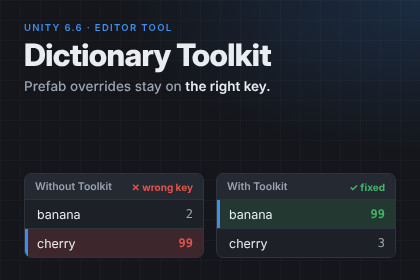
Search, validate, import/export and protect Unity 6.6's native serialized dictionaries, including a guard that keeps prefab overrides on the right keys.The Problem:Since Unity 6.6 you can finally serialize dictionaries natively. They basically work like lists. Every entry is a key-value pair.Now imagine you have a prefab and three instances of it in your scene. Each instance overrides a value, so it's different from the original prefab. Then you delete a single entry from the prefab's dictionary… and suddenly the values on your instances jump to the wrong keys. And the only solution is to change them manually again...Why? Unity stores an instance override by the entry's position, not by its key. An override doesn't say "Health Potion = 0.9" but "entry 2 = 0.9". Remove an entry above it, and entry 2 is now a different key, which gets your 0.9. Entries without overrides are obviously fine, only your overrides end up in the wrong place. Unity's documentation lists this as a known limitation and recommends checking every instance by hand.So, what does this Toolkit do?Prefab Override Guard: the toolkit remembers the key order of every prefab dictionary. When you change a prefab, it tells you exactly which instances are affected and which values would land on the wrong key: in open scenes, closed scenes, prefab variants and nested prefabs.One click, and every override is back on its key. Changed your mind for whatever reason? Hit Revert.Of course, that is not all:Dictionary Browser: you can search and filter your dictionaries (the native Inspector can't), edit several objects at once and copy entries between them.Import & Export feature: CSV and JSON, Excel-friendly (the right delimiter for your region is picked automatically). Keep your item data in a spreadsheet and pull it back into Unity.Project Validation: scan your whole project for duplicate and empty keys that Unity silently drops at runtime, and remove them in one go. Also runs from the command line for CI.Right-click any dictionary field in the Inspector for quick access.I found these obligatory to add, especially if you have big dictionaries. Who would, for example, search a list of 100 key-value pairs by hand???No code changes needed, it works with every [SerializeField] Dictionary field. Editor-only, nothing ends up in your build. Full C# source, manual and demo scene included.Requirements and Limitations:It requires Unity 6.6 or newer, since native dictionary serialization doesn't exist in earlier versions. It simply won't do anything in older versions.The toolkit works with Unity's native dictionaries only, not with Odin or custom wrapper dictionaries.Fixing overrides can't be undone with Ctrl+Z (a Unity limitation), but you can use the Revert button.Entries removed on an instance are flagged for you to check, not changed automatically.Prefab Override GuardDictionary BrowserImport & Export feature (CSV, JSON)Project ValidationUnity 6.6 or newerEditor-only, no runtime code in buildsWorks with all render pipelinesFull C# source codeManual (Markdown) and demo scene included43 automated tests (Unity Test Framework)The C# source code, tests and documentation of this package were written with the assistance of an AI model (Claude, by Anthropic). The publisher defined the product scope and features, tested every feature in Unity 6.6, reported the problems found during testing and directed the changes until all features worked. The package contains no AI-generated images, audio or 3D content.

