




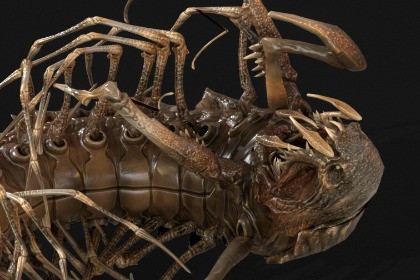
Low-poly game-ready model of the character Cave Centipede.Low-poly game-ready model of the character Cave Centipede.A giant centipede from deep caves: a long segmented body of armored chitin plates, 26 walking legs, a pair of huge jaws, raptorial forcipules, mouthparts that work while it bites, and tail pincers. It rears up, bites and grasps its prey, slams with the forebody and the tail, curls into a ring and rolls forward at high speed, burrows under the ground and comes out of it, grabs a rock with its jaws and hurls it at the enemy.Made as a boss or giant creature enemy for dark fantasy, horror, cave and dungeon, sci-fi, RPG, action and survival games.Ready-made effects: dust and rock crumbs while it rolls, a swarm of flies circling close around its body and small beetles crawling over it, a burrow hole with a dirt burst, dust puffs and impacts when it falls or hits the ground, a throwable rock with crumbs.A showcase scene with all animations, effects and skins is included.Animations: 36 (+ 23 in place versions, 59 files)Idle (x2): Idle, Idle AlertWalk (x4): Walk Forward, Walk Back, Strafe Left, Strafe Right - root motion and in placeRun (x2): Run, Fast Run - root motion and in placeTurn (x3): Turn Left 90, Turn Right 90, Turn 180Roar (x1)Attack (x8): Bite, Combo, Forebody Slam, Grasp, Reared, Reared Flurry, Tail Slam, Rock ThrowRoll (x4): Roll Start, Roll Loop, Roll End, Roll Defend (curls into a ring and rolls)GetHit (x6): Front, Left, Right, Back, Front Heavy, Front BurstDeath (x4)Burrow (x2): Burrow In, Burrow OutLooping clips have matching first and last frames.Skins: 5 (4096x4096 PBR textures: Base Color, Normal, Roughness, Metallic, AO)Materials: 1 character material slot, 5 skin variantsSkeleton: custom centipede skeleton, 115 bones (body segments, head, jaws, mouthparts, forcipules, tail pincers, 26 legs, rock socket). Not a humanoid skeleton, all animations are made for it.Rigged: Yes | Animated: Yes | Game-ready: Yes | LODs: NoPolygons (base mesh)faces 24,719verts 19,874tris 38,650Supplied filesBase mesh: FBX, Maya (.mb), Blender (.blend); effect meshes (rock, 5 stones, burrow hole, swarm bug) FBXAnimations: 59 FBX clips, all animations in one FBX, SBORKA.fbxTextures Main: original 4096 TGA maps for 5 skins (Albedo, Normal, AO, Roughness, Metalness, Gloss, packed Metalness+Roughness and Metalness+Gloss) - for any engineEngine-ready textures: packed PBR maps (BaseColor, Normal, ORM, Mask Map) and effect texturesReady-to-use project with the showcase scene (details in the technical information below)Package: Cave Centipede.unitypackage (showcase scene included)Unity Version: 2022.3 LTS or newerRender Pipelines: Built-in, URP 14+, HDRP 14+ in one package; materials switch automaticallyNumber of Textures: 28Texture Dimensions: 4096 (15 creature), 2048 (7: recolor masks, burrow hole), 1024 (6: rock, dust, ground)Polygon Count: 38,650 tris (creature), 1,002 tris (rock)Minimum Polygon Count: 6 tris (stone)Maximum Polygon Count: 38,650 trisNumber of Meshes: 9 FBX: creature (18 parts), rock, swarm bug, 5 stones, burrow holeNumber of Prefabs: 5 (playable creature, display creature, Mecanim creature, rock, swarm bug)Rigging: Yes, Generic, custom skeleton (115 bones)Animation Count: 59 (.anim + Animator Controller): 36 animations + 23 in place versionsAnimation Type List: Idle 2; Walk 4; Run 2; Turn 3; Roar 1; Attack 8; Roll 4; GetHit 6; Death 4; Burrow 2 (root motion and in place)UV Mapping: YesLOD Information: No LODsTypes of Materials and Texture Maps: PBR, 14 materials; creature recolor shader (Built-in, URP), HDRP/Lit; Base Color, Normal, Mask Map, Color MaskEffects: rolling dust and stones in 5 sizes, 20 flies circling close around the body and 8 beetles crawling over its surface, rock throw, burrow hole with dirt burst, impact dustScripts: 11 runtime C# (controller, animator, effects, swarm, rock throw, display) + 1 editor (pipeline setup); no third-party packagesDemo scene: all 59 clips, 5 skins, all prefabs and effects, captioned in the editor, animated in Play modeDocumentation: Documentation folder - step-by-step instructions (import, pipelines, recolor, controls, effects)

