



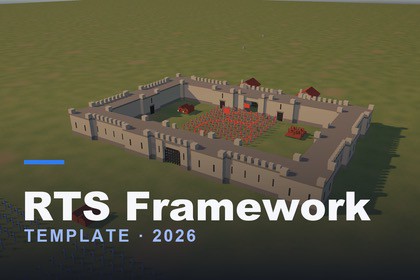
Command formation battles and sieges in Unity 6: morale and routing, breachable walls and gates, siege engines, capture points and a themed HUD.RTS Framework Template – 2026Documentation | Website Build formation battles and castle sieges in Unity 6. You command companies of soldiers rather than single units. They march and turn in rank and file, lose heart under fire, break and flee, then rally. They can man walls, batter down gates and fight over key points.It's a working foundation, not a black box. All the source is included as readable C#, set up from the Inspector, with Scene-view tools for the fiddly parts. Two playable demo scenes show every system working together.Armies and formationsGroups of any size, from a handful of men to over a hundred, move and fight as one company.Drag with the right mouse button to draw the front line. The drag's length sets the frontage and its direction sets the facing.Order several groups at once and they form up side by side without crossing each other.Soldiers are matched to their new positions, so an about-face doesn't send the ranks walking through each other.Groups re-form automatically as casualties mount.Combat, stances and moraleMelee and ranged units. Arrows lead moving targets, and walls and buildings block line of sight.Stances: Defensive (hold the line) and Aggressive (advance on threats), plus Auto-attack, Double time and an ordered Retreat.Morale drains while a group is under fire and depends on how badly it has been hurt.Broken groups rout, fleeing with a marker over their heads, then rally and re-form once they reach safety.Hit flashes, floating damage numbers, death animations and optional sound effects.Walls, gates and siegesProcedural walls with towers, battlements, walkways and tower doors.Draw the outline and place gates directly in the Scene view with handles.Gates open only for the faction that owns them.Catapults breach wall sections and rams smash gates. The NavMesh updates live, so troops pour through the gap.Order infantry onto a wall to man the battlements.Buildings have intact, damaged and destroyed models, with optional rubble troops can walk through.Battle flowA deployment phase with a zone for each side and a Start Battle button.Capture points: key points, gates handed to whoever takes the point, and a morale shock to the side that loses it.Victory by holding the keep or breaking the enemy army, and a defender's win when the timer runs out.Controls and HUDClassic RTS controls:click, box and Shift selectioncontrol groups 1–9 (tap twice to jump the camera there)attack-move, stop, stance hotkeysa camera with edge-panning, rotation and zoomA modern HUD: group hotbar with health and morale bars, command bar, battle timer, capture point badges, tooltips and a result screen.One UI Theme asset controls every colour, icon, font size and animation timing. Change it and rebuild the HUD from a menu item.What's includedFull C# source in its own assembly definition, plus editor tools.Two demo scenes: SiegeBattle and a sandbox scene.Unit prefabs:an animated humanoid soldieran archera placeholder infantrymana catapult and a ramArrow and boulder projectiles, buildings, walls and example wall-part prefabs.Formation and Group Settings assets for quick army setup.A 35-page PDF manual with screenshots: installation, building a scene step by step, every Inspector field, troubleshooting.RequirementsUnity 6 (6000.0) with the Universal Render Pipeline.Packages: Input System, AI Navigation, uGUI / TextMeshPro.Three physics layers (Unit, Ground, Building). The manual shows how to set them up.Please noteThere is no AI commander. Enemy groups defend, react and attack on their own, but nothing plans their strategy.Formations are rectangles only.There are no ladders or siege towers, and siege engines have no crews.The art is simple placeholder art, meant to be swapped for your own.RequirementsUnity 6 (6000.0.70f1 or later)Universal Render Pipeline (URP 17)Input System 1.19 (Active Input Handling set to Input System Package or Both)AI Navigation 2.0uGUI 2.0 with TextMeshPro (TMP Essential Resources must be imported)Physics layers: Unit, Ground and BuildingCode36 runtime scripts and 7 editor scripts, about 11,000 lines of commented C#All code is in the RTSFramework namespaceRuntime and editor code are split into two assembly definitions: RTSFramework and RTSFramework.EditorBuilt from MonoBehaviours and ScriptableObjects, and configured in the InspectorNo DOTS/ECS and no third-party code dependenciesSystemsMovement: NavMeshAgent pathfinding on a single NavMeshSurface. Formation slots are snapped onto the NavMesh.Unit grid: a spatial grid handles target searches and capture-point counting, instead of physics queries.Runtime NavMesh patching: breached walls and broken gates are rebaked in the background from a copy of the NavMesh data, so the baked asset is never modified.Gate ownership: gates use NavMesh areas 29–31, so each faction can only path through its own gates.Ranged combat: scripted projectiles, with line-of-sight checks against configurable layer masks.Animation: Animator driven by parameters (Speed, Fighting, Attack, Hit, Dead). Root motion is off, and distant units update their animation less often.Hit flashes: unit tinting uses MaterialPropertyBlocks, so no materials are duplicated.InputNew Input System, with an RTS action map defined in InputSystem_Actions_RTSAll bindings can be changed in the action mapMouse and keyboard only; no gamepad bindings for RTS controlsUIuGUI HUD on a Screen Space – Overlay canvas, scaled from a 1920×1080 referenceAll HUD styling comes from one UI Theme ScriptableObjectHUD sprites and icons are generated as SDF shapes by an editor toolWorld-space canvases for health bars, rout icons and damage numbersEditor toolsCustom Scene-view handles for walls (points and gates), deployment zones and capture pointsMenu items to generate the theme sprites, rebuild the HUD prefabs and create example wall prefabsContent28 prefabs: units, siege engines, projectiles, buildings, walls and wall parts, battle objects, HUD and UI widgets6 ScriptableObject presets: formations and group settings2 demo scenes with baked NavMeshes1 Animator ControllerHumanoid animation clips from Kevin Iglesias Human AnimationsModels are low-poly placeholders made from primitives and generated meshes; there are no textures apart from UI spritesPlatformsDeveloped and tested on macOS in the Editor, with mouse and keyboardNo platform-specific code; standalone desktop targets are expected to workDocumentationA 35-page PDF manual in Assets/RTS Framework/DocumentationAn in-editor welcome window with documentation and support links

