



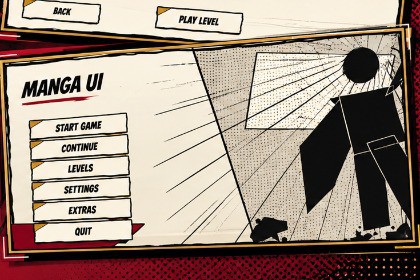
A complete manga/anime-inspired UI kit for Unity featuring ready-to-use menus, settings, level selection, and more. Includes a fully working demo scene you can customize and build upon.Engine: Unity 2021.3 LTS or newerUI: Unity UGUI / CanvasText: TextMeshProInput: Unity Legacy Input Manager for the included key rebinding systemDependencies: TextMeshProThe kit is designed around Unity's standard Canvas UI system, making individual elements easy to reuse in your existing projects.Manga UI Kit — Anime & Manga Menu SystemGive your Unity game a bold manga-inspired interface with a complete collection of hand-crafted UI graphics, reusable prefabs, ready-to-use menu systems, comic effects, and a fully functional demo.Manga UI Kit is designed to help you quickly build stylish anime/manga-inspired interfaces without creating every element from scratch.From buttons and panels to settings screens, level selection, pause menus, comic effects, icons, sliders, toggles, and decorative elements — everything is designed to work together as one cohesive UI system.✦ What's IncludedComplete Working Menu SystemThe included demo provides a complete menu flow with working navigation:Main MenuSettings MenuLevel SelectPause MenuGameplay PlaceholderBack / navigation functionalityWorking menu transitionsExample level selectionWorking settings controlsPause and resume functionalityThe demo is ready to explore and use as a starting point for your own game.⚙ Settings SystemThe included Settings menu contains categories for:AudioGraphicsGameplayControlsGeneralThe system includes working controls and persistent settings using Unity PlayerPrefs.Note: The kit does not include sound effects or music. The Audio settings are provided as part of the menu system so you can connect your own game's audio system.🎨 UI Art LibraryThe kit includes approximately 100 manga-inspired UI graphics, including:ButtonsPanelsIconsSlidersTogglesDropdownsDecorative elementsManga backgroundsComic effectsMenu elementsThe artwork uses a bold manga-inspired visual language with ink outlines, screentones, comic styling, speed lines, and accent colors.🖼 PanelsMultiple reusable panel styles are included:StandardLargeDialogueComicSettingsLevel CardPopupConfirmationThe panel assets are designed for use as reusable Unity UI components.🔘 ButtonsMultiple button sizes and states are included:SmallMediumLargeWith states including:NormalHoverPressedSelectedDisabled🎮 IconsA collection of commonly needed game UI icons is included, including:PlayPauseSettingsAudioMusicSFXGraphicsControlsBackNextPreviousLockUnlockStarEmpty StarTrophyTimeScoreCheckCloseResetHomeExitVolumeFullscreen💥 Manga / Comic EffectsAdd manga-style impact and motion to your UI with decorative elements such as:BAM!POW!WHOOSH!Impact burstSpeed linesRadial speed linesInk splashesHalftone dotsScreentone gradientsHand-drawn arrowsSpeech bubblesShout bubblesCorner flourishesUnderlinesBrush strokesSeparatorsTransition wipesComic panel bordersThese can be used throughout menus, popups, tutorials, dialogue screens, loading screens, and other UI elements.💬 Dialogue & Comic UICreate manga-style dialogue and presentation screens using:Dialogue panelsComic panelsSpeech bubblesShout bubblesDecorative manga elementsCharacter placeholdersImpact effectsCombine them with Unity's Canvas UI and TextMeshPro to create your own manga-style dialogue, tutorial, or story interfaces.📊 Sliders, Toggles & DropdownsReusable controls are included for common game settings:Slider tracksSlider handlesSlider fillsToggle backgroundsToggle checkmarksDropdown backgroundsDropdown arrowsSelected item backgrounds📱 Multiple Menu ScreensThe included system demonstrates a complete menu structure that can be adapted for your own project:Main Menu → Level SelectMain Menu → SettingsMain Menu → Gameplay → PausePause → Resume / Settings / Level Select / Main MenuUse the included demo as a foundation instead of starting your UI navigation from an empty Canvas.✦ Built for CustomizationThe kit is intended to be a starting point for your own game.You can:Replace iconsReplace backgroundsReplace character artworkChange fontsTint UI elementsAdd your own levelsAdd new menu screensAdd new settingsCreate your own UI layoutsExtend the included menu controllersReuse individual UI assets independentlyLevel selection uses ScriptableObject-based level data, allowing you to add additional levels without manually wiring every level card.✦ Included Unity SystemsThe package includes working C# systems for:Menu navigationSettings persistenceKey rebindingLevel dataLevel selectionButton effectsPanel animationsUI transitionsSafe-area handlingTabsUI theme configurationGameplay demo flowThe animation system uses lightweight built-in Unity coroutines and does not require DOTween.✦ Perfect ForManga UI Kit is suitable for:Anime-inspired gamesManga games2D gamesVisual novelsRPGsAction gamesFighting gamesPlatformersMobile gamesMenu-heavy gamesDialogue systemsStory-driven gamesAnime-style projectsIndie gamesUse the complete demo as a starting point, or simply take the individual assets you need and build your own interface.Create Your Own Manga-Style InterfaceStop rebuilding the same buttons, panels, settings screens and menu elements from scratch.Start with a complete manga-inspired UI foundation and customize it for your game.Engine: Unity 2021.3 LTS or newerUI: Unity UGUI / CanvasText: TextMeshProInput: Unity Legacy Input Manager for the included key rebinding systemDependencies: TextMeshProThird-party UI frameworks: NoneDOTween: Not requiredThe kit is designed around Unity's standard Canvas UI system, making individual elements easy to reuse in your existing projects.AI was used to help with the creation of package, specifically helping with setting up the demo scene.

