




Stylized Post FX: Retro & Cinematic Effects for URP
WolfNightMare
$5.50
(no ratings)
Jump AssetStore
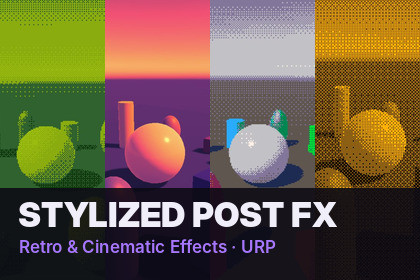
Four stylized URP post effects: palette mapping, retro dithering, shaped heartbeat vignette and directional chromatic aberration.Setup: add the Stylized Post FX Feature to your URP Renderer (one click: Tools -> Stylized Post FX -> Add Renderer Feature), enable Post Processing on the camera, and add the effects as Volume overrides.Give your game a signature look in minutes. Stylized Post FX adds four lightweight full-screen effects to the Universal Render Pipeline. You control all of them with standard Volume overrides, so they blend between areas, animate from code and work with your existing post-processing.Palette Mapping• Remap the whole screen to any color palette: 4-color handheld, 16-color fantasy, 1-bit and more• Nearest-color matching (perceptual) or luminance gradient map (stepped / smooth)• Pixelation and Bayer 2×2 / 4×4 / 8×8 dithering locked to the virtual pixels• Import palettes from palette images (.png) or .hex filesRetro Posterize• Color-level reduction in perceptual space with ordered dithering• One-slider retro 3D look (32 levels + Bayer 4×4)Shaped Vignette• Any color, three blend modes (normal / multiply / additive)• Circle, oval or rounded rectangle shape• Animated noisy edge• Heartbeat pulse, with a ready-made low-health driver scriptDirectional Chromatic Aberration• Radial, fixed-direction or camera-motion driven• 3–16 samples with spectral weighting for smooth rainbow fringes• Edge mask keeps the center sharpIncluded• 10 Volume Profile presets (Handheld Green, Fantasy 16, Retro 3D, 1-Bit Amber, Synthwave, Night Vision, Sepia Film, Speed Rush…)• 9 palettes• One-click setup and a demo scene generator• Full source code (C# + HLSL) and PDF documentationTechnical• Unity 6 (6000.0+), URP 17+, Render Graph API• Effects that are off add zero passes• Tested on Windows (DirectX 11)Key features:4 full-screen effects: Shaped Vignette, Directional Chromatic Aberration, Retro Posterize, Palette MappingControlled with standard URP Volume overrides: blend between areas, animate from codeSingle Renderer Feature, one-click setup via Tools -> Stylized Post FXEffects that are off add no render passesConfigurable injection point (before or after URP post-processing)Some C# code, HLSL shaders and support documentation were drafted with the help of an AI assistant and me, then reviewed, tested and adjusted by me in Unity

