




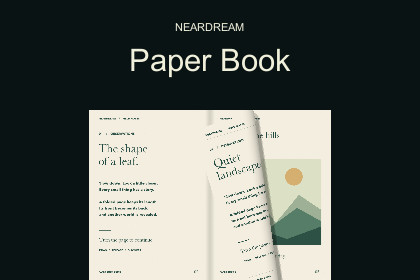
Bring pages to life with two-sided uGUI curls, animated 3D prefab pop-ups and one page-turn speed slider. Includes ready-to-use demos and English/Korean guides.Built-in and URP 17.0.4 verified in Unity 6000.0.74f1. Includes a dedicated pop-up shader. Supports uGUI Overlay, Camera and front-facing World Space canvases. No external Asset Store assets required.Unity 6000.0.74f1에서 Built-in·URP 17.0.4 검증. 전용 팝업 셰이더와 Overlay·Camera·정면 World Space 캔버스 지원. 외부 Asset Store 에셋 의존성 없음.Give your in-game journal the feel of turning a sheet of paper, with small 3D worlds rising above the pages. NearDream Paper Book combines two-sided uGUI page curl, moving shadows and optional animated 3D prefab pop-ups.Start with GameObject > UI > NearDream Paper Book or NearDream Pop-up Paper Book. Replace the sample Pages with your own textures, assign visual 3D prefabs and enter Play mode. The included demos and English/Korean guides cover setup and game integration.Place a model on a specific page and control its reveal, rotation and floating. Animator-based prefab animation is supported. Pop-ups also work on Screen Space Overlay canvases, follow reading direction and book resizing, hide during page turns and reappear on the visible spread. Tree and crystal sample prefabs are included.Control page-turn speed with one setting: 1x normal, 0.5x slower, 2x faster, adjustable from 0.25x to 4x. Use the Inspector, the demo slider or the public TurnSpeed / SetTurnSpeed(float) API. It applies to automatic turns and drag completion or return animations; live speed changes preserve the current curl position. Direct dragging follows the pointer.Use it for quest journals, storybooks, comic readers, instructions and pause-menu books. Players can drag and release pages or tap the outer edges. Buttons and public C# methods provide additional control. Left-to-right and right-to-left reading, cover-first ordering, Texture2D/RenderTexture pages, adjustable curl quality and optional motion-driven paper rustle are included. Animation uses unscaled time by default for paused games.Includes complete C# and shader source, a configured book prefab, two interactive demos, eight original book-page images, four dedicated pop-up page images, tree/crystal models, one original rustle clip and optional EditMode/PlayMode tests. No paid dependency or runtime service is required.This is a uGUI book presentation. Pop-up models do not bend with the curled paper. World Space use is intended for front-facing books. UI Toolkit, PDF/document decoding, page caching and a built-in Timeline track are outside this package. Text and UI controls must be rendered into a page texture to curl.Support: neardream0@gmail.comHow to use (English)1. Import the full package into Unity 6.0 with Unity UI (uGUI) installed.2. Choose GameObject > UI > NearDream Paper Book. Replace Pages with one texture per page, starting with the cover. Enter Play mode and drag a page toward the spine or click an outer edge.3. For 3D, choose GameObject > UI > NearDream Pop-up Paper Book, or click Add 3D pop-ups on an existing book. In Pop Ups, assign Page Index and a visual 3D Prefab. Index 0 is the cover; 1 and 2 are the first spread.4. Set Position and Size, then Spin Speed and Float Height / Speed for motion. Animator prefabs are supported. Pop-ups hide during a turn and appear again on the visible spread.5. Adjust the single Page turn speed option: 1x normal, 0.5x slower, 2x faster; range 0.25x-4x. The demo TURN SPEED slider changes the same setting. It applies to buttons, edge clicks and drag completion/cancellation.6. For your own slider, set Min Value 0.25, Max Value 4 and Value 1. Connect On Value Changed (Single) to PaperBook > SetTurnSpeed(float), using the dynamic float entry. Buttons can call NextPage() / PreviousPage().Demo: Tools > NearDream > Paper Book > Open 3D Pop-up Demo. Toggle 3D ON/OFF and MOTION ON/OFF.Full offline guide: Assets/NearDream/PaperBook/Documentation/UserGuide.md. Use visual-only prefabs and materials compatible with your project's rendering pipeline.사용법 (한국어)1. Unity 6.0 프로젝트에 Unity UI(uGUI)를 설치하고 패키지 전체를 임포트하세요.2. GameObject > UI > NearDream Paper Book을 선택하세요. Pages에 한 쪽당 이미지 한 장을 표지부터 넣고 Play를 누릅니다. 책등 방향으로 종이를 드래그하거나 바깥 가장자리를 클릭하면 넘겨집니다.3. 3D를 쓰려면 GameObject > UI > NearDream Pop-up Paper Book을 선택하거나 기존 책의 Add 3D pop-ups / 3D 팝업 기능 추가를 누르세요. Pop Ups에서 Page Index와 표시용 3D Prefab을 연결합니다. 0은 표지, 1·2는 첫 펼침면입니다.4. Position과 Size로 위치·크기를, Spin Speed와 Float Height / Speed로 회전·떠다니기를 조절합니다. Animator 프리팹도 지원하며, 넘김 중에는 숨었다가 보이는 페이지에서 다시 나타납니다.5. 책장 넘김 속도 / Page turn speed 옵션 하나로 조절하세요. 1배는 기본, 0.5배는 느리게, 2배는 빠르게이며 0.25~4배 범위입니다. 데모 TURN SPEED 슬라이더도 같은 설정을 바꿉니다. 버튼·가장자리 클릭·드래그 후 완료와 복귀에 모두 적용됩니다.6. 내 Slider는 Min Value 0.25, Max Value 4, Value 1로 두고 On Value Changed (Single)에 PaperBook > SetTurnSpeed(float)의 동적 float 항목을 연결하세요. 다음·이전 버튼은 NextPage() / PreviousPage()를 연결합니다.데모: Tools > NearDream > Paper Book > Open 3D Pop-up Demo. 3D ON/OFF와 MOTION ON/OFF로 효과와 움직임을 켜고 끌 수 있습니다.전체 한국어 설명서는 Assets/NearDream/PaperBook/Documentation/사용법.md에 포함되어 있습니다. 게임 로직이 없는 표시용 프리팹과 현재 렌더 파이프라인에 맞는 머티리얼을 사용하세요.Requirements: Unity 6.0 (tested with 6000.0.74f1), Unity UI (com.unity.ugui 2.0.0) and Shader Model 3.0. Other editor versions are not validated.Book: two-sided cylindrical page curl; layered shadows; drag/hold/release/cancel and edge clicks; LTR/RTL reading; Texture2D and RenderTexture pages; Contain/Cover/Stretch fitting; navigation/manual animation APIs; UnityEvents; optional paper audio; paused-game animation.Page speed: one 0.25x-4x multiplier in the Inspector and sample slider. TurnSpeed and SetTurnSpeed(float) support game settings UI. Automatic turns and drag completion/cancellation share the same setting.3D pop-ups: per-page visual prefab, normalized position, size and rotation; reveal, rotation, floating and Animator support. Models render to transparent textures at 256/512/1024 resolution. Runtime copies are isolated from the main camera; hidden-page models/textures are released. Use visual-only prefabs without gameplay scripts.Canvas: Screen Space Overlay, Screen Space Camera and front-facing World Space; stencil masks, RectMask2D and CanvasGroup alpha. Generated pop-up images do not intercept book input.Input: uGUI EventSystem pointer interfaces. Legacy Input Manager works without extra packages. The new Input System is optional. Gamepad actions can call the navigation API or select UI buttons.Quality: Low 32 x 10, Medium 64 x 21 and High 96 x 32 leaf subdivisions. Book mesh buffers are reused and idle geometry is not rebuilt each frame. Each visible pop-up requires an additional render; profile your target hardware.Tested environment: macOS / Metal / Unity 6000.0.74f1. Page curl and transparent 3D pop-ups are verified with Built-in and URP 17.0.4. Portrait/landscape demo layouts, navigation, timing, masking and clean import are checked in the editor. Physical mobile devices, player builds, HDRP, XR, WebGL and other editor versions are not validated.Documentation: offline English UserGuide.md and Korean 사용법.md under Assets/NearDream/PaperBook/Documentation. Optional Unity Test Framework is required only for the included tests. URP is not a required dependency. The exported dependency manifest includes Unity UI; no external Asset Store package is required.OpenAI Codex assisted with C# and shader implementation, tests, English/Korean documentation, procedural sample illustrations and sample 3D models. Page-curl mathematics and page ordering were adapted from NearDream's existing Android comic viewer. Original graphics, geometry and paper-rustle audio were created for this package; no third-party artwork was copied. Verified with Unity tests, clean import and Built-in/URP rendered previews. The runtime requires no AI service or subscription.

