



Pixel VFX Pack - 8 Effects x 6 Variants (Prefabs Ready)
The_KnightShift
$5.49
(no ratings)
Jump AssetStore
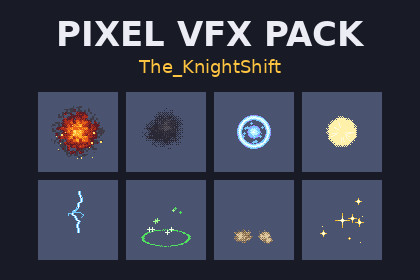
8 pixel-art effects in 6 variants each (48 strips of 12 frames, 64x64), pre-sliced for pixel art, with a prefab and AnimationClip per strip and a demo scene.2D sprites with Unity's Sprites-Default material. Tested in Unity 6000.0.84f1 with the Built-in render pipeline. For URP's 2D Renderer, switch the material to Sprite-Unlit-Default (see the PDF); HDRP is not supported.Pixel VFX Pack is 8 one-shot pixel-art effects for 2D games: explosion, smoke, magic burst, impact, lightning strike, heal, dust cloud and pickup sparkle. Each comes in 6 variants, 48 sprite strips in all, each 12 frames of 64x64 pixels with hard-edged alpha. The 6 variants of an effect share its shape and size and differ in debris, sparks, bolts and puff placement, so think of it as 8 effects with subtle variations, not 48 different effects.It is set up so you don't have to. Every PNG arrives already sliced into its 12 frames, with Point filtering, no compression, no mip maps and 64 pixels per unit, so the pixels stay crisp. Every strip has a ready prefab: drag it into your scene, press Play, and it plays once and removes itself. From code it is one line: PixelVfxPlayer.Spawn(explosion, position).The small PixelVfxPlayer component sets the frame rate, looping, play-on-enable and what happens at the end (destroy, disable for pooling, hide, or hold the last frame), and raises a Finished event. If you prefer the Animator, every strip also has an AnimationClip (12 fps, no loop). A demo scene plays all 48 in a grid.The Python generator that drew the strips is included (standard library only), so you can render more variants from new seeds outside Unity.Quick start: drag any prefab from Prefabs/ into your scene and press Play, or open Demo/PixelVFX_Demo.unity.The 8 effectsExplosion: fireball with a dithered fire ramp, smoke ring and sparksSmoke: grey puffs that rise, grow and break upMagic: cyan and violet shockwave ring with sparklesImpact: white and yellow hit flash, then radial hit linesLightning: jagged bolt strikes down, flickers once, leaves a spark burstHeal: green ground ring with rising plus-shaped sparklesDust: landing or dash dust cloud rolling out along the groundSparkle: gold four-point stars that pop in and twinkle outThe other six effects fade out and end on 1-3 empty frames (impact draws 9 of its 12). Explosion and smoke end on a still-visible frame; the prefabs remove them when they finish. Explosion art touches the 64x64 cell border from frame 6 on and smoke art on frames 11-12; the other six effects stay at least 2 pixels inside the cell.Key features8 pixel-art effects x 6 variants = 48 sprite strips, 12 frames of 64x64 eachPre-sliced in every .meta: Sprite Mode Multiple, Point filter, no compression, no mip maps, 64 pixels per unit48 prefabs: drag in and press Play; plays once and removes itselfPixelVfxPlayer: fps, loop, play on enable, destroy / disable / hide / hold at the end, Finished event, unscaled time48 AnimationClips for Animator workflows (12 fps, no loop)Demo scene with all 48 effects (no input setup needed)Python generator included for new variantsOffline PDF documentationTechnical detailsSprites: 48 PNG strips, 768x64, RGBA, alpha only 0 or 255; 12 frames of 64x64 each, sliced as sprites _0 to _11.Import settings in every .meta: Texture Type Sprite, Sprite Mode Multiple, Mesh Type Full Rect, Pixels Per Unit 64, Filter Mode Point, Wrap Clamp, Compression None, no mip maps.48 prefabs (SpriteRenderer + PixelVfxPlayer, Sprites-Default material, Order in Layer 10), 48 AnimationClips, 1 demo scene (Demo/PixelVFX_Demo.unity).Scripts: 3 C# files in 2 assembly definitions (TheKnightShift.PixelVFX and TheKnightShift.PixelVFX.Demo), namespace TheKnightShift.PixelVFX. C# 9 or older, core UnityEngine APIs only, no package dependencies.Documentation: Documentation/PixelVFX_Documentation.pdf, README.txt.Generator/: vfxgen.py and vfxgen_plus.py, Python 3 source, not used by Unity.Everything installs under Assets/TheKnightShift/PixelVFX. Package file about 190 KB (about 1 MB unpacked).Every sprite in this package is drawn by our own procedural generator code (Python, standard library only); that code was written with an AI coding assistant. No generative-AI image model was used. The C# scripts (PixelVfxPlayer, FrameClock, the demo), the prefabs, animation clips and demo scene, the PDF documentation and this store text were also written with AI assistance. The sprites are checked by machine (size, alpha, frame counts, slicing) and were looked at frame by frame before release.

