



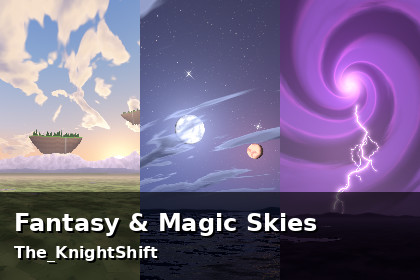
16 stylized fantasy skies: twin moons, aurora, floating islands, a magic storm, an eclipse, a comet. Ready Skybox/6 Sided materials, lossless PNG, demo scene.Skybox materials use Unity's built-in Skybox/6 Sided shader (panoramas also work with Skybox/Panoramic); no custom shaders. Tested in Unity 6000.0.84f1 with the Built-in render pipeline and with URP (Universal 3D template): imported with 0 Console errors and the demo played. HDRP: no ready materials (the PDF gives Unity's HDRI Sky steps, untested).Fantasy & Magic Skies is a pack of 16 stylized skies for fantasy, JRPG and low-poly 3D games.Each sky is a full 360 degree environment. The cube faces join without visible seams and nothing pinches at the poles; both were checked by script on every sky. Below the horizon each sky has a distant landscape, a sea or lake that reflects the sky, or a sea of clouds, so the horizon reads even before you add terrain.Every sky comes ready to use: a Skybox/6 Sided material with its six 1024x1024 PNG faces already assigned, plus a lossless 2048x1024 PNG panorama for Skybox/Panoramic or a Cubemap. Textures are already imported for skies (Clamp on the cube faces, Repeat on the panoramas, no mipmaps, uncompressed).To use a sky, drag a material from Materials/ into Window > Rendering > Lighting > Environment > Skybox Material. Or open Demo/Demo.unity, press Play and use the Left and Right arrow keys to step through all 16 skies (works with the Input Manager, the Input System package, or Both).The 16 skiesEnchanted Dusk, Twin Moons, Aurora Night, Crystal Night, Magic Storm, Floating Island Dawn, Violet Nebula Sunset, Emerald Twilight, Starfall Night, Rainbow Morning, Heavenly Rays, Arcane Eclipse, Spirit Wisps, Cloud Sea Sunrise, Celestial River, Comet Dusk.LimitationsThe images are 8-bit sRGB PNG (LDR), not HDR or EXR. Clouds are stylized and flat, not volumetric, and the skies do not move.Below the horizon is a backdrop seen from a distance, not terrain; put your own terrain in front of it for anything nearby.Render pipelines: Built-in tested in Unity 6000.0.84f1 and URP tested in Unity 6000.0.84f1. HDRP has no ready materials; the PDF gives Unity's HDRI Sky steps, untested by us.Most skies have their main feature on the Front (+Z) side but well above the horizon, higher than a level camera sees: tilt the camera up (the demo camera looks 20 degrees up) or turn the sky with the material's Rotation.Key features16 stylized fantasy skies, each a full 360 degree environment16 ready-made Skybox/6 Sided materials (Unity's built-in shader, no custom shaders)96 cube faces, 1024x1024 PNG, and 16 panoramas, 2048x1024 PNG: all losslessImport settings already set (Clamp / Repeat, no mipmaps, uncompressed)Demo scene with an arrow-key sky switcher (Input Manager and Input System package)Offline PDF documentation: setup, render pipelines, script reference, troubleshootingTechnical detailsTextures: 96 cube faces (1024x1024) and 16 panoramas (2048x1024), 8-bit sRGB PNG, 112 textures in all.Materials: 16 Skybox/6 Sided (Materials/Fantasy_.mat).Demo: Demo/Demo.unity (camera tilted 20 degrees up, light, no meshes) and Scripts/SkyboxCycler.cs (namespace TheKnightShift.FantasyMagicSkies, UnityEngine only, optional Input System support).Documentation: Documentation/FantasyMagicSkies_Documentation.pdf (6 pages), README.txt, LICENSE.txt.Everything installs under Assets/TheKnightShift/FantasyMagicSkies.AI tool used: Claude by Anthropic (an AI coding assistant, used through Claude Code). What it made: the Python code of our procedural sky generator, the C# demo script, the demo scene and material files, the PDF documentation, the README and this store text. The 16 sky images are produced by running that generator code; no AI image model, photo or scan was used. What we added beyond the raw output: each sky is checked by script for seams between cube faces, the panorama wrap, the poles, near-duplicates and that each sky shows what its name says, and for face orientation against Unity's panorama mapping; we also look at every sky before release.

