






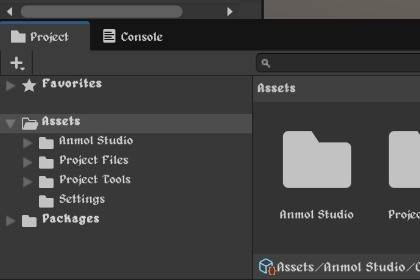
Safely customize fonts, scale text, and refine styling across your entire Unity Editor. Works seamlessly with IMGUI and UI ToolkitCustom Editor Font Style gives you complete control over typography and font sizing inside the Unity Editor. Replace default editor fonts with any custom TTF or OTF font, adjust font scaling, and apply styling across both IMGUI and UI Toolkit interfaces⚡ Key Features🔤 Custom TTF/OTF Font Integration : Assign any standard .ttf or .otf font file to personalize your Unity Editor interface🔍 Dynamic Font Resizing Engine : Scale editor text globally with an intuitive offset range (-5 to +5). The engine normalizes zero-size styles and caps oversized text across all open editor windows🏷️ Global Styling & Hierarchy Preservation : Choose from Normal, Bold, Italic, or Bold & Italic global styles. Toggle Preserve Bold Headers to keep inspector headers and bold labels distinct even when applying custom typography✨ Dual Engine Support (IMGUI & UI Toolkit) : Applies fonts seamlessly across both legacy IMGUI controls (EditorStyles, GUI.skin, DockArea window tabs) and modern UI Toolkit windows (Inspector, Project Browser, custom editor tools)🛡️ Built-in TabSafe™ Crash Protection : Includes an automatic binary font-patching engine (CustomEditorTabSafeFont). It detects and fixes zero-advance tab glyphs (U+0009) in custom fonts that cause native FreeType divide-by-zero crashes in Unity IMGUI🚀 Quick Start GuideOpen Settings via: Unity Preferences: Go to Edit > Preferences > Custom Editor Font Style OR Project Asset: Select Custom editor font style.asset directly in your Project windowCheck Use Custom Editor Font Style.Drag and drop any .ttf or .otf font asset into Custom Font Asset.Adjust Global Font Style and Font Size Offset to your preference!This asset uses the Dosis font under SIL OFL 1.1; see Third-Party Notices.txt file in package for details.Portions of the source code in this package were generated with AI assistance. All generated code was reviewed, integrated, structured, and extensively tested by the developer to ensure stability, performance, and Unity best-practice compliance

