







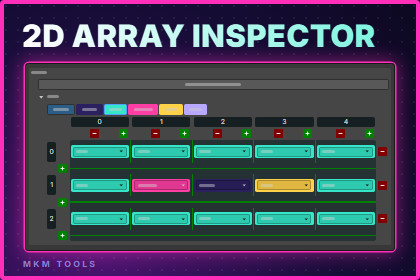
Unity still can't save a T[,]. It never shows up in the Inspector, so grid data ends up as a list of lists that you edit one foldout at a time.2D Array Inspector gives you Matrix: a 2D array that Unity saves like any other field and shows as a grid you can actually work in.[SerializeField] Matrix level = new Matrix(8, 12);Tile t = level[row, col];level.Resize(10, 16); // existing values are keptEdit it like a level editorPaint mode: pick a brush and drag across the grid. Enums and bools get a brush palette; for any other type, Alt+Click a cell to use its value as the brush. One Undo step per stroke.Coloured cells: put [MatrixColor("#35E6C8")] on your enum values and every cell shows its colour, so a level layout looks like the level.Drag rows and columns by their number to move them. Select several and drag them together. Insert and delete anywhere with the + / − buttons or the right-click menu. Your other data stays where it was.Edit it like a spreadsheetSelect cells with Click, Ctrl/Cmd+Click and Shift+Click, or select whole rows and columns.Copy, cut, paste, fill and reset blocks of cells from the right-click menu or the keyboard: Ctrl/Cmd+C, X, V, A, Delete, arrow keys (Shift to extend), Enter or F2 to edit.Named rows and columns: [MatrixHeaders] labels them with enum names or your own text, which is perfect for type charts and balance tables. [MatrixFixedSize] locks the size.Thumbnails: [MatrixThumbnails] shows sprite, texture and prefab previews in the cells.Built for real projectsAny serializable type: ints, floats, bools, strings, enums, vectors, colors, curves, prefabs, sprites, ScriptableObjects and your own [Serializable] classes and structs.Matrix Editor window for big grids, and paging so large matrices stay responsive. You choose the page size in Preferences.Undo/Redo for every action, prefab overrides (bold values, Apply and Revert), multi-object editing.Live in Play Mode: change the matrix from code and the Inspector updates as it happens.Works with Unity's own serializer. No extra serialization package, nothing to inherit from. Scenes, prefabs, ScriptableObjects and JsonUtility all work.Dark and light Editor skins.Full C# source, a PDF guide and example scenes (level painter, type chart, runtime demo).Great forTile maps and level layouts · inventory and crafting grids · puzzle boards (match-3, sudoku, chess) · type-effectiveness and damage charts · difficulty and balance tables · cellular automata and procedural seeds · any data that fits rows and columns.Is it genre-specific?No. It's a data tool, so it fits 2D, 3D, strategy, RPG, puzzle, roguelike and simulation projects alike. You pick the element type, from a bool mask to a full custom class.Requirements: Unity 2022.3 or newer. Built-in, URP and HDRP (no rendering dependency).

