






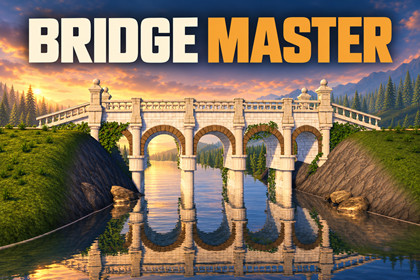
Bridge Master - Stylized Bridge Builder
AnkleBreaker
$19.24
$38.49
50%OFF
(no ratings)
Jump AssetStore
Build stylized stone, timber and rope bridges in the Unity Editor or during gameplay. Shape spans, customize looks and add ruins. Includes a walkable demo and runtime construction tools.💬 Join the AnkleBreaker Community! 💬
Got a question, feedback, or a feature you'd love to see? Join our Discord - we actively improve our assets based on your input, and it's where we drop our latest announcements and run giveaways.
👥 Discord: 👉 https://discord.gg/2D36VUmsYN
🌐 Website: 👉 https://anklebreaker-consulting.com
🌉 Give your world a crossing worth exploring 🌉
Connect a castle to its approach, carry a woodland path across a stream, or hang a rope bridge over a ravine. Bridge Master builds stylized bridges from modular pieces, with control over their shape, materials and weathering. Create crossings in the Unity Editor, or let players build them during gameplay.
🛠 Build the crossing, then make it yours 🛠
Three distinct families: monumental stone arches with Grand, timber trestles with Carpentered, and suspended walkways with Rope.
Place it between banks: pick two supports, preview the crossing and adjust its placement before you build.
Set it into your map: place on collider surfaces, let piers follow the measured ground, and fit Unity Terrain beneath the entrances in the Editor. Walking surfaces, railings and supports include collision.
Shape the silhouette: arrange spans, adjust width and rope sag, and choose the arches, railings, pillars and other parts available for each family.
Make it fit your world: start with a saved look, change materials and colors, then save your own combinations to reuse.
Add age and character: authored damage, loose stones, ivy and crack foliage give each crossing its own history.
Keep refining: edit bridges with live rebuilding, Scene view handles and Undo. Your added props stay with the bridge when you rebuild.
Reuse your work: save a bridge as a prefab, or add its recipe to a library for construction in your game.
🎮 Let players build the way forward 🎮
Turn a gap into a construction objective. Let players choose a bridge, place its supports, preview the result and build a crossing, brand new or as a ruin. Keep several completed bridges and save their recipes for the next play session.
🏝 Walk it first, then build your own 🏝
Start on Demo Island: explore eight finished bridges on foot, then complete the Cross the gap quest by building your own crossing during Play. Next, open Build in Editor and use the guided scene to place a permanent bridge between two banks.
📦 What you get 📦
20 supplied colorways to start from, including Pale Ashlar, Terracotta Brick, Desert and Grey Castle.
Full C# source, with a runtime API and examples to plug construction into your own controls and UI.
Nothing else to install: no Git, no additional package. Just Unity 6 and URP.
See Technical details for content counts, requirements, placement limits and measured runtime costs.
Setup: import Bridge Master into your Unity 6 URP project, wait for compilation, then follow the Welcome window.
Assisted by AI: the art assets (models and textures) combine AI-generated content with hand finishing by our artist.
🛠️ And also quality & productivity tools for Save Systems, Character Customization, Ballistic Systems, Popups & Notifications, Minimaps, Maps & Compasses, and more.Unity: Unity 6 (6000.0+) and URP 17+. Tested: 6000.0.68f1, 6000.5.11f1, 6000.6.0f1 and 6000.6.7f1. Forward, Forward+ and Deferred (bridges use a forward pass). No Built-in or HDRP.
Graphics: Windows D3D11 tested on 6000.0, D3D12 on 6000.6. Shader Model 5.0, hardware tessellation and per-pixel additional lights required. macOS, mobile, WebGL and headless generation unsupported; Linux, Vulkan and consoles unvalidated.
Installation: approximately 1.4 GB download and 2.1 GB package content, plus Library and generated caches. First import takes several minutes: about 9 minutes in a previous clean-project test. Sizes and timings vary by release and hardware.
Dependencies: URP; no Git or extra package for normal use. Unity Mesh Simplifier 3.1.1 (MIT) included, Editor only. Optional Managers Loader integration requires Managers Loader and AnkleBreaker Core.
Content: 1,430 source FBX files. The active index has 1,046 module entries (Grand 419, Carpentered 502, Rope 125), referencing 1,045 distinct FBX models. 588 kit materials, including shared materials and variants.
Source triangles: per indexed FBX, Grand 8–52,638; Carpentered 8–48,574; Rope 12–13,878. Before tessellation, excluding reduced LODs; these are not whole-bridge budgets. Reduced LODs and distant merged proxies are baked in the Editor.
Textures: 583 art maps shared across families, mostly 1024×1024 or 2048×2048; some rectangular, smallest side 512 px. Default import caps: 1024 or 2048. Mip streaming enabled on the maps; enable it in project Quality settings.
Placement: straight bridges, no curves. Rope follows the slope between banks up to a 35 % grade (its sag hangs below that line); Grand/Carpentered keep a level deck at the higher bank, with banks up to 12 m apart in height. At scale 1: Grand/Carpentered 2–256 m, Rope 4–60 m. Approach stairs are optional. Modular lengths; positive uniform scale required.
Your map: collider-based support picking and ground layer mask; piers fit measured ground. Editor-only Terrain fitting beneath abutments. Walking-surface mesh collision and blocking boxes on rails/supports, with walkable-only and simple Rope-deck options. Ruin gaps stay open.
Lighting / navigation: baked lighting via Light Probes, not lightmaps; Add light probes action included. Bake and test your own NavMesh; no automatic NavMeshLinks.
Runtime: recipe libraries, builds across frames, multiple retained bridges, saveable placement records and prewarming. No reduced LODs/proxies for runtime builds; optional static batching and culling. No physics destruction, weathering decals or networking transport.
CPU measurements: warm 24 m recipes took 27–75 ms total across 7–19 frames; maximum slices were 4.1–7.4 ms across repeated runs (Windows Development player, 6000.0.68f1). The 4 ms target is soft; engine calls and first use can exceed it. Profile your recipes and hardware.
Memory measurements: a 24 m Rope retained 1.94 MiB of generated rail meshes, excluding shared data and scene objects. Demo catalogue at startup: about 199 MiB meshes / 386 MiB textures; optional scene-based loading. Unity object estimates, not process RAM. Source meshes retain Read/Write.
Examples: Demo Island with eight bridges and a construction quest; Build in Editor practice scene. Demo supports Input Manager and Input System. Full C# source, guide and integration examples.
Project data: keep the package at Assets/AB/BridgeMaster. Saved looks/generated data use Assets/AB_PackageData/BridgeMaster; commit them with your scenes and prefabs.Generative AI was used for marketing material: the key images are AI-assisted images. Every gallery screenshot and every shot in the trailer is a real render or capture from Unity using the package's actual bridges, tools and runtime results.Assisted by AI: the art assets (models and textures) combine AI-generated content with hand finishing by our artist.During development we used AI coding assistants and AnkleBreaker MCP For Unity, which lets an AI assistant drive the Unity Editor, to automate editor tasks, testing and screenshot captures. All code and content was reviewed, tested and validated by our team.

