






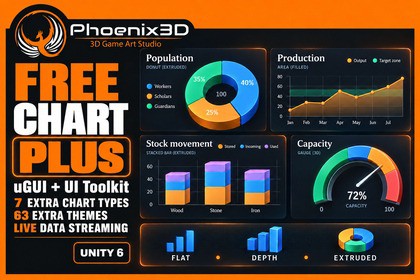
10 chart types, live-data streaming, reference lines and bands, Depth and Extruded styles, and 63 extra themes for uGUI and UI Toolkit. Easy to use, with a quick-start guide written for humans.Try the free version first—it’s enough for 99% of developers! :) Only buy this package if you’d like to support us or have very specific requirements for your game. Fully documented, with brief, human-friendly documentation and detailed, AI-friendly documentation.◼ Join Our Community ◼Join our Discord community to collaborate, innovate, and inspire!◼ Key Features ◼📊 7 additional chart types: Donut, area, stacked bar, 100% stacked bar, scatter, gauge, and sparkline.🎨 63 additional themes: Enjoy 67 themes in total when combined with Free Chart's 4 themes.🧩 uGUI and native UI Toolkit: Use Plus with the same chart components and workflow as Free Chart.✨ Flat, Depth, and Extruded styles: Add shading, raised details, bar faces, and tilted pie or donut thickness inside your UI.💡 Adjustable visual effects: Control depth, tilt, light direction, and shading strength.🔄 Live-data streaming: Manage bounded history, rolling windows, update intervals, and pause/resume controls.📏 Reference lines and bands: Highlight targets, thresholds, and ranges on charts with axes.🥧 Customizable donut charts: Adjust hole size and add optional center text.🎯 Gauge controls: Configure ranges and thresholds to show progress or measurements.↔️ Stacked comparisons: Use vertical or horizontal bars, including normalized 100% stacks.🖱️ Interactive data: Keep tooltips and sample selection available with the visual styles.🖌️ Dashboard-wide styling: Switch chart themes and render styles together with the included group components.🎥 2 Plus dashboard scenes: Explore every chart type, installed themes, visual styles, and streaming in uGUI and UI Toolkit.📦 Canvas dashboard prefab: Start building your own themed dashboard with the included example.📚 Documentation and C# API: Integrate custom datasets, streaming, annotations, and chart settings.About the visual styles: Depth and Extruded create simulated 3D visuals inside Unity UI. Extruded adds geometry to bar, pie, donut, and gauge charts; other chart types use Depth shading.◼ Contact Us ◼-If you require a custom texture map that is not included in our default pack, please feel free to contact us. We would be happy to provide you with the necessary texture.-If you need a particular texture or model for your games, we can offer it to you at the most competitive global price, or we can provide it as a package deal. Please do not hesitate to contact us for more information.Phoenix3D Support◼ Our Mission ◼Our mission is to provide game developers worldwide with high-quality assets at the most competitive prices possible, empowering them to focus on their passion for creating exceptional games.Phoenix3D.Requirements• Install the matching P3D: Free Chart package first. Plus is an add-on, not a standalone chart package.• Minimum Unity version: 6000.0.25f1 (Unity 6).• Uses Free Chart's UI Toolkit and uGUI dependencies and shared renderer.• No render pipeline dependency.Additional chart types• Donut, area, stacked bar, 100% stacked bar, scatter, gauge, and sparkline.• XY Chart Setter supports explicit scatter coordinates.• Stacked bars support vertical/horizontal orientation and separate positive/negative stacks.Styling and content• 63 additional themes; 67 total with Free Chart.• Flat, Depth, and Extruded render styles with depth, tilt, light direction, and shading controls.• Extruded geometry applies to bars, pie/donut slices, and gauges; other kinds use Depth shading. These are simulated 3D UI visuals.• Per-chart settings and Canvas dashboard style-group components.• 2 Plus dashboard scenes (uGUI and native UI Toolkit), plus a Canvas dashboard prefab.Live data and annotations• StreamingChart and ChartStream with per-series capacity, series limits, rolling windows, sampling/publication intervals, and pause/resume.• Push samples from the Unity main thread; X must be non-descending within each series.• Reference lines and filled bands with optional labels and X/Y coordinates on charts with axes.• Documentation and C# API reference included.Input and verification• Example scenes use StandaloneInputModule: use Legacy Input or Both, or replace it with your Input System UI module.• Recent dashboard/render-style checks used Unity 6000.3.8f1 on Windows. Other platforms require separate verification.AI was used during the package development process and to generate marketing images.

