






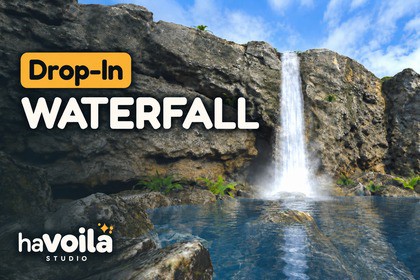
Drop-In Waterfall — Realistic URP System
haVoila Studio
$15.39
$21.99
30%OFF
(no ratings)
Jump AssetStore
Realistic waterfalls for URP: falling water, spray, mist and a transparent river, lit by your scene day and night. Tested on Meta Quest 3. Drop it in and fit it to your cliff.📖 Documentation • 🎬 Video • ✉️ Support • 🌐 havoila.comRealistic waterfalls for URP: falling water, mist, spray and a living river, lit by your scene from noon to midnight.Drop-In Waterfall builds a waterfall the way water really falls. The column follows the water's path from the lip, its streaks stretching as gravity speeds them up, its outline bulging, narrowing and swaying on the way down. Spray, mist and fine drips give it volume, and a transparent river carries the foam away from the plunge pool. Sunlight shines through the thin water and the spray, the cliff's shadow falls across the column, and at night it is as dark as the rocks around it.Pick a size from the Tools menu and fit it to your cliff with Scene view handles. The Editor builds it into ordinary meshes and particle systems: nothing runs in script in your game, and it was tested on Meta Quest 3.✅ Real falling water: a ballistic column with gravity-stretched streaks and a living outline✅ Lit by your scene: the sun or the moon with its shadows, the ambient light and the fog, day and night✅ A complete fall: spray, mist, drips and a transparent river with foam and reflections✅ Built for VR and mobile: tested on Meta Quest 3, with no depth or opaque texture needed💧 THE FALLING WATER━━━━━━━━━━━━━━━━━━━━A real trajectory. The column follows the ballistic path of the water from the lip. Its streaks accelerate and stretch with gravity, with no simulation to pay for.A living outline. Bulges, necks and a sideways sway travel down with the water.Weight and depth. Thick masses of water darken the column, and surges travel down it as in real backlit falls.From every side. Nothing turns to face the camera: walk or fly all around the fall.🌫️ SPRAY, MIST AND DRIPS━━━━━━━━━━━━━━━━━━━━Volume from particles. Water clumps along the column, spray, mist that blasts out along the pool and slows down, slowly rising mist and impact spray.Mist tubes. Animated mist wrapped around the foot of the fall, soft from every side.Dripping rocks. Drip sources along the rock with fine, streaked drops and optional rain curtains.Soft edges. Mist and particles fade above the water and near the camera with no depth texture; soft intersections with the rocks are optional.🏞️ RIVER AND PLUNGE POOL━━━━━━━━━━━━━━━━━━━━A transparent river. Depth colour, flow-mapped ripples and foam that follows the current, from a one-time bake: no depth or opaque texture at runtime.Three bake modes. A flat pool with no ground needed, any ground mesh or terrain below a water level, or a river path drawn on the ground in the Scene view.Reflections. Unity reflection probes with smoothness, tint, blending and box projection, distorted by the ripples.☀️ LIT BY YOUR SCENE━━━━━━━━━━━━━━━━━━━━Sun or moon. The main light wraps around the column, shines through the thin water and the spray from behind, and glows when you look towards it through them.Shadows. The main light's shadows fall across the column and the river, a cliff's shadow included, and its cookie too, such as Drop-In Sky & Weather's cloud shadows.Day and night. The scene's ambient light, and optional point and spot lights for a campfire by the pool. Nothing glows by itself: at night the fall is as dark as the rocks around it.Fog. Unity's fog, or Drop-In Sky & Weather's fog and ground mist when it is in the scene.🛠️ DROP-IN WORKFLOW━━━━━━━━━━━━━━━━━━━━Ready to start. Tools > Havoila Studio > Drop-In Waterfall > Create Waterfall makes a 6 m, 15 m or 35 m drop, or use the ready-made prefab.One component, one Inspector. A section per part with an on/off switch, the materials edited in place, sliders with tooltips, live rebuild and a slow-motion preview in the Scene view.Scene view handles. The lip, the exit speed, the widths, the drip sources, the pool, the river and the mist tubes, all with undo.Nothing at runtime. The Editor builds plain meshes and Particle Systems: no script of ours runs in your game.Full source. C# and HLSL.🥽 VR AND MOBILE━━━━━━━━━━━━━━━━━━━━Tested on Meta Quest 3. Single-pass instanced and multiview, premultiplied transparency and fixed render queues, so nothing flickers as it sorts.Light on the GPU. No camera depth or opaque texture needed. The column and the river are lit per pixel, the mist and the particles per vertex.Scalable. Mesh resolution, particle rates and caps, and each part's on/off switch fit the effect to your budget.📦 INCLUDED━━━━━━━━━━━━━━━━━━━━A demo scene. A waterfall pouring down a rocky cliff into a reflective pool, among mossy rocks and ferns under a cloudy sky, with baked lighting and a VR camera rig.Ready to use. A medium waterfall prefab, nine materials and six textures.Documentation. As a PDF and online.✔️ COMPATIBILITY━━━━━━━━━━━━━━━━━━━━Unity 2022.3 LTS or newer. URP 14 or newer, with the Forward and Forward+ renderers. Tested with Unity 2022.3 (URP 14) and Unity 6.6 (URP 17).Desktop, mobile and XR. Tested on Windows and on Meta Quest 3 (Android, Vulkan).No URP setup. The URP Renderer's Transparent Receive Shadows, on by default, brings the main light's shadows.Pairs with Drop-In Sky & Weather. Sold separately, not required: the waterfall takes its fog, its ground mist and its cloud shadows.🚧 GOOD TO KNOW━━━━━━━━━━━━━━━━━━━━Realtime light. Mixed and Realtime lights reach the effect, Baked ones don't, and it takes the ambient light rather than lightmaps or light probes. Point and spot lights cast no shadows on it.Baked river. The river's shape and flow are baked, and there is no water simulation, collision or interaction.Ribbons, not a volume. Seen exactly along the lip, the column looks thinner, as a real waterfall does, and it casts no shadows.Placement. Turn waterfalls around Y only, at scale 1.Probe reflections. The river reflects cubemaps from probes, not planar or screen-space reflections.Demo models. The demo's cliff, rocks and ferns are CC0 models from Poly Haven.💬 SUPPORT━━━━━━━━━━━━━━━━━━━━Questions or issues? Write to support@havoila.com with your Unity and URP versions, your target platform and a screenshot of the Inspector.Unity 2022.3 LTS or newer, URP 14 or newer. Tested with 2022.3.62f3 (URP 14.0.12) and 6000.6.0f1 (URP 17.6). Built-in RP and HDRP are not supported.Desktop, mobile and XR: tested on Windows and on Meta Quest 3 (Android, Vulkan). Single-pass instanced and multiview shader variants; Forward and Forward+.No camera depth or opaque texture needed; only the optional soft particle intersections use the depth texture.5 shaders (column, mist, particles, river, and an unlit ground helper), 9 materials, 6 textures: streaks 256 × 1024, particle atlas 1024 × 512, mist noise, foam and ripple normal 512 × 512, droplet 64 × 64.The Editor builds each waterfall into 3 to 5 meshes, Unity Particle Systems and a small river data texture; no custom script runs at runtime.Lighting: the main light per pixel on the column and the river (its shadow map and its cookie add one fetch each), per vertex on the mist and the particles; optional point and spot lights per vertex; fog per vertex.Demo: a waterfall over a rocky cliff into a reflective pool, with baked lighting and a VR camera rig (XR Legacy Input Helpers). Its cliff, rocks and ferns are CC0 models from Poly Haven (Coastal Cliff 02, Rock Moss Set 02, Fern 02); its sky is our own panorama. The whole package is about 61 MB.Dependencies: URP only. The demo's camera rig also uses XR Legacy Input Helpers.Code and shaders. The C# editor tools (builder, river bake, Inspector, Scene handles) and the HLSL shaders were written with AI.Textures. The streak, particle, mist noise, foam and ripple textures were generated procedurally by us (noise functions)Documentation. The documentation was drafted with the AI assistant, then reviewed and edited by us.Not AI. The demo environment assets (cliffs, rocks and plants) are public environment assets from Polyhaven.

