






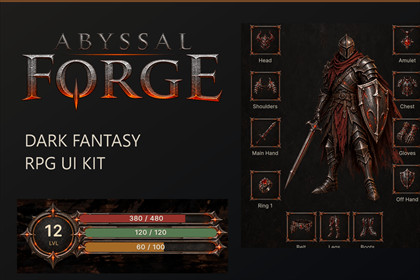
Abyssal Forge - Dark Fantasy RPG UI Kit
Nexa Visuals
$19.24
$27.49
30%OFF
(no ratings)
Jump AssetStore
Five cohesive dark fantasy UI screens for Unity, with editable layouts, forged-metal artwork and an interactive demo showcasing menu, HUD, inventory, forge and settings.Render pipeline compatibilityThe included demo scenes are configured for the Built-in Render Pipeline in Unity 6000.3.20f1.The interface uses UI Toolkit and uGUI/TextMeshPro. URP, HDRP, and custom render pipeline compatibility have not been fully verified for this release and are not advertised as supported.A cohesive dark fantasy interface — from the main menu to the forge.Abyssal Forge brings forged-metal frames, ember accents and atmospheric artwork to five coordinated RPG interface screens. Start with the included showcase, explore the demonstration interactions, and adapt the editable layouts to your own game.Five screens. One consistent visual style.Main Menu — a cinematic introduction with a reusable menu-button prefab and TextMeshPro typography.Gameplay HUD — player resources, boss status, objectives, interaction prompts, notifications and four quick slots.Inventory & Equipment — item browsing, search, sorting, comparison and local demonstration actions.Forge & Crafting — recipe selection, material requirements, quantity controls and crafting feedback.Settings — gameplay, video, audio and controls tabs with an apply, cancel and reset workflow.More than a collection of imagesThe package includes assembled Unity scenes, editable interface layouts, reusable artwork and C# demonstration scripts. Explore each screen individually or use the combined showcase to move between them.The Main Menu uses uGUI and TextMeshPro. The remaining screens use UI Toolkit, UXML and USS, giving you access to their structure, styling and demonstration behavior.Make it your ownReplace artwork, adjust colors and spacing, change labels, and connect the supplied interface to your own gameplay systems. Offline documentation covers setup, scene navigation, dependencies and integration limitations.Know what you are gettingThis is a UI kit with local demonstration behavior, not a complete RPG framework.A save system, shared gameplay backend, playable 3D environment, translations and gamepad rebinding are not included. Settings demonstrate interface state rather than applying actual engine options. Forge Upgrade, Dismantle and Enchant gameplay is not implemented.AI and third-party contentSome artwork was created with OpenAI image-generation assistance. OpenAI Codex assisted implementation and documentation.Includes Cinzel and Liberation Sans font resources under the SIL Open Font License 1.1, and TextMeshPro resources and adapted shaders under the included Unity Companion License notice. See the included Third-Party Notices for details.Package contents5 interface designs and 6 Unity scenes, including the combined showcase.71 PNG files containing backgrounds, interface artwork and icons.2 SVG control indicators.5 UXML layouts, 7 USS stylesheets and 2 TSS themes.2 PanelSettings assets and shared text settings.7 C# runtime scripts.1 reusable uGUI menu-button prefab.2 static TextCore font assets and 3 static TextMeshPro font assets.3 adapted TextMeshPro UI shaders.Offline English setup and integration documentation.Asset counts refer to physical files, not unique designs.Unity requirementsAuthoring version: Unity 6000.3.20f1.Dependencies: Unity UI — com.unity.ugui 2.0.0, including TextMeshPro — UI Toolkit and the built-in vector graphics module.Reference resolution: 1920 × 1080.Interface and documentation language: English.Demo input: keyboard and mouse using Legacy Input Manager.Input System-only projects require input adaptation. Unity may display a Legacy Input Manager deprecation notice.UI architectureMain Menu: uGUI / TextMeshPro.HUD, Inventory, Forge and Settings: UI Toolkit / UXML / USS.Editable source scripts and local demonstration data.No external service, subscription or API key required.Rendering compatibilityAuthored using the Built-in Render Pipeline. Supplied TMP shaders include explicit URP passes, but the current release is not certified for full URP or HDRP compatibility. Other Unity versions and target platforms have not been verified.Background illustrations are 2D presentation artwork, not playable 3D environments.Static typographyFonts use baked atlases; TTF source files are not included. Character coverage is limited to the supplied glyph tables. Additional languages or unsupported characters require new font atlases. See STATIC_FONTS.md for details.Integration notesDemo state resets when scenes unload. Add all six scenes to the active scene list for showcase navigation. Preserve the product folder structure unless updating scene paths and asset references. Existing projects may need to reconcile the supplied TMP Settings with their own configuration.Texture / image specifications71 PNG files, including reused artwork across screens.Source image dimensions (width × height, pixels; file count):36×36 (1), 72×72 (1), 128×128 (1), 240×72 (1),256×256 (1), 392×96 (1), 420×72 (1), 480×162 (1),512×512 (6), 517×86 (4), 720×72 (1), 1024×785 (1),1024×818 (1), 1086×1448 (1), 111×866 (1), 119×378 (1),1254×1254 (34), 1278×1230 (1), 1536×1024 (1),1672×941 (3), 1921×819 (1), 2020×779 (1),2048×682 (2), 2172×706 (2), 2172×724 (2).Color depth: 8 bits per channel.68 PNG files use RGBA (32-bit) with an alpha channel.3 PNG files use RGB (24-bit), without an alpha channel.Dimensions above describe the supplied source PNG files.UI reference design resolution: 1920×1080.OpenAI image-generation tools were used to create portions of the supplied UI artwork and background illustrations. OpenAI Codex assisted with UXML/USS layouts, C# demonstration code, integration and documentation. Content was selected and revised under publisher direction, organized into reusable interface elements, and integrated into five Unity screen compositions with interactive demonstration behavior. Typography was converted to baked static font atlases and package-owned theme styling was added.Owner action: replace “OpenAI image-generation tools” with the exact product/tool name used and add any other tools that contributed delivered content. The earlier wording “openai imagen, codex и т.д.” does not identify the full list unambiguously; available project documents do not resolve it. Do not invent a model name. This disclosure remains a reviewed draft, not a confirmed exhaustive list.

