






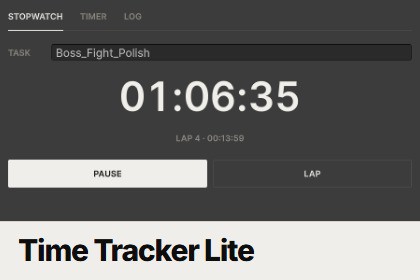
A simple stopwatch with laps, a countdown alarm and a log of everything you timed, right inside the Unity Editor. Keeps running through recompiles and restarts.Time Tracker Lite is a tiny, distraction-free timer that lives in a Unity Editor tab. Time a task, split it into laps, set an alarm, and keep a log of what you timed without leaving Unity.StopwatchName a task and press Start. Press Lap to split the time, Pause to stop, and Reset to save it to the log. Task names count up automatically (Task_01, Task_02, and so on), so back-to-back sessions stay organised.TimerType or scroll hours, minutes and seconds, then press Start. When it reaches zero Unity beeps, shows a dialog and saves the countdown to the log. It's handy for focus blocks, playtest breaks or "check the build in 15 minutes".LogEvery finished stopwatch and countdown, grouped with totals. Hover an entry to see when it started, expand it to see its laps, and right-click to delete.It just keeps going: both clocks survive script recompiles, closing the window and even restarting Unity, because time is measured from real timestamps. A countdown that ended while Unity was closed finishes as soon as you reopen it. The window tab shows the running time, so you can see it while the tab is docked in the background.No setup, no screenshots, no tracking of other apps. Data is saved in the project's UserSettings folder, which Unity's default .gitignore already excludes.Need activity levels, screenshots, a work diary and client-ready invoicing reports? Check out the full Time Tracker.Features• Stopwatch with named tasks, pause/resume and laps• Countdown timer with typed or scroll-wheel input, sound and dialog alert• Log of stopwatches (with laps) and countdowns, with totals, tooltips, per-entry delete and Clear log• Auto-incrementing task and alarm names• Live time in the window tab• Survives domain reloads, window close and editor restarts (timestamp based)• UI Toolkit interface styled for light and dark editor skinsCompatibility• Unity 6000.0 or newer (tested on 6000.3)• Editor-only assembly, nothing is included in player builds• Any render pipeline, any platform the Editor runs on (Windows, macOS, Linux)• No package dependenciesIncluded• Full C# source• README.md, Documentation.txt, CHANGELOG.md• Namespace: DuzeraTools.TimeTrackerLiteCode: AI helped refactor and debug parts of the C# scripts, editor tooling and shaders. I directed, reviewed and tested all of it in Unity before including it.Documentation: AI helped draft and edit the README, the documentation and code-level text, which I then checked against how the tool actually works.Store listing: AI helped write the listing copy and build the marketing images from HTML layouts.The package contains no AI-generated 3D models, textures, audio or other art assets. All design decisions, testing and final approval were mine.

