






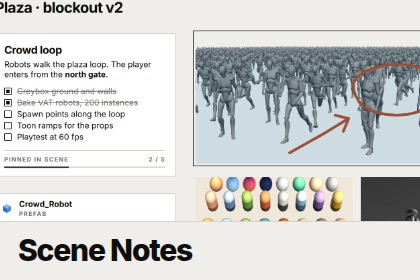
A PureRef-style reference board for every scene: Markdown notes, checkable tasks, images, voice memos, sketches and links to assets, saved right next to the scene.Scene Notes gives every scene its own infinite reference board, right inside the Unity Editor. Collect reference images, write notes and to-do lists, record a quick voice memo and sketch over screenshots without leaving Unity or losing track of which level they belong to.Open it from Tools ▸ Scene Notes. The board follows the active scene and is saved as " Notes.asset" next to it, so it moves with the scene and goes into version control like any other asset.Notes and tasksDouble-click anywhere to write. Notes support a practical subset of Markdown: headings, bold, italic, strikethrough, code, links, bullet and numbered lists, quotes and rules. Write "- [ ]" to make a task and click its box to check it off. Each note with tasks gets a progress bar, and the toolbar counts every open task on the board. Six note colours, or plain text with no card for board titles.ReferencesDrag in textures and sprites, drop image files straight from your file explorer, or paste an image from the clipboard. Crop, flip, grayscale and native size are all non-destructive. Drop prefabs, materials, folders or GameObjects from the Hierarchy to get link cards: double-click to ping the asset or frame the object in the Scene view.Audio and drawingRecord a voice memo from the microphone and it lands on the board as a clip with a waveform. Press D for pen mode, with four colours, three sizes and an eraser, and circle problems or sketch paths over your references.Scene view pinsPin a note to a GameObject or to a point in the level. The pin shows the note's title and task progress in the Scene view and follows the object. Click it to jump back to the note.It feels like PureRef: pan, zoom around the cursor, marquee select, resize, Arrange to pack everything into tidy rows, and Frame to fit it all. Everything is undoable. It is editor-only, so nothing is added to your builds.It feels like PureRef: pan, zoom around the cursor, marquee select, resize, Arrange to pack everything into tidy rows, and Frame to fit it all. Everything is undoable. It is editor-only, so nothing is added to your builds.Features• Infinite canvas per scene, saved as an asset next to the scene (follows the active scene, or pin a board)• Markdown notes: headings, bold, italic, strike, code, links, lists, quotes, rules, code blocks• Checkable tasks with per-note progress and a board-wide open task count• Seven note styles: Paper, Sand, Clay, Sage, Slate, Ink and None• Images from the Project, the file explorer or the clipboard, with crop, flip, grayscale and native size• Link cards for assets, folders and scene objects (ping, select, open, frame in Scene view)• Voice memos recorded from the default microphone (up to 10 min), or any AudioClip• Pen mode with 4 colours, 3 sizes and an eraser• Scene view pins that follow a GameObject and show task progress• Pan, zoom, marquee select, resize, Arrange, Frame, duplicate, copy and paste, bring to front and send to back• Full Undo support• Light and dark editor skinsCompatibility• Unity 6000.0 or newer (tested on 6000.3)• Editor-only assembly, nothing is included in player builds• Any render pipeline• Windows, macOS and Linux. Pasting images and files needs xclip on Linux; macOS pastes one file at a timeIncluded• Full C# source and a UI Toolkit stylesheet• Edit Mode tests for the Markdown parser• README.md• Namespace: DuzeraTools.SceneNotesCode: AI helped refactor and debug parts of the C# scripts, editor tooling and shaders. I directed, reviewed and tested all of it in Unity before including it.Documentation: AI helped draft and edit the README, the documentation and code-level text, which I then checked against how the tool actually works.Store listing: AI helped write the listing copy and build the marketing images from HTML layouts.The package contains no AI-generated 3D models, textures, audio or other art assets. All design decisions, testing and final approval were mine.

