






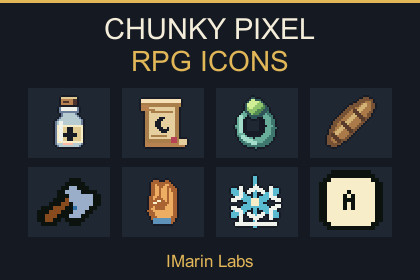
Fantasy RPG icons for loot, equipment, skills and input prompts, with transparent PNG artwork and a searchable Unity demo.Tested: Unity 2022.3.0f1 and 6000.0.80f1; Built-in, Windows standalone. Demo dependency: Unity UI 1.0.0 on 2022.3, 2.0.0 on Unity 6, declared in import metadata. Legacy Input Manager is used; Input-System-only projects need Both or a compatible EventSystem module. Other pipelines/platforms are untested. Native previews use Canvas units.Give your fantasy RPG an interface packed with recognizable loot, skills and input prompts.Build inventories worth exploring, equipment screens full of character and ability bars players can read at a glance. Chunky Pixel RPG Icons brings together fantasy objects and symbols with bold silhouettes, dark outlines and limited palettes, ready for your next dungeon crawler, roguelike or retro RPG.Cover everything from weapons, armor and consumables to talents, status effects and controller prompts, with individual transparent PNGs you can organize and use in your own interface.Exactly what’s includedEvery count below represents individual PNG files in that category.Equipment, loot and consumablesWeapons: 34Armor: 11Artifacts: 15Bags: 5Bombs: 12Food: 13Keys: 4Miscellaneous items: 28Missile items and projectiles: 29Potions: 38Quest items: 12Rings: 12Scrolls: 24Seeds: 11Spell items: 11Stones: 12Trinkets: 18Wands: 13Auxiliary items and item holders: 62Item appearance variants: 60Skills, character information and interface symbolsAbilities: 77Talents: 160Status effects: 192Item effects: 60Character stats: 35Interface and control symbols: 83Compact HUD cues: 37Input promptsKeyboard keys and templates: 133Wide keyboard keycaps: 9Controller prompts: 30Mouse and touch prompts: 8Animation frames and appearance variants are included in these counts. Catalog aliases reuse existing artwork and are not counted as additional images.Find the right icon quicklyExplore the collection in the included Unity IconBrowser. Search by name or ID, filter categories, page through results and inspect selected sprites against dark, light or slate backgrounds.Native-size-multiple previews help you check pixel detail and contrast, while the responsive demo layout fits resized viewports.You also receive:A reusable IconBrowser prefab and serialized Sprite catalog.An eight-frame looping hourglass, complete with animation clip, Animator controller and uGUI prefab.CSV and JSON inventories for browsing and integrating the collection.Demo and editor scripts, plus offline setup and usage documentation.Ready for pixel-art projectsThe collection combines 16×16 and 32×32 artwork, compact 7×7 HUD cues and rectangular keycaps. Transparent backgrounds, Point filtering, uncompressed textures and disabled mipmaps preserve sharp pixel edges.Tested with Unity 2022.3 LTS and Unity 6.0 LTS using the Built-in Render Pipeline on Windows. The browser demo uses Unity UI (uGUI).Use the artwork to build your own inventories, shops, crafting screens, equipment menus and combat HUDs. Gameplay systems, menu logic, input binding, rebinding, device detection and localization are supplied by your project.Files and sizes1,248 distinct transparent PNG sprites; 31 categories; 1,413 logical IDs including 165 aliases. Native sizes: 757 at 16×16, 449 at 32×32, 31 at 7×7, 10 at 32×16, and one at 16×32. Raster pixel art with binary transparency.Import settingsSprite Single, Full Rect, centered pivot, 16 Pixels Per Unit, Point filtering, uncompressed textures, Clamp wrap, no mipmaps and no NPOT rescaling. At the supplied PPU setting, a 32×32 Sprite Renderer spans twice the unscaled world extent of a 16×16 sprite.Demo and animationIconBrowser scene and reusable prefab: search, category filtering, pagination, selection, contrast previews and input examples. Centered 1280×800 content with Canvas Scaler Expand. Native ×1/×2/×4 examples describe Canvas units; resized viewports can use fractional screen scaling.Animated: Yes — an eight-frame looping hourglass at 8 FPS, with AnimationClip, AnimatorController and uGUI prefab. No skeletal animation. The busy indicator does not report actual loading progress.Compatibility and dependenciesTested with Unity 2022.3.0f1 (2022.3 LTS) and Unity 6000.0.80f1 (6.0 LTS), Built-in Render Pipeline, Windows standalone. Other configurations are not claimed as tested.The optional demo requires Unity UI (com.unity.ugui 1.0.0 for Unity 2022.3, or 2.0.0 for Unity 6) and built-in UI/animation modules. Native package metadata declares the Registry dependency; no paid Asset Store package is required.The demo uses StandaloneInputModule and the legacy Input Manager. Input-System-only projects need Active Input Handling Both or a compatible replacement EventSystem module. The icons themselves do not depend on an input implementation.DocumentationOffline setup, sprite usage, compatibility, demo controls and input-prompt documentation. CSV/JSON inventory records each sprite’s ID, label, category, path and native dimensions.

