






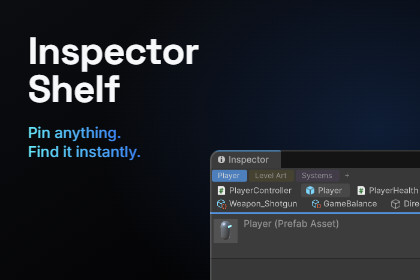
Pin the assets and scene objects you use most to a bar at the top of the Inspector. One click to select, double-click to open. Sort pins into color-coded groups.Stop hunting for the same files in the Project window.Inspector Shelf adds a small bar to the top of every Inspector window. Drag in the scripts, prefabs, materials, scenes, ScriptableObjects and scene objects you use every day, and they stay one click away.No setup. Import the package and the shelf is already there. It is Editor-only, so nothing ends up in your game build.HOW IT WORKS• Drag anything from the Project or Hierarchy window onto the shelf to pin it. Or press Alt+Shift+P to pin what you have selected.• Click a pin to select it and show where it is.• Double-click a pin to open it. Scenes open, prefabs open in Prefab Mode, and scene objects are framed in the Scene view.• Middle-click a pin to remove it.• Drag pins left or right to change their order.• Drag a pin out of the shelf and drop it into any object field.• Right-click a pin for Open, Ping, Copy Path, Unpin and Move to Group.GROUPS• Right-click the shelf and choose New Group. Groups show up as tabs, like "Player", "Level Art" or "Systems".• Double-click a tab or press F2 to rename it.• Give each group a color. Pick one of six presets or any color you like.• Drop a pin on a tab to move it into that group.• Each Inspector window can show a different group, so you can drag pins from one Inspector to another.WORKS THE WAY YOU EXPECT• Every change can be undone with Ctrl+Z.• Scene objects stay pinned through Play Mode, script reloads and scene saves. If their scene is closed, the pin turns grey and comes back when you open the scene again.• Dock the shelf to the bottom of the Inspector if you want it out of the way.• Turn off labels for a compact, icon-only shelf.YOUR PINS STAY YOURSPins are saved per project and per user, in a file that Unity keeps out of version control by default. Your teammates keep their own pins, and you never get merge conflicts.Requirements: Unity 2021.3 or newer. No other packages needed.Features• Pin bar inside every open Inspector window• Pins assets (by GUID) and scene objects (by GlobalObjectId)• Groups as tabs, with preset or custom colors• Drag and drop to pin, reorder, move between groups, or assign into object fields• Full Undo/Redo support• Shortcut: Alt+Shift+P to pin the selection, rebindable in Edit > Shortcuts > Inspector Shelf• Options in Edit > Preferences > Inspector Shelf: Enabled, Show Labels, Dock to BottomCompatibility• Unity 2021.3 or newer• Editor-only: nothing is included in player builds and there is no runtime cost• Works with Built-in, URP and HDRP, because it does not touch rendering• Pure C# editor code with no native pluginsSetup• None. Import the package and the shelf appears. No prefabs, components or scene setup.Data• Pins are saved in UserSettings/EditorUserSettings.asset, per project and per user• Preferences are saved in EditorPrefsCode• Full C# source included: 4 scripts in the InspectorShelf namespace• Own assembly definition: InspectorShelf.Editor• Built with UI Toolkit• No third-party code and no dependenciesDocumentation• README.md included in the packageI use AI to code

