






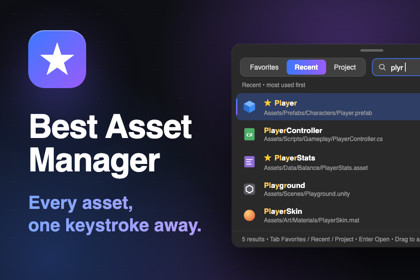
Favorites, fuzzy Quick Open, reference finding and project cleanup in one fast editor window. Reach any asset in a keystroke and see exactly where it is used.Stop hunting for assets. Start building.Best Asset Manager puts every asset you need one keystroke away, shows you exactly where each one is used, and clears out the clutter that slows your project down. All in a fast, modern editor window that feels at home in Unity 6.Favorites that keep up with youPin the prefabs, scenes, ScriptableObjects and folders you open all daySeparate profiles for each feature or task, with your own row colorsDrag to reorder, open favorites 1 to 9 with a shortcut, and star assets right from the Project windowQuick Open: one shortcut, then typeFuzzy search across your favorites, your recent assets and the entire projectLive preview, and edit ScriptableObjects inline without leaving the searchDrag a result straight into any Inspector fieldReferences and usages in secondsSee everything that uses an asset, and everything it usesJump to the exact GameObject and component field inside a scene or prefabThe reference index is saved between sessions, so lookups stay instant after the first scanKeep your project leanUnused Assets finds what nothing in your build reachesDuplicate Assets merges byte-identical copies and rewires every reference, verified and backed up before a single file is writtenImport Audit spots textures and audio that waste memory or build size, with an estimate of what you would saveNever lose workA badge warns you about Inspector changes that are still only in memory, with one-click savingRecent history tracks what you open automatically, ordered by latest or most usedBuilt for real projectsEditor-only, so nothing is added to your buildsNo third-party dependencies, with Addressables supported when installedmacOS and Windows, Unity 6 and newerEvery shortcut can be rebound, and favorites and settings stay per project and per userPress Ctrl+Alt+F (Ctrl+Option+F on macOS) and you will wonder how you ever worked without it.FeaturesFavorites with multiple profiles, row colors, drag-to-reorder and Project window starsAutomatic Recent history, ordered by latest or most usedQuick Open with fuzzy search over favorites, recent assets and the whole project, Unity search filters such as t: and l:, live preview and inline ScriptableObject editingFind References and Show Dependencies (direct or full chain), with usage locating inside scenes and prefabsPersistent reference index, validated against Unity's import hashes so only changed assets are re-scannedUnused Assets: build scenes, Resources, Addressables, preloaded assets and render pipeline assets count as usedDuplicate Assets: byte-identical detection, verified reference rewiring and automatic file backupsImport Audit: texture compression, size, Read/Write, sprite mipmaps and audio settings on the active platformUnsaved-changes tracker with one-click savingRebindable shortcuts, a settings window and a welcome tourRequirementsUnity 6 (6000.0) or newerEditor-only: no runtime code and nothing added to buildsNo third-party dependencies. Addressables are supported when installedResolving duplicates requires Asset Serialization set to Force TextSupported OSmacOS and WindowsDocumentationIncluded in the package as Documentation.mdAn AI assistant was used mainly for the store presentation of this package:Store images: the icon, card, cover and social images and the screenshots were composed with AI assistance from mock-ups of the tool's real interface.Promotional video: the script, the animated scenes and the captions were produced with AI assistance. The narration uses a synthetic text-to-speech voice.Store text: the description, release notes and keywords were drafted with AI assistance and edited by me. The Chinese, Japanese and Korean versions are AI-assisted translations.Code: an AI coding assistant was used during development. All code was reviewed and tested by me.The package contains no AI-generated art, audio or runtime content.

