






Smart Racks – Modular Warehouse Racks & Shelf Generator
LoneWorks
$19.24
$27.49
30%OFF
(no ratings)
Jump AssetStore
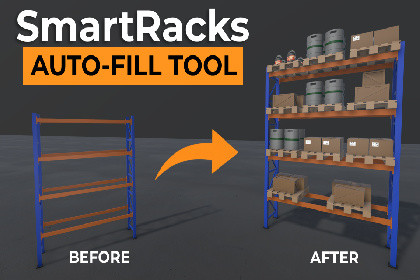
Automatically populate shelves with customizable prefab collections and adjustable fill. Includes modular warehouse racks, cargo props and support for your own shelving.Build your storage layout. Populate the shelves in a few clicks.Smart Racks combines modular warehouse racks and cargo props with an editor tool for automatic shelf population. Use the included rack prefabs or configure your own shelving with anchors and custom item collections.AUTOMATIC SHELF POPULATIONChoose an Item Collection, adjust the fill percentage and generate a layout. Regenerate for a different arrangement, or reuse a random seed to reproduce a layout with the same collection and settings.Control item spacing, depth alignment, position and rotation variation, optional vertical stacking and allowed depth overhang. Enable individual shelf levels or leave selected shelves empty.USE YOUR OWN RACKS AND ITEMSConfigure your own shelving by placing shelf anchors, entering its dimensions and assigning a collection of your own item prefabs.Item Collections let you choose which prefabs can appear and adjust their relative selection weights.WORK ACROSS YOUR SCENEGenerate or clear items on an individual rack, selected racks or all active racks across loaded scenes. Each rack uses its own collection and settings. Editor generation and clearing support Undo.INCLUDED CONTENTFour rack variants: pallet, single-sided cantilever, double-sided cantilever, and basic shelving.Ready-made rack prefabs and modular parts for assembling your own layouts.Cargo props including boxes, crates, pallets, containers, planks and pipes.Plank and pipe bundles and loaded pallet arrangements.Shelf Generator, Shelf Item Collections and batch generation tools.Warehouse demo and asset overview scenes.PDF documentation and a quick-start README.An online custom-rack setup tutorial.SETUP AND SCOPEShelf Generator places existing prefabs onto configured shelves. It does not create rack geometry or item models.Ready-made rack prefabs are included. Custom rack assemblies and shelf anchors are configured manually. Auto-Detect Anchors registers existing named anchors; it does not automatically identify shelf surfaces.Placement uses object bounds rather than physics simulation. Irregular items and stacked arrangements should be checked visually.The generation workflow is designed for Unity Edit Mode. Included materials and demo scenes use the Universal Render Pipeline (URP).VIDEOSWatch the Product ShowcaseWatch the Custom Rack Setup TutorialCOMPATIBILITY• Developed in Unity 6000.5.1f1.• Included materials and demo scenes use the Universal Render Pipeline (URP).• Built-in Render Pipeline and HDRP compatibility has not been verified.• Generation and batch tools are intended for Edit Mode.GENERATOR FEATURES• Prefab collections with relative selection weights.• Adjustable fill percentage.• Per-shelf generation toggles.• Manual anchor assignment and name-based anchor detection.• Shelf width, depth, thickness, edge padding and top clearance settings.• Front, Center and Back depth alignment.• Item spacing, position jitter and rotation jitter.• Optional vertical stacking and configurable depth overhang.• New random seeds or repeatable generation with a fixed seed and unchanged settings.• Generation and clearing for individual racks, selected racks or active racks across loaded scenes.• Editor Undo support.CUSTOM RACK REQUIREMENTS• Shelf anchors must be placed manually on the shelf surfaces.• Automatic detection requires “anchor” somewhere in each anchor object's name, case-insensitive.• Manually assigned anchors do not require a specific name.• One shelf width and depth are shared by all anchors on a generator. Shelf groups with different footprints require separate generators.• Custom item prefabs require valid renderer bounds or supported collider bounds.PLACEMENT LIMITATIONS• Placement is based on bounding volumes, not detailed mesh contact or physics simulation.• Existing scene obstacles are not automatically treated as exclusion areas.• Fill Percentage controls placement-slot occupancy, not exact shelf area or volume coverage.• Regenerating replaces the current generated content. Manual edits inside generated-content containers are not preserved.ASSET SPECIFICATIONS• Rack variants: 4 — pallet, single-sided cantilever, double-sided cantilever and basic.• Unique meshes: 42• Prefabs: 50• Triangles per mesh: 28 - 3608• Materials: 1 shared material• Textures: 1 color palette texture (1024 x 1024)• Texture maps: Base color (color palette)• LODs: No LODs included.• Colliders: Box collidersDOCUMENTATION AND DEPENDENCIES• PDF documentation and a plain-text README are included.• An online custom-rack setup tutorial is available.• TextMeshPro is used for labels in the overview scene. Import TMP Essential Resources if these labels are missing.• The rack assets and Shelf Generator do not require TextMeshPro.

