






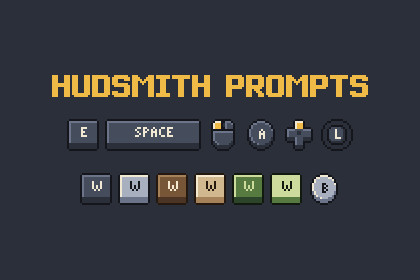
151 pixel input prompts (87 keys, 8 mouse, 56 generic gamepad) with pressed frames, dark and light keycaps and 3 palettes: 1,812 sprites, 16 px tall, imported for crisp uGUI.Hudsmith Prompts is a set of 16 px pixel-art input prompts for tutorials, button hints and control screens, imported for Unity UI (uGUI).Created by wookdev using AI tools. The prompts were drawn as pixel grids in code; key legends are stamped from the bitmaps of the Pocketpip pixel font.What is inside: 151 prompts (87 keyboard, 8 mouse, 56 gamepad), every one in 2 states (normal, pressed), 2 themes (dark and light keycaps) and 3 palettes (Slate & Gold, Parchment, Pocket Green) = 1,812 sprites.Keyboard: A-Z, 0-9, F1-F12, Esc, Tab, Caps, Shift, Ctrl, Alt, Space, Enter, Backspace (text and symbol versions), arrows, Home/End/PgUp/PgDn/Ins/Del, punctuation keys and blank keycaps 16/24/32/48 px. Mouse: body, left, right, middle, wheel up/down/scroll, move. Gamepad (generic, no brand marks or console names): A B X Y and shape buttons, D-pad in 8 states, both sticks in 13 states each, LB/RB/LT/RT, L1/R1/L2/R2, Start, Menu, Select, View.Normal and pressed frames have the same size, so swapping them never moves the layout. HudsmithFlipbook loops press hints; HudsmithIntegerScale keeps the canvas at a whole-number scale.Good to know: legends are Latin capitals, digits and ASCII punctuation. Not included: numpad, media keys, OS logo keys, touch gestures, console-specific button sets or colours. Lettering in the store images uses separate font products.1,812 PNG sprites (151 prompts x 2 states x 2 themes x 3 palettes), pixel based (not vector)Every prompt is 16 px tall; widths 16, 24, 32 or 48 pxImport settings: Sprite (2D and UI), Pixels Per Unit 16, Point filter, no compression, no mipmapsAnimated: press loops via HudsmithFlipbook (normal/pressed frame pairs)Scripts: HudsmithFlipbook, HudsmithIntegerScale (own namespace and assembly definition)Data: prompts.json (names, labels, sizes), hudsmith_map.json, palettes.jsonDemo scene: HudsmithPrompts_Demo.unityRequires the Unity UI package (com.unity.ugui, included in the default 2D and 3D templates)Built with Unity 2022.3.62f3 LTS, Screen Space - Overlay canvas, tested in the Built-in render pipelineGraphics: wookdev used AI tools (Claude by Anthropic) to draw every prompt as a pixel grid in code, and a generator script turned the grids into the PNGs and data files; key legends come from the bitmaps of a pixel font that was also designed in code with Claude. No image-generation (diffusion) model was used. Code: the C# components, the demo scene builder and the import settings script were also made with Claude. Every image was checked by script and reviewed visually, and the .unitypackage was imported into a fresh Unity 2022.3 project and its demo scene rendered before upload.

