






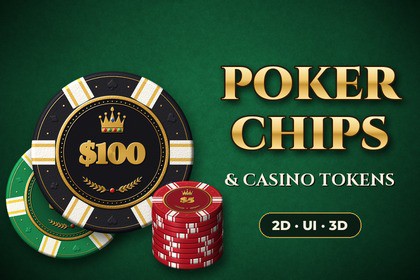
Poker Chips Kit – 2D, UI & 3D Casino Chips and Tokens
CodePlayStudio
$8.79
$17.59
50%OFF
(no ratings)
Jump AssetStore
12 poker chip values and 15 casino tokens as matching 2D sprites, UI prefabs and real-scale 3D chips. Scripts build stacks of any height and turn any amount into chips.2D sprites, UI prefabs and scripts work in Built-in, URP and HDRP. 3D chip materials are included for URP and Built-in (switch via Tools > CodePlayStudio > Poker Chips). For HDRP, the included Albedo/Normal/Mask textures can be assigned to HDRP/Lit materials. Requires the Unity UI (uGUI) package for UI components and demo scenes (installed by default).Give your poker, blackjack, roulette or social-casino game a complete chip set in one consistent, premium style.Every chip and token comes from the same design: clay body with compression-moulded edge inserts, gold-foil bezel, embossed suits, a crowned denomination on the front and a crowned spade in a laurel wreath on the back. Front faces, backs, angled views, edge views, stacks, UI buttons and 3D materials all match, so 2D, UI and 3D parts of your game look like one set.WHAT'S INCLUDED• 12 denominations: $1, $5, $10, $25, $100, $500, $1,000, $5,000, $10,000, $25,000, $50,000, $100,000• 15 tokens & table markers: Dealer, Small Blind, Big Blind, Ante, All In, VIP, Bounty, Lucky, Tournament, Jackpot, Diamond, Spade, Heart, Club, Diamonds• 200+ sprites: front, back, angled and edge views, plus rotated variants for natural-looking stacks• 52 pre-rendered stacks (1, 5, 10 and 20 chips, plus 4 mixed stacks)• Real-scale 3D chips and tokens with PBR materials for URP and the Built-in pipeline• 70+ ready-to-use 2D, 3D and UI prefabs• 3 demo scenes: 2D showcase, UI betting table, 3D table with physics chipsREADY-TO-USE SCRIPTS• Breakdown: turn any amount (a pot, bet or bank) into the fewest chips with one call• Dynamic stacks for 2D, UI and 3D: set a value and a count, and the stack builds itself (also in the Editor)• Pot / bet displays that update automatically when the amount changes• Clickable UI chip buttons with hover and press feedback and an onClick(value) event• Toss-to-pot, flip and pop animations without any tween libraryCUSTOMIZABLEAdd your own denominations or swap art in the Chip Set asset, and every component picks the changes up straight away. Stack spacing, jitter, sorting and layout are all adjustable in the Inspector, and the full C# source is included.GREAT FORPoker (Texas Hold'em, Omaha), blackjack, roulette, baccarat, social casino, card and board games, tabletop simulators, mobile casual games and reward/shop UIs.Full PDF documentation included.Support: info.codeplay.studio@gmail.com• Unity 6000.0 or newer (built and tested with 6000.0.77f1)• Render pipelines: 2D sprites, UI and scripts work in Built-in, URP and HDRP; 3D materials for URP and Built-in (one-click switch from the Tools menu)• 12 chip denominations + 15 tokens• Sprites: 1024 px front/back/angled/edge views, 512 px stacks and rotated variants, PNG with clean halo-free alpha, pivots pre-set, 1 world unit wide• 52 pre-rendered stacks + contact shadow sprite• 3D: real-scale mesh (39 x 3.3 mm, chamfered edge, 768 tris) + 80-tri convex collider• 54 materials (27 URP + 27 Built-in) using 1024 px Albedo, Normal and Metallic/Smoothness atlases• 71 prefabs: 2D chips & tokens, 3D chips & tokens, UI chip buttons, dynamic stack and amount-display prefabs• 11 runtime C# components in their own assembly and namespace (CodePlayStudio.PokerChips), no third-party dependencies• Physics-ready 3D chips (tuned contact offset, continuous collision)• 3 demo scenes; demos support both the Input System package and the legacy Input Manager• Tileable edge-strip textures for custom meshes• Includes Cinzel font (SIL OFL 1.1) for the demo UI• PDF documentation + READMEAI tools were used solely as a writing and documentation assistant during the preparation of the project documentation and related written materials.No generative AI was used to create the artwork or development assets. Every chip, token, stack, and texture is rendered procedurally from vector shapes, height maps, and lighting calculations using our own scripts. The project content and assets were reviewed, tested in Unity, and finalized by CodePlay Studio.

