






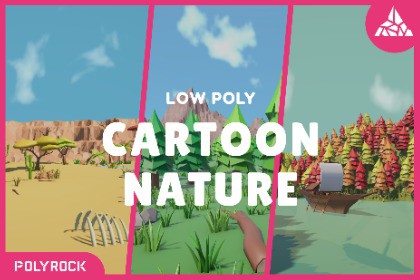
Step into a colorful low-poly world of nature, filled with a wide variety of models for creating atmospheric environments. Asset includes 394 models, scenes and etc. All created in a low-poly style.🌿 Low Poly Nature Asset PackThis Asset Pack is designed for different game engines and 3D projects, with special attention to Unity integration. It includes ready-to-use prefabs, models, materials, textures, scenes, and additional files.🌳 What is Included?The main collection contains 394 models, all created in a consistent low-poly style.The pack includes a wide variety of trees, bushes, flowers, plants, mushrooms, grass, rocks, dry vegetation, and other natural details.Models:🌲 Trees:🌳 Oak Trees12 models🌳 Acacia Trees8 models - 4 colors🌴 Palm Trees9 models - 3 colors🌸 Sakuras4 models🌲 Spruces132 models:54 regular - 6 cool colors54 Smooth - 6 cool colors24 tall Smooth - 2 cool colors🌳 Logs3 models - 3 colors🌿 Sticks18 models - 3 colors🍂 Dry Spruces2 models - 2 colors🍂 Dry Acacia Trees4 models - 2 colors🌿 Bushes & Flowers:🌵 Cactuses16 models - 4 colors🌿 Bushes24 models - 6 colorsSome variants include berries.🌺 Flowers36 models - 6 colors🌷 Tulips12 models - 4 colors🌱 Leafy Plants with Berries2 models - 2 colors🌱 Leafy Plants without Berries8 models - 4 colors🍄 Mushrooms52 models with a large variety of different variations.4 main colors + 4 additional color variations.🌾 Grass and Water plants:🌱 Grass16 models - 4 colors🌾 Tall Grass6 models - 4 colors🌾 Reeds8 models - 4 colors🌷 Lilies12 models - 3 colors🗿 Rocks4 models - 2 colors🦴 Bones1 model — 1 color🎁 Bonus ObjectsThe pack also includes additional objects:🚢 Ship🛢️ Wooden Barrels🪣 Bucket with Fish📦 Wooden Boxes🏮 Chinese LanternThe bonus objects are also included in the total 394 models.🎨 Consistent Style & MaterialsAll main assets use one shared color palette and texture, helping maintain a consistent visual style throughout the pack.All Asset Packs use this color palette, except for the landscapes from the demonstration scenes and the bonus objects - these use regular materials.The pack also includes a Smoothness Palette. It is intended for working with materials and textures, but is not used directly in Unity.This pack also includes an Instruction Guide for the palette, which can be found somewhere in the pack.☁️ SkyboxesThe demonstration scenes use 3 different Skyboxes, helping create different atmospheres and environments.🗺️ Demonstration LandscapesIn addition to the 394 models, the Asset Pack includes 3 demonstration scenes:🏜️ Savanna🌲 Forest🍂 Autumn ForestThey demonstrate the assets in ready-made environments.The landscapes from these scenes are not included in the 394 models.📦 Scene with All PrefabsThe pack also includes a separate scene containing all prefabs, already arranged for convenient viewing.The scene includes cameras prepared for rendering.💚 Thank You!Thank you for choosing the Low Poly Nature Asset Pack!I hope this pack helps you create beautiful and atmospheric natural environments for your projects.If you are already using this pack, please share your honest opinion about the asset in the reviews - your feedback helps improve the pack and future updates.The Asset Pack may also receive future updates and improvements.🚀 Future Projects🏙️ Large Low-Poly City Asset Pack🌿 Bigger Cartoon Nature Asset Pack🦁 Animal Asset Pack🏕 Enviroments Asset Pack🏟️ Buildings And Urban Asset Pack🗺️ Landscapes Asset Packand other future projects...📑Statistics:394 models144827 triangles2 palette3 skyboxes3 unity scenes + 1 scene (all models)script for rendering images (scenes only)📁 File FormatsThe Asset Pack includes:Unity package with all prefabsAll demonstration scenesAll required prefabsTextures and palettesHDRI Skyboxes📸 Screenshot ScriptA special screenshot script is included in each scene.To take a screenshot:1. In the Hierarchy, select the CameraScreenshot object.2. In the Inspector, select the camera you want to use for the screenshot.3. In the demonstration scenes, the required camera is already set as the main camera by default.4. Press Play.5. After the scene has loaded, press the P.6. Exit Play Mode.7. Wait a few seconds.The finished render will then appear in the Assets folder.A message will also appear in the Console confirming that the screenshot has been created.

