






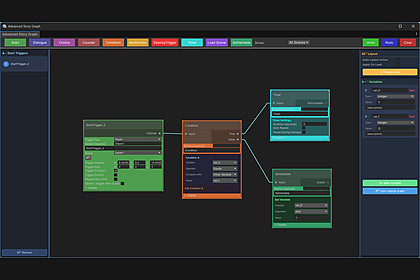
Click your Unity scene to create triggers! Build branching dialogues, chain events, create main menus, manage save/load systems, and integrate custom C# scripts with drag and drop.🎮 One click on your Unity scene, and you're ready to go!Create triggers, open their Story Graph, and visually build dialogues, choices, branching paths, and consequences. Create new triggers directly from your dialogues, connect them together, and chain events based on conditions and variables. Create your own main menus, integrate save and load systems, and drag and drop custom C# scripts to take things even further!Decision Impact System 1.0 is a finished visual Story Graph and dialogue system for building branching conversations and meaningful player choices in Unity. Create dialogue flows, connect questions and answers, evaluate conditions, update variables, and let decisions influence scenes, characters and persistent world state.Designed for RPGs, narrative adventures, action games and interactive experiences, the system keeps dialogue and story logic organized in a clear node-based workflow. Full editable C# source, example content and reusable runtime components are included.Finished version 1.0 features:• Node-based Story Graph editor for branching dialogue flows• Dialogue nodes, questions, answers, player choices and multiple outcomes• Conditional branches, typed variables, counters and timers• Timed choices with configurable default outcomes• Start triggers, scene transitions and graph-driven actions• Save/load persistence for variables, counters, timers, scene state and play time• Dialogue languages: FR, EN and MG+• Dialogue voice clips and configurable UI themes• Gameplay events and relay actions for connecting story decisions to world changesIncluded preview content:Additional player, NPC behaviour, combat, health UI, scene, NavMesh, build and animation-controller components are bundled for experimentation and possible use. They are not part of the finished version 1.0 core and are planned for further development toward version 1.1. Evaluate these preview components before using them in production.Developed and validated with Unity 6000.4.7f1. Input System, Unity UI/TextMesh Pro and Timeline are required Unity Registry packages. AI Navigation integrations are optional. Included demo scenes use the Built-in Render Pipeline; URP projects may require material conversion for demo visuals.Documentation is included at Assets/Decision Impact System/Documentation/README.md. No third-party Asset Store content is bundled.Unity version: 6000.4.7f1Finished version 1.0 core: Story Graph editor and dialogue runtimeCore features: Dialogue nodes, questions and answers, player choices, branching outcomes, conditions, typed variables, counters, timers, triggers, scene actions and persistent stateDialogue languages: FR, EN and MGSource: Full editable C# source includedPackage format: .unitypackagePackage size: approximately 17 MBRender pipeline: Built-in Render Pipeline for included demos; core runtime C# is generally pipeline-independentRequired Unity packages: Input System 1.19.0+, Unity UI/TextMesh Pro (UGUI 2.0.0+), Timeline 1.8.12+Optional Unity packages: AI NavigationPreview notice: Included player, NPC behaviour, combat, health UI, scene, NavMesh, build and animation-controller components are experimental preview content. They are not part of the finished version 1.0 core and are planned for further development toward version 1.1.Documentation: Assets/Decision Impact System/Documentation/README.mdThird-party content: None bundled; Unity Registry dependencies are installed separately through Package ManagerSupported OS: Unity-supported Editor and player platforms; verify platform-specific behaviour in the target projectAI-assisted code generation tools were used for limited portions of the C# source code during development. All architecture, algorithms, design decisions, implementation, integration, testing, and validation were performed by the publisher.Some UI visual assets, including certain JPEG textures and graphical elements, were generated using AI-assisted image creation tools and then integrated, adjusted, and optimized by the publisher for use within the Unity project.This asset contains no AI functionality, requires no AI service at runtime, and is provided as a Unity Story Graph and dialogue system.

