






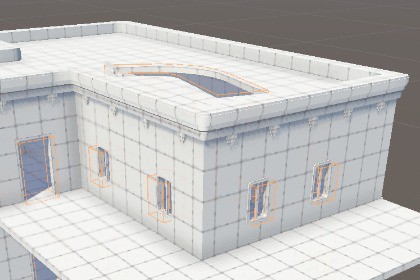
A Unity editor extension with a live, non-destructive boolean cutting for doors, windows and tunnels in ProBuilder meshes, plus Blender-style modelling tools.Demo scene has only been tested with Unity 6000.4.0f1 URP, though since these are just level making tools, it should work with any rendering pipeline.Documentation: https://tsitski.com/probuilder-toolsSupport: https://discord.gg/rPv4JSuhNRI built these tools while doing level design for Partizan, my immersive sim FPS. I needed doors, windows, vents and tunnels in ProBuilder walls without hand-cutting geometry, and a few of the modelling conveniences I missed from Blender. They’ve saved me a lot of time, so I’m making them available to other devs building levels in ProBuilder.The main tool is the ProBuilder Cutter: a shape that cuts a hole through any ProBuilder mesh it overlaps, live in the editor. Place it where you want an opening and it subtracts its shape from the meshes it touches. It also builds the inside walls, so the opening looks like a real cut through a solid wall. Move, scale or rotate the cutter, or edit the mesh, and the cut updates immediately. Your original mesh is never modified.Cutter Shapes:Box: a plain box, or round each of the four corners on its own. Round just the top two for an arched doorway, or all four for rounded windows.Cylinder: round holes, portholes and pipe openings, with an adjustable number of sides. A non-square size gives an oval.Polygon: draw any outline you like, concave shapes included, right in the Scene view.Select points with click, Shift+click or Shift+drag.Move, rotate and scale them with Unity’s normal W/E/R tools.Click an edge to add a point, and press Delete to remove points.The cut result is a separate generated mesh shown in place of the original. Switch to a ProBuilder edit mode and the original comes back to edit. Switch back and the cut rebuilds. Cuts are saved as normal meshes, so nothing runs in play mode or in builds.Alongside the cutter are three modelling tools:Bridge FacesCollapse Edges or VerticesCenter Transform To MeshYou can reach them from the Tools menu or an Alt+X popup in the Scene view.The package isn’t tied to a genre. It’s for anyone blocking out or building levels in ProBuilder. It’s also customizable:Per-axis control over which inside walls are generated and where they endA choice of material for the inside wallsA small editor scripting APIFull source codeProBuilder CutterLive boolean cut through any ProBuilder mesh the cutter overlapsCut updates immediately when you move, scale or rotate the cutter or edit the meshDraggable size handles in the Scene viewAutomatic inside walls (Create Mesh), or turn them off to just remove geometryPer-axis inside wall generation (Generate Faces X/Y/Z)Clip To Tunnel (per axis): ends inside walls flush at the mesh’s own surface, for thick, sloped or uneven wallsReveal Material for inside walls (defaults to the mesh’s first material)Non-destructive: the original ProBuilder mesh is never modifiedCutters inside prefabs don’t cut their own prefab, so door and window prefabs can punch their own openingsOne cutter through several meshes only adds inside walls to the deepest one, so there are no doubled wallsCut result gets a matching Mesh Collider (original colliders are disabled) and copies renderer settingsZero runtime cost: cuts are saved as normal meshes“Rebuild All Cutters” menu commandEditor scripting API: ProBuilderCutter.SetBox(center, size)Cutter shapesShape setting on every cutter: Box, Cylinder or PolygonBox: per-corner radius (top left, top right, bottom left, bottom right) in local units, with adjustable corner segmentsCylinder: adjustable segment count (3 or more)Polygon: any number of points (3 or more), concave outlines supportedPolygon editing in the Scene view:Click, Shift+click and Shift+drag selectionMove, Rotate and Scale handlesInsert points on edgesDelete key and Ctrl/Cmd+click removalFull Undo supportRounded box, cylinder and polygon outlines are drawn on the cutter’s local XY plane and extruded along local ZExisting cutters and scenes are unchanged: every cutter defaults to a plain BoxModelling toolsBridge Faces: bridges two faces or face groups with a tunnel of quads, with no twisting and the new faces oriented outward (outlines need the same edge count)Collapse Edges or Vertices (Alt+Delete): merges flat faces and removes in-line vertices, skips corners and logs whyCenter Transform To Mesh: moves the pivot to the geometry centre (grid-snapped) without moving the mesh or its childrenAlt+X Scene view popup that lists every tool and greys out unavailable onesCompatibilityUnity 6.4 (6000.4) or newer (could work on previous versions, though it’s untested)ProBuilder 6 (installed automatically as a dependency)Built-in, URP and HDRPEditor tool: no runtime scripts run in buildsRuntime and Editor assembly definitions, namespace Tsitski.ProBuilderToolsNo third-party dependenciesFull source code includedDemo scene included (uses TextMeshPro with an included Open Sans font; Unity may prompt to import TMP Essentials)Claude has been used to help write the boolean math.

