






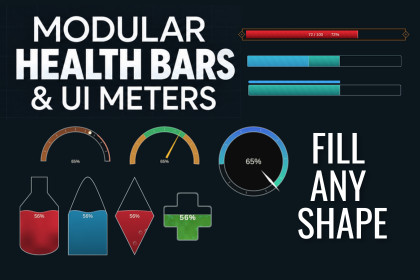
Create customizable health bars, shields, gauges and UI meters with animated fills, custom shapes and conditional labels. Connect your game values and preview changes without entering Play Mode.Build health bars, stamina meters, ability charges, temperature displays and gauges that fit your game.Modular Health Bars & UI Meters gives you control over the shape, fill, effects and information your meters display. Start with a simple bar, then add features as you need them. Adjust the appearance in the Inspector and preview them without entering Play Mode.Create the shape you needChoose horizontal or vertical bars, circular meters and partial-arc gauges. Use your own transparent image to define a custom fill shape, such as a flask, shield or resource icon. Directional custom masks also support area-based filling, so a percentage can represent the visible filled area.Give your fills more characterChoose Gradient, Liquid, Energy, Stripes or Image / Texture fills. Customize colours and movement, add a texture overlay, or use flow distortion to animate the details. Liquid fills include adjustable waves and optional bubbles.Display more than one valueAdd shield overlays, separate resource strips, recoverable-health regions or independently filling charge cells. Configure ranges, visible intervals and segments to suit the information your game needs to show.Make each state easy to readAdd zones, markers, dividers, arc needles and pointers. Attach text and icons, or use label conditions to display words such as Ready, Charging, Empty or Critical as values change. Add delayed damage trails, flashes and low-value warnings for visual feedback.Connect it to your gameUse the optional value reader to select a numeric field or property from a component, connect compatible Unity events through Meter Value Input, or supply values from code. Main-value, resource and individual-cell events let other systems react to changes.Your gameplay system stays in control of health, damage, shield behaviour and recharge. The meter displays the values and provides visual feedback.Test while you designUse the editor preview to increase or decrease values, check empty and full states, and inspect transitions. Included demo scenes, example prefabs and documentation help you get started.Built for Unity’s Canvas UI (uGUI), with TextMeshPro label support.Documentation: [Link]Discord: [Discord Link]'UI Themes Showcases' uses AI generated Background as a reference for game visual to showcase UI design.

