




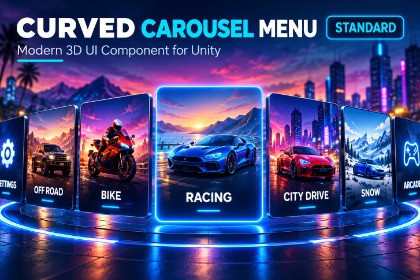
A customizable Unity UI carousel with Arc, Flat, 3D Ring, and Vertical Wheel layouts, smooth animation, multiple input methods, dynamic items, and pooling.This is a Unity uGUI-based UI framework. It does not use custom SRP-specific shaders or rendering features and is designed to work with Unity UI across supported render pipelines.Curved Carousel Menu Standard is a customizable Unity UI carousel framework for creating modern game menus and selection interfaces.Create character selectors, vehicle selectors, game-mode menus, inventory browsers, level selectors, card interfaces, item browsers, and other interactive UI experiences.FEATURES• Arc carousel layout• Flat carousel layout• 3D Ring carousel layout• Vertical Wheel carousel layout• Smooth snapping• Configurable easing• Drag and swipe navigation• Mouse wheel navigation• Previous and Next buttons• Select button support• Keyboard navigation• Gamepad navigation• Click-to-focus• Item selection• Optional looping• Center-item highlighting• Scale and opacity falloff• Rotation and position animation• Custom animation curves• Layout transition animation• Dynamic item creation• Runtime item management• Custom item prefabs• Image, title, subtitle, icon, badge and custom content support• ScriptableObject carousel data• UnityEvents• C# API• Input Action Reference support• Item pooling• Multiple carousel support• Custom Inspector• Editor tools and layout preview• Demo scene• Demo content generator• DocumentationLAYOUTSARCA curved fan-style layout suitable for character, vehicle and game-mode selection.FLATA horizontal layout with optional rotation and depth for a simple or cover-flow-style presentation.3D RINGPlaces items around a 3D-style circular ring with configurable radius, perspective, rotation, depth and opacity.VERTICAL WHEELA vertical picker/wheel layout suitable for menus, lists and selection interfaces.CUSTOMIZATIONUse your own carousel item prefab and customize the artwork, images, titles, subtitles, icons, badges, highlights and other UI content.Carousel settings can be adjusted through the Inspector or controlled from C#.DATACarousel content can be created directly in the component or stored in reusable ScriptableObject data assets for sharing between scenes and carousels.INPUTSupports mouse drag, touch/swipe, mouse wheel, UI buttons, keyboard and gamepad navigation. Advanced users can also connect their own Input Action References.PERFORMANCEThe carousel supports visible-item rendering and pooling so large item lists do not require every item to remain instantiated and visible.USE CASES• Character selection• Vehicle selection• Game mode selection• Weapon selection• Inventory interfaces• Level selection• Card selection• Item browsers• Media-style menus• Game menus• Other Unity UI selection interfacesCurved Carousel Menu Standard is designed for developers who want a reusable carousel system with multiple layouts, customization options and a straightforward Unity workflow.Curved Carousel Menu Standard is a Unity UI/code framework and does not contain 3D models, character rigs, or imported model animation clips.KEY FEATURES• Four carousel layouts: Arc, Flat, Ring3D and Vertical Wheel• Smooth snapping and configurable easing• Drag and swipe navigation• Mouse wheel navigation• Keyboard and gamepad navigation• Previous, Next and Select button support• Click-to-focus and item selection• Optional looping• Center-item highlighting• Scale, opacity and rotation falloff• Custom animation curves• Layout transition animation• Dynamic runtime item management• Custom carousel item prefabs• ScriptableObject carousel data• UnityEvents and C# API• Input Action Reference support• Item pooling• Custom Inspector• Editor layout preview and tools• Demo scene and generator• DocumentationUI / FRAMEWORK• Unity uGUI• RectTransform• CanvasGroup• Unity UI• TextMeshPro• Unity Input System3D MODELSNot applicable.RIGGINGNo.ANIMATIONNo imported character or model animation clips are included. Carousel animation is generated at runtime using Unity UI and C# logic.UV MAPPINGNot applicable.LODNot applicable.MATERIALSUI-based materials and components are used. No 3D PBR material workflow is required.TEXTURESThe carousel framework does not require a specific texture set. The included/demo item artwork is used for demonstration, while developers can provide their own sprites and UI content.MESHES / PREFABSIncludes UI prefabs and demo content for the carousel workflow. No 3D model meshes are required.CUSTOMIZATIONDevelopers can use their own UI item prefabs, images, sprites, titles, subtitles, icons, badges and other UI content.This package was created with the aid of AI. Its contents were generated, completely or in part, with Claude (an AI assistant by Anthropic).AI-generated content:- All C# code: runtime scripts, Editor tools (Inspector, menus, demo generator), the demo controller and the sample scripts, plus the assembly definitions.- The demo content: card prefabs, example Carousel Data, demo scene and all demo images and icons, created by the demo generator, which was written with AI. The images are generated procedurally by code. No image-generation model was used and no third-party images are included.- The documentation (README and Changelog).Work by the publisher (CodeStart-AI): defined the product scope and features, imported and tested the package in Unity 6000.3.16f1, reported the problems found during testing and had them fixed, and reviewed the package before submission.

