




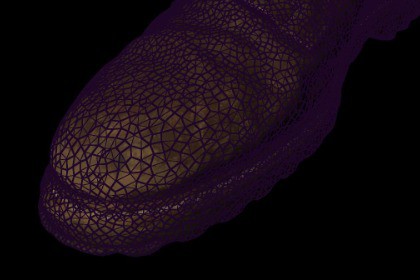
A customizable URP wireframe camera effect with color, thickness, smoothing, quadify and overlay controls for technical and stylized visuals.Wireframe Vision Camera Effect is a customizable full-screen wireframe rendering solution created for the Universal Render Pipeline.The package redraws selected scene objects using a procedural wireframe shader and displays the result as a camera overlay. It is suitable for technical visualizations, scanning effects, holographic displays, cyberpunk scenes, architectural presentations, object previews, debugging views and stylized gameplay sequences.The effect can be configured directly from the Universal Renderer Data or controlled at runtime from the included camera component.Main customization options include:• Wireframe edge color• Line thickness• Line smoothing• Fixed-width line rendering• Quadify mode• Layer filtering• Opaque and transparent object filtering• Scene View visibility• Configurable render pass injection point• Runtime effect enable and disable controlsThe included showcase controller can automatically animate the wireframe color, thickness, smoothing, Fixed Width and Quadify properties during a configurable promotional sequence.The core effect is procedural and does not require external textures.The package includes example scenes demonstrating:• Direct wireframe material rendering• Camera-based wireframe effects• Wireframe overlay renderingIMPORTANT COMPATIBILITY INFORMATIONThis package is designed primarily for Unity 6 and the Universal Render Pipeline with Render Graph enabled.The wireframe shader uses a geometry shader. The target platform and graphics API must support geometry shaders.The package is intended primarily for desktop projects using compatible graphics APIs such as DirectX 11 or DirectX 12.The package does not support Apple Metal. Therefore, it is not compatible with macOS, iOS or tvOS builds that use Metal.WebGL is not supported.Mobile platform support is not guaranteed and is not recommended because geometry shader availability depends on the device and graphics API.The package does not support the Built-in Render Pipeline or the High Definition Render Pipeline.Console platforms have not been tested.Before purchasing or publishing a build, confirm that the target device reports geometry shader support.RENDER PIPELINE• Universal Render Pipeline only• Primary target: Unity 6 with URP 17• Native Unity 6 Render Graph implementation• Compatibility Mode is not required in Unity 6• Includes an older URP compatibility rendering path• Built-in Render Pipeline is not supported• High Definition Render Pipeline is not supportedPLATFORM REQUIREMENTS• Requires geometry shader support• Intended primarily for desktop platforms• Recommended graphics APIs: DirectX 11 and DirectX 12• The target GPU and graphics API must support geometry shaders• SystemInfo.supportsGeometryShaders can be used to check runtime supportUNSUPPORTED OR UNVERIFIED PLATFORMS• Metal is not supported• macOS with Metal is not supported• iOS is not supported• tvOS is not supported• WebGL is not supported• Mobile support is not guaranteed• Consoles have not been tested• Devices without geometry shader support are not supportedINCLUDED EFFECTS• Number of VFXs: 1 main customizable wireframe effect• Direct wireframe material mode• Camera wireframe effect mode• Wireframe overlay mode• Optional animated showcase modeCUSTOMIZATION• Edge color• Wireframe thickness• Line smoothing• Fixed-width rendering• Quadify mode• Effect enable and disable• Layer Mask filtering• Opaque object filtering• Transparent object filtering• Scene View visibility• Configurable RenderPassEvent• Runtime property controlRENDERING FEATURES• ScriptableRendererFeature integration• Unity 6 RecordRenderGraph implementation• Renderer List based object drawing• Runtime camera controller• Per-camera configuration• Optional scene-depth handling• Opaque and transparent render queue supportINCLUDED CONTENT• 3 custom shaders• Wireframe geometry shader• Wireframe composite shader• Solid-color helper shader• Wireframe Renderer Feature• Camera-side runtime controller• Renderer Feature installation utility• 3 example scenes• Example materials• Example 3D model• Source code includedTEXTURES• No textures are required by the core wireframe effect• The effect is procedurally generated• Texture sizes: Not applicablePERFORMANCE NOTES• The selected objects are rendered again for the wireframe pass• Performance depends on visible object count and mesh triangle count• Very dense scenes may require Layer Mask filtering• Transparent objects can be disabled to reduce rendering cost• Test performance on the final target hardwareINSTALLATION1. Import the package into a URP project.2. Select the active Universal Renderer Data asset.3. Add WireframeRendererFeature.4. Assign the included wireframe material if required.5. Select the desired Layer Mask and render queues.6. Add WireframeEffect to the target camera for runtime control.7. Keep Render Graph enabled when using Unity 6.List of VFXs included:Customizable procedural wireframe camera effect with direct material, full camera effect and overlay presentation modes.Texture sizes:No textures are required by the core effect. The wireframe is generated procedurally.Number of VFXs:1Custom shaders:Yes. Includes 3 custom shaders: Wireframe Geometry, Wireframe Composite and Wireframe Solid Color.SUPPORTED• Unity 6• Universal Render Pipeline• Render Graph enabled• Desktop GPUs with geometry shader support• DirectX 11• DirectX 12NOT SUPPORTED• Built-in Render Pipeline• High Definition Render Pipeline• Metal• macOS using Metal• iOS• tvOS• WebGL• GPUs without geometry shader supportNOT GUARANTEED / NOT TESTED• Android• Other mobile platforms• Consoles• Virtual reality platforms• Graphics APIs other than the tested desktop configurationMarket app data was prepared using artificial intelligence.

