




Icon Bake Studio - 3D to 2D Icon Generator
Rip Vertices Studio
$19.79
$39.59
50%OFF
(no ratings)
Jump AssetStore
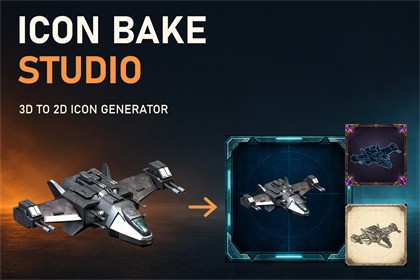
Create inventory icons and item thumbnails from your 3D models and prefabs. Preview 12 camera angles, apply adjustable art styles, and export transparent PNGs up to 4K.Create a consistent set of game icons from the models already in your Unity project. Icon Bake Studio brings camera framing, visual styles, editable backgrounds and PNG baking into one focused editor window.SELECT. STYLE. BAKE.Select a scene object or drag in a prefab, then click Create Icon. Preview 12 camera angles, choose perspective or orthographic projection, and select the views you want to export. Adjust framing, orbit and studio lighting while keeping your source object and materials unchanged.FIND YOUR LOOKStart with one of 24 adjustable styles, including Oil Paint, Watercolor, Soft Pastel, Charcoal, Sketch, Comic, Pixel Art, Blueprint and Hologram. Fine-tune the available style controls, colour filters, outline, glow and shadow. Quick choices follow the active workflow page, so relevant options stay close to your preview.BUILD YOUR BACKDROPKeep the background transparent, use a solid colour or gradient, or explore 52 procedural patterns. Adjust pattern colour, gradient stops, scale, rotation, thickness, softness and distortion. Editable profile and falloff curves give you finer control over coverage and fading.Choose from 54 original decorative backdrops: 25 Fantasy, 25 Science Fiction and 4 Showcase frames used in the covers. Recolour backgrounds with independent hue, saturation and brightness controls. The included illustrations were generated with AI assistance.REUSE AND EXPORTUse 81 included presets or save your own looks for consistent results across different objects. Bake selected camera views as individual RGBA PNG files from 32 to 4096 pixels, with optional 2x supersampling and automatic Sprite import inside Assets.Rendering, filters, procedural patterns and exports run locally in Unity. No AI account, API key or online image service is required to use the plugin. The package includes the textured Cruiser demo model, prefab, PBR material and showcase scene, so you can try the workflow immediately.RESET WITH ONE CLICKReset to Defaults restores the complete look and default camera selection while keeping the source object. Reset This Tab restores only the current workflow page.DOCUMENTATIONCompatibility- Minimum Unity version: 2022.3 LTS, tested also in Unity 6000.5.6f1.Inputs and rendering- Scene objects, prefabs and imported models with enabled MeshRenderer or SkinnedMeshRenderer components.- Skinned meshes are captured in their current pose; first populated LOD is used.- 12 camera presets; orbit, framing, perspective and orthographic projection.- One source object per capture; multiple selected views can be exported in one bake.- Isolated mesh snapshot does not instantiate source scripts.Included controls and content- 24 local 2D style filters; they do not replace 3D materials.- Foreground hue, exposure, contrast, saturation and tint; glow, outline and shadow.- 52 procedural patterns; multicolour/alpha gradient, scale, rotation, thickness, softness, distortion, profile and radial falloff curves.- 54 decorative PNG backdrops, 512x512 each: 25 Fantasy, 25 Science Fiction and 4 Showcase.- Independent backdrop hue, saturation and brightness.- 81 reusable presets; custom presets saved as project assets.Output- Square RGBA PNG: 32, 64, 128, 256, 512, 1024, 2048 or 4096 pixels.- 1x native or 2x supersampling, subject to graphics-device and memory limits.- Optional Unity Sprite import for output inside Assets; external folders supported.- Existing files are preserved with numbered filenames.- Preview and background processing are limited to 512 pixels. Larger exports render the object at output resolution and upscale the background.Capture limitationsParticles, VFX, sprites, Terrain and source scene lighting are outside the snapshot. Scene-dependent shaders, screen-space effects and additive materials may differ from the original scene. The isolated HDRP preview disables some scene features, including geometry self-shadows. The plugin's 2D shadow effect remains available.Demo includes a Cruiser FBX, original 4096px albedo/normal/emissive PNGs, a derived 2048px metallic/AO/smoothness map, material, prefab and scene. Texture import is limited to 2048px by default. The demo material adapts to the active Built-in, URP or HDRP pipeline. Demo source model and textures were supplied by the publisher.DOCUMENTATIONAI was used to assist with code writing and background images generation.

